• We do not provide troubleshooting help for unsupported phones. Please try with a supported phone.
  • V20 Update 10 Alpha 2 Learn more

Duplicate Caller ID

Status
Not open for further replies.

slapster

Customer
Joined
Apr 11, 2021
Messages
20
Reaction score
2
Hi all, I’m finding that calls come in with a second copy of the Caller ID number on my new v.18.0/1029 installation. The display on a Snom D315 shows the CID number (or contact name) followed by the CID number again, which I’d like to remove. It displays like this:

from 0XXXXXXXX 0XXXXXXXX or
from Caller, Name 0XXXXXXXX or
from Main:Caller, Name 0XXXXXXXX or
from Caller, Name:Main 0XXXXXXXX

This makes for an unnecessarily long Caller ID screen, and it’s a bit of a mess. It’s a similar story for voicemail notifications. It has happened with 2 trunk providers I tried. Is this a known thing? Any way to fix it?

Secondly, above, I think there should be a space after the colon, as that would look much better. Is there a way for me to change that? I guess not, but worth asking.

Thanks.
 
Hi there:
  • 3CX Version, Pro 18.0/1029
  • Server OS, 3CX hosted
  • Is the 3CX Server Hosted and where? 3CX hosted - UK
  • IP Phone Make/Model/Firmware This occurs on Snom D315 10.1.64.17, 3CX iOS App & Voicemail emails
  • Provisioning Method: Local / VPN / STUN / SBC The Snom D315s are 3CX provisioned via SBC
  • Trunk Provider or Gateway Make/Model Telnyx and Voipfone
  • Has the Firewall Checker passed: 3CX hosted
  • Are custom Phone Templates being used: No
While most of the above is not very relevant to an issue that occurs on a straightforward up to date Pro installation hosted by 3CX, across IP phones, softphones and notifications, and two separate trunk providers, I'd also add that I have what I think is a separate issue about provisioning the Snom IP phones. They provision fine, and work fine. But shortly afterwards throw up an error in the dashboard saying "Not Supported 10.1.64.17" This was the firmware I installed from https://www.3cx.com/support/phone-firmwares/

I'm happy to treat that as a separate issue after this is solved, but thought you should know as well.

Many thanks!
 
Hey,

In regards to the firmware, do note that the firmware seen in https://www.3cx.com/support/phone-firmwares/ is in fact the latest one and you should keep the device on it. Version 18 has yet to be updated with the latest ones so you can simply, ignore the message saying it's unsupported.

Regarding the issue, I have tested the same exact 3CX PBX version and the same exact Snom device with firmware version 10.1.64.17 but was unable to replicate the issue. Is there any chance the caller number is also registered as a contact on the 3CX PBX in question?

Could you also send a screenshot of what you are seeing on the device? (Do remove any sensitive information such as phone numbers from the screenshot)
 
Hi, thanks for this. And the firmwares are now showing as healthy. Maybe you worked some magic in the meantime?

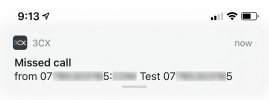
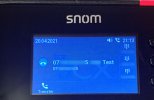
I've attached a couple of examples from the Telnex line. It's pretty much the same everywhere. The IP phone is a Snom D717, but other than the smaller text on the 2nd line, it behaves the same as the D315. This is in the context of no contact for that number, and "Add Group, Queue or DID/DDI Names to Caller ID" being set to Prepend. (Contacts is an odd place to have that setting!).

Without the number in contacts, the display is: [Caller's number]:[Inbound route name] [Caller's number]
With the number is in contacts, the display is: [Inbound rule name]:[Contact name] [Caller's number]

This was from a Telnex Trunk. I have now found another Trunk (Voipfone) behaves quite differently. This is without changing anything else.

Without the number in contacts, the display is: [Voipfone connection name] [Caller's number]
With the number is in contacts, the display is: [Contact name] [Caller's number]

Ideally what I would like is to display the source of the phone call - which number they called or preferably Inbound rule name (because the user needs to know whether the caller is calling them personally, or a pool, as it affects how they greet them), and either the caller's Contact name, or the caller's number. But never to have the caller's number twice. I can't see anywhere obvious in Telnyx's system to be able to tweak what is sent from them.

This is obviously not a critical problem, but it looks badly configured if the caller's number appears twice! Overall, I am blown away with 3CX's system. It is a quantum leap for us, so I feel bad quibbling about niggles like this.
 

Attachments

  • IMG_3988.jpg
    IMG_3988.jpg
    66.7 KB · Views: 9
  • IMG_3987lo.jpg
    IMG_3987lo.jpg
    94.5 KB · Views: 10
Regarding the firmware versions, do note that new versions were indeed loaded on v18 as well.

In regarding to the issue you are facing, bear in mind that the Append/Prepend name to the Caller ID function under "Contacts >> Options" will always also add the Caller Number to the displayed name in addition to the Inbound Rule or RingGroup/Queue name. Since the Caller Number already exists in a different SIP field, which does not get affected by this functionality, you will inevitable end up with having it show up twice on screen. There recently was a case on our forum where something similar to what you need was required so you might want to take a look and see if it suits your case as well: https://www.3cx.com/community/threads/modify-caller-id-name.80919/#post-373434
 
  • Like
Reactions: slapster
Thanks. That looks useful. I will have a deeper look to see if I can tidy it up.
 
  • Like
Reactions: ChrisC_3CX
Status
Not open for further replies.

Forum statistics

Threads
112,147
Messages
590,959
Members
165,167
Latest member
Finatra.us