Duplicate Extensions in Extension Statistic Report

Status
Not open for further replies.

MichaelMiano

New User
Joined
Apr 12, 2023
Messages
1
Reaction score
0
I have been getting duplicate extension when generating the Extension Statistic Report.
These duplicates are not renamed extensions.
Even if they were, these duplicates still appear even when generating the report for just yesterday's calls.
Any idea how to fix this?
Thanks!
 
Hi,

I'm on 3CX V20 and im having the same issue above with the extension statistics report, I suspect the duplicate extension is only for users that have a physcical phone + softphone.
One entry shows first Firstname Lastname and second entry shows as Lastname, Firstname.

However when I export the report to a CSV it shows it correct.

Thanks for checking!
 
We get the same problem here.
Running on 3CX Version 20.0 Update 1 (Build 731 Release)

Some extensions(NOT ALL) get duplicated. As mentionned above, One entry shows first Firstname Lastname and second entry shows as Lastname, Firstname.

Since none has a physical phone attached to it, It's definitely not the issue here.
I tried to double check any difference between two extensions who show differently but can't find any.
 
In that case the only correlation I can see is that the affected people are in multiple queues
 
I had a very similar issue on one of our installs after changing a phonebook setting.
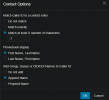
I changed the 'Phonebook Display' setting (System > Phonebook > Options), after the setting changed duplicate 'extensions' were displaying in reports.
I had to revert the setting change to remove duplicate extensions from the reports. I believe the First Name, Last Name being changed is what caused it to duplicate the extension in logs.
1718330694896.png
 
Regarding the above issues, has anyone moved to the alpha version of New 20.0 Update 2 Release | 20.0.2.688.

They are releasing updates for AI reports and for our clients we prefer to wait for general release and wondering if anyone has updated to this and if this has resolved duplicate users in 3cx extension statistic reports?

FYI we have having this issue on 20.0.1.731
 
  • Like
Reactions: Jaydan
Hi there.
Does it mean you are changing the user name/surname in the system and placing the caller etc?
 
  • Like
Reactions: Jaydan
Hi OlegR

We are just creating the user extension, entering the first and last name and these extensions are then added to departments and call queues, we are then running a report on a department but when going through extension statistics it shows 2 of the same user, one with first name surname with no calls and surname first name with all the calls the user has taken whether its a daily or weekly report.

It doesnt happen for all extensions but ive tested it with users in multiple departments, multiple queues, in only 1 department and queue thats getting scanned for reports.

Just wondering if the update to the new version available, New 20.0 Update 2 Release | 20.0.2.688 gives further updates to reports and resolves this issue, and if this causes any other issues is it worth to hold off on the alpha and wait for general release, and do we have a date when the general release will be out?

Thanks
 
  • Like
Reactions: Jaydan
Yes, but if the user is removed and then added or name is changed, and mean time there were calls, the system needs to know about those changes, that as we need to be able to have information on the user if he was changed etc so in this case it shows you in the report.
 
We get the same problem here.
Running on 3CX Version 20.0 Update 1 (Build 731 Release)

Some extensions(NOT ALL) get duplicated. As mentionned above, One entry shows first Firstname Lastname and second entry shows as Lastname, Firstname.

Since none has a physical phone attached to it, It's definitely not the issue here.
I tried to double check any difference between two extensions who show differently but can't find any.
Running on Version 20.0 Update 1 (Build 731 Release)
I've checked the scheduled reports for today (no changes at all made for 30+ days now to any extensions), and running into the same issue as yourself, very odd. I'm yet to determine the cause.
 
Version: Version 20.0 Update 2 (Build 715 Release)

Has anyone found a way to remove the duplicated extensions from the 3CX Extension Reports ?

I am still receiving the issue. Extensions show twice:
1st appearance = First Name + Last Name
2nd appearance = Last Name + First Name (No comma displayed.) Also shows no call history. See the image below.
1722568240679.png
 
Version: Version 20.0 Update 2 (Build 715 Release)

Has anyone found a way to remove the duplicated extensions from the 3CX Extension Reports ?

I am still receiving the issue. Extensions show twice:
1st appearance = First Name + Last Name
2nd appearance = Last Name + First Name (No comma displayed.) Also shows no call history. See the image below.
View attachment 42949
Hi Jayden,

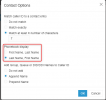
I set the phonebook options for the phonebook display as first name, last name as it was set to default for last name, first name.

And now when i run extension statistic reports for multiple departments they only show once with a list of users as first name, last name.

System>Phonebook>options:

1722842350081.png
 
  • Like
Reactions: cem_ari
I'm having same issue. We currently use these reports to bill - so duplicate extensions can make this difficult to get an accurate count. I have one listed as 'last name first name' and the next listed as 'First Name, Last Name'.

These users do not use desk phones and I have not changed any phonebook settings for this one.
 
Hi Jayden,

I set the phonebook options for the phonebook display as first name, last name as it was set to default for last name, first name.

And now when i run extension statistic reports for multiple departments they only show once with a list of users as first name, last name.

System>Phonebook>options:

View attachment 42988
Thanks for the reply.
You could be on to something.
The 'Phonebook' settings were set to 'Last Name, First Name'.
I'll do some more testing with this knowledge. I'll report back with the results.
 
  • Like
Reactions: EthanTurner
Hi Jayden,

I set the phonebook options for the phonebook display as first name, last name as it was set to default for last name, first name.

And now when i run extension statistic reports for multiple departments they only show once with a list of users as first name, last name.

System>Phonebook>options:

View attachment 42988
Hi. I have same issue and tried your method but didn't work. I changed as First Name, Last Name inSystem>Phonebook>options. After this I checked extension statistic report and it was same. I created new report (save/schedule) and checked again but same. Did I miss something? BTW Version 20.0 Update 2 (Build 715 Release)
 
Hi Cem_Ari, i had it where it would show the lastname firstname if i had reports within the dates before the change.

for example if you have a daily report for users and make the change now and check the tomorrow report it should show the correct users as firstname lastname but if you create old reports for a week ago for example before the change it will show both firstname lastname users as well as the lastname firstname.
 
  • Like
Reactions: Jaydan and cem_ari
Hi Cem_Ari, i had it where it would show the lastname firstname if i had reports within the dates before the change.

for example if you have a daily report for users and make the change now and check the tomorrow report it should show the correct users as firstname lastname but if you create old reports for a week ago for example before the change it will show both firstname lastname users as well as the lastname firstname.
Hi. Yes, you are right. When I check the report as today, no double names. Thanks a lot.
 
This Problem seems to persist in Update 3 (Build 786 Beta).
 
Status
Not open for further replies.

Members Online Now

Forum statistics

Threads
111,832
Messages
589,284
Members
164,662
Latest member
DejanMDS