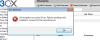
Sending to Exchange Online requires TLS.
v10 won't do TLS, v11/12 will.
So.. for v10, relay your mail using an on-premise SMTP server, utilizing proper SPF to ensure better delivery.
If you are runnning v10 on Windows Server, add that role/feature and point 3CX to it.. can either do a local auth or config it to just allow the relay from your subnet. I "prefer" using an on-premises SMTP host and sending email from there.. not using an Exchange Online mailbox and depending on it running correctly.. but that's me. I'd do this for v11, even though it does TLS.
So.. for v11.. use TLS of course. As mentioned, the sending address will need a user account on Exchange Online.. meaning another Office 365 license gets chewed up. See why I mention using your own SMTP host now? If you are trying to send using Exchange Online, it will need a mailbox for the address you use.. and a license for the mailbox.
That, and it's better practice. I fight with web hosts all the time over the same matter.. just send the mail from the website host.. you don't "need" to auth to my Exchange/SMTP host to send mail.