Enabling the Callback Unsuccessful Blind Transfer Feature NOT WORKING

Status
Not open for further replies.

toptech1

Free User
Joined
Jul 5, 2021
Messages
23
Reaction score
5
I created a dial code for

Unsuccessful Blind Transfer​

*2
I dialed this code to activate it but it tells me NO ACTION PREFORMED any advice? maybe I'm doing it wrong?
 
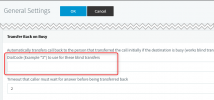
Are you talking about the Dial Code under Settings --> General?
1628147777565.png

If yes, maybe consider changing the "*2" as that overlaps with the default dial codes found in Settings --> Dial Codes.

I'd suggest using what's in the example: *3*
 
Yes I changed it to *3* and dialed that code still says NO ACTION PERFORMED
 
my question is if I have to dial this once into the system or everytime I transfer
 
my question is if I have to dial this once into the system or everytime I transfer
No, you actually don't need to dial it at all. The transfer back on busy should now just work if you perform a Blind transfer to a busy extension.
 
Status
Not open for further replies.

Latest Posts

Forum statistics

Threads
111,982
Messages
590,117
Members
164,908
Latest member
FarizQasimov