Error installing on amazon aws - configuring firewall

angelo1

Trial User
Joined
Jun 18, 2008
Messages
13
Reaction score
0
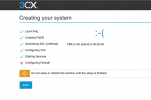
I'm using the 3CX certificates but the installation gives up on the last step, when Configuring Firewall.
I've tried creating it multiple times, the EC instance is running, but the installation never finished.
Why can I do?
1733524646891.png
Thanks
angelo
 
Hey @angelo1
Judging by the error you're getting it seems the PBX was unreachable on it's https port when the installation was closing to an end.

That said, what I recommend you check first, is the firewall rule on AWS. Just go to the AWS EC2 Console, select your region from up-top, open "Security Groiups" under "Network & Security", edit the "pbxexpress" security group and check the rules for https.
• Make sure that you have 2 HTTPS rules for port 443 (IPv6 and IPv4)
• Make sure you have 2 TCP rules for port 5001 (IPv6 and IPv4)
 
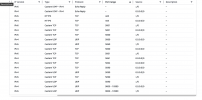
Yes, both rules exist, for both version of ip:

1733752907232.png
 
Hi @ChrisC_3CX ,
Did you have time to review this? it looks like a problem on the script that creates the EC2 image.
Thanks
angelo

 
Hey @angelo1

We cannot replicate this on our end so what i recommend you try is delete any and all security policies with name "pbxexpress". And try to redeploy. The required security policy will be auto-generated and should work out of the box

Let me know how it goes
 
Hey @angelo1

We cannot replicate this on our end so what i recommend you try is delete any and all security policies with name "pbxexpress". And try to redeploy. The required security policy will be auto-generated and should work out of the box

Let me know how it goes
I've removed all the security policies previously created by the automated deployment and after do it agin, I get the same error
 

Members Online Now

Forum statistics

Threads
111,835
Messages
589,291
Members
164,668
Latest member
Infinity Network