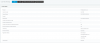
Error: IP address mismatch

Status
Not open for further replies.

ciscokid

Silver Partner
Basic Certified
Joined
Mar 31, 2019
Messages
4
Reaction score
0
Hi All
I have a new installation of 3CX on a VMware Cloud Platform. We have L2 connectivity between our DC and our cloud provider.
The IP address is not used elsewhere in our network
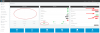
10043

When the server starts everything is green and all is OK. After 6-12 hrs I get the above dashboard showing the IP mismatch error.
Nothing has been configured yet (brand new server) no extensions, SIP trunks etc.
The license is a "free" 1 year 4 simultaneous calls etc

There is nothing in the logs showing a crash etc.
When it is in this state, I am unable to access the "Services" tab, I have to issue the:
$ systemctl restart 3CXPhoneSystemMC01 command and everything comes back again as below

We have our own SSL certificate installed and works fine.
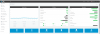
10045

10046

I see a ticket had been created previously, but no definitive solution.

Any help would be greatly appreciated
Best Regards
Wallis
 
Without a doubt a network issue. Look at issues in regards to public IP allocation or layer 3 access.

What is happening by a look at your first screenshot is the 3CX system is losing its public IP and the licence is showing failure.

FYI: your 3CX needs constant internet access for contact with the licencing server in the cloud.

What sort of NAT are you using? For 3CX you require ideally full cone NAT/1 to 1 NAT mappings public to private.
 
Thanks for your feedback eddv123. I'll check with my Ops people (I'm on the core network). Wont be the first time IP allocation has been done on the fly for "testing" and then forgetting about it. Let me check and will provide feedback tomorrow. There will be blood if that's the case :)
 
It's really odd that it works for up to 12 hours however. On top of confirming your NAT type I would also check what state the NIC card on the VM is in when it fails.

To my memory also you can set you VM NIC as bridged or NAT'd.
 
I am using full cone NAT (1:1) and am using the cloud providers VMWare vCloud Director to access our VDC with the VM's running in VApps also using the VMWare NSX Edge Gateway and distributed firewall.

Its a bit different to the ESXi's I am used to:)
 
Hello @ciscokid

From the provided screenshots it looks like something is not running correctly when the issue occurs. If you face the issue again try to access the instance using SSH and check if all 3CX services are running.
Code:
service 3CX* status
 
Just to provide some more feedback .....
Having left the 3CX as is for 24 hrs, everything is still green and working as expected.

It looks like that whenever I run the firewall test it complets ok- sometimes about 99% pass (some arbitrary ports, never the same, " Mapping does not match xxx, Mapping is yyyy") and other pass 100%

The issue here is that once it completes the test (or I cancel it) it restarts the services BUT the management console is dead. As mentioned previously I have to restart the service and all is OK again

From the 1st image, where all the red errors are shown, this , I think, occurs because of the following:
  1. When the firewall tests starts, the 3CX could restart/stop some network TCP elements, thus losing connectivity to the license server, which gives the activation failed error and perhaps the IP mismatch error. Perhaps 3CX could confirm exactly what TCP services are stopped during the test?
  2. The other issue I am looking into is that when the UDP port scanning occurs, that the firewall drops all connectivity (initiating the license activation error) and then allows traffic to pass?
  3. Somehow when the services restart after firewall test I see that the 3CXPhoneSystemMC01 service has stopped, again giving me all the errors until I restart and it clears again. Perhaps 3CX could change some parameter to increase the timeout value, or initiate a restart of the service if it fails consecutively say after 1 or 2 times,then stop until a manual restart is initiated?

In a nutshell, there are two things that I think are occuring
  1. The IP mismatch / license activation error is due to loss of connectivity to the license server either by some TCP network elements being stopped, or the FW stops and starts the connectivity due to port scanning protection and
  2. The Mgmt Console service fails to start automatically thus showing the errors and explaining why nothing is accessible from the dashboard. Possible solution is as outlined in the previous paragraph.

I have a TeamViewer session this afternoon with our Cloud Provider and will provide further feedback
Cheers
 
It might be a vNIC process offloading problem.

In my experience 3CX / debian does not get on with some VMWare vNIC configs (sorry, can't remember which vNIC it is) resulting in 100% vCPU use and services falling over in some network heavy scenarios (which would explain both of your problems). It has something to do with the vNIC not handling process offloading efficiently.

You may be able to eliminate this as a possibility simply by checking whether the vCPU use is very high when the processes fall over.

If it is that the fix is to disable process offloading on the vNIC or change to a different vNIC.

It may well not be this but it's one of those "Quick to diagnose, quick to fix" faults that you may as well check for.
 
When a firewall check is initiated the 3CX system will stop the services to be able to complete the tests. The issue you are having is that services do not start back up normally. The IP and licence error you are getting is because the services are stopped and the PBX cannot read the information correctly.
I am guessing that something in your system is preventing the services to start up normally and then you need to manually restart them to fix the issue. To troubleshoot the issue you may need to go through the PBX and Debian logs to be able to determine the cause.
 
  • Like
Reactions: Lee Cramman
Status
Not open for further replies.

Latest Posts

Forum statistics

Threads
111,918
Messages
589,736
Members
164,792
Latest member
LBS Care