


- Joined
- Aug 2, 2019
- Messages
- 67
- Reaction score
- 9
Hi!
I'm having problems on a customer, where he can't access the Office 365 integration settings. When he tries to access the settings, the message appears:
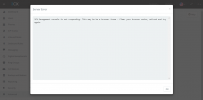
"3CX Management console is not responding. This may be be a browser issue - Clear your browser cache, refresh and try again."
The problem is that it has nothing to do with the browser cache, as I've tried it on PC's and browsers that I've never accessed before and the problem persists.
I already restarted the services and even the server, but it didn't solve.
Does anybody know how to solve this?
I'm having problems on a customer, where he can't access the Office 365 integration settings. When he tries to access the settings, the message appears:
"3CX Management console is not responding. This may be be a browser issue - Clear your browser cache, refresh and try again."
The problem is that it has nothing to do with the browser cache, as I've tried it on PC's and browsers that I've never accessed before and the problem persists.
I already restarted the services and even the server, but it didn't solve.
Does anybody know how to solve this?


