Error loading Office 365 integration settings

Status
Not open for further replies.

erpardeiro

Free User
Advanced Certified
Joined
Aug 2, 2019
Messages
67
Reaction score
9
Hi!

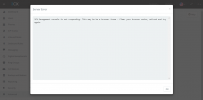
I'm having problems on a customer, where he can't access the Office 365 integration settings. When he tries to access the settings, the message appears:
"3CX Management console is not responding. This may be be a browser issue - Clear your browser cache, refresh and try again."

The problem is that it has nothing to do with the browser cache, as I've tried it on PC's and browsers that I've never accessed before and the problem persists.

I already restarted the services and even the server, but it didn't solve.

Does anybody know how to solve this?
Screenshot_1.png
 
  • Like
Reactions: erpardeiro
Hi @NickD_3CX , thank you for your answer.

This customer's AD has 6000 users, but only 200 need to be imported. This is just one of the problems.
The customer has several branches and it is not necessary to import them all, each branch has a different domain, but 3CX cannot separate this, there is no field where I can select which domain will be imported. Another solution that would work is to specify an OU, but this don't exist.
Could it be that the reason for being like this is the fact that it has 6000 users?
How do I remove the integration configuration, so that I can access the settings Office 365 screen again?
 
Hi @NickD_3CX , thank you for your answer.

This customer's AD has 6000 users, but only 200 need to be imported. This is just one of the problems.
The customer has several branches and it is not necessary to import them all, each branch has a different domain, but 3CX cannot separate this, there is no field where I can select which domain will be imported. Another solution that would work is to specify an OU, but this don't exist.
Could it be that the reason for being like this is the fact that it has 6000 users?
How do I remove the integration configuration, so that I can access the settings Office 365 screen again?
To completely remove the Office 365 settings you have, you can do the following:
  1. Make a Full Backup of your 3CX (precaution in case something goes wrong)
  2. Log into your Management console and go to Settings --> Parameters
  3. Here search for parameter: OFFICE365_CONFIG
  4. Edit it and remove everything in the "Value" field.
    Important! DO NOT delete the whole parameter, just the content of the "Value" field.
  5. Go to Dashboard --> Services, select the Management Console and System Service and restart
After this, if you go to the MS365 settings everything should be cleared out.
 
  • Love
Reactions: erpardeiro
Thank you very much! It's work now!!!
 
  • Like
Reactions: NickD_3CX
Status
Not open for further replies.