Error when Adding / Modifying / Removing holidays

lancerichards

Platinum Partner
Advanced Certified
Joined
Aug 14, 2024
Messages
159
Reaction score
199
Hi Team,

I am getting the following error on a system which was upgraded from 18 to 20 when trying to do anything with a holiday.

Removing Existing Error
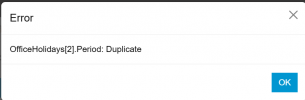
OfficeHolidays[6].Period: Duplicate

Editing Existing / Adding New Error
OfficeHolidays[7].Period: Duplicate

It seems like some sort of database corruption for the department.
I am not seeing any dupes of any kind. There are no other holidays on any other department.

If I add a new department, I can do all functions without issues.

Has anyone seen this before and is there a known fix?

Best,
Lance
 
Same problem here, also upgrade from 18 to 20.

All the prompts are empty on history hollidays and it is impossible to delete, add or edit holidays.
 
Ran into this issue for one of my clients. Found that the issue was due to an old over lap between a one off holiday and one set to annual. Since there was an over lap it would not let me create any new holidays. Check to see if you possibly have an over lap in dates from your old holidays and remove the one that is conflicting.
 
I'm seeing this on two clients but not all.

On one I could delete a long "holiday" (closed during remodeling) but other prompts would not delete. After deleting that one I was able to modify other prompts. There was no overlap that I could see. Same behavior for all departments for that client.

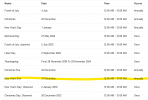
On another I eventually attempted to delete individual holidays until I found the offending one:
1735836270074.png

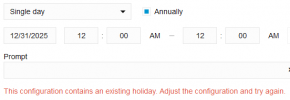
However I cannot recreate New Year's Eve unless I make it 12:00 am - 11:59 pm ... "whole day" shows an error:
1735836320902.png
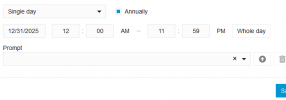
but:
1735836342603.png
...so maybe it is overlapping "12:00 am" ending time on 12/31 with "12:00 am" on 1/1?

Edit: overall, attempt to delete holidays and the invalid one will delete even though others cannot.
 
Last edited:
We also had this error message in v20 u4 few times. I haven't seen a logic when this problems occurs. Deleting every holiday entry in an department fixed the problem for that department. So it was annoying but not breaking. Hoping for bugfix in v20 update5...
 
Interesting, so deleting just one didn't work? I was unable to delete any until I found the "bad" one.
 
Interesting, so deleting just one didn't work? I was unable to delete any until I found the "bad" one.
Oh, maybe it was like that.
 
Ah! Sounds like it is probably the same bug. Though as worded it doesn't match what I was seeing since they already existed (both as annual), it worked if ending at 11:59 pm, and I couldn't edit or delete other holidays either.
 
Yup! The old V18 schedules ended at 12:00 AM, one minute into the following day. Set all V20 holidays to end at 11:59 PM.
 
Yup! The old V18 schedules ended at 12:00 AM, one minute into the following day. Set all V20 holidays to end at 11:59 PM.
Actually, the Version 18 schedules ended at 1:59PM so there was a 1 minute gap at the end of the day. In version 20 the schedules can go 12:00AM to 12:00AM so there is no gap.
 
Hi,

we have the same issue: OfficeHolidays[7].Period: duplicate
It is not possible to add new holidays in the default group. Doesn´t matter if annual or one time. In all other groups it is possible.

Does anyone know if the fix in the changlog affect this problem?
 
@bit101 Haven't tried it yet, however, I just went down the list and tried to delete each holiday. The first/only one it let me delete was the problem one and after that was removed I could edit/add others. From the fix and what I found, look for a Dec. 31 holiday that ends at 12:00.
 
Been having this also. I have now resolved.

1738924883583.png

For me, the issue was had a repeating annual appointment set as 25th December to 31st December. From what others say, a full day is now 00:00 to 00:00. Changed to 25th December to 30th December and added 31st December 00:00 to 23:59 annually and worked fine.

Before doing this, removed all the matching holidays set in other departments but still had the issue but this resolved.
 

Latest Posts

Forum statistics

Threads
111,962
Messages
589,996
Members
164,868
Latest member
swegner