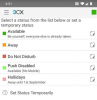
Solved Exit - Ignores PUSH disappear

Status
Not open for further replies.

andrea.soc

Premier Customer
Joined
Feb 24, 2016
Messages
35
Reaction score
8
Hi
the new app is very cool compliments, but you have removed the possibility of closing the app with the option in canvas menu , EXIT IGNORES PUSH, and it becomes very inconvenient to close the app by entering the settings -> applications and end the app.
I hope to settle soon.:confused:
 
Hi,
Actually you don't have to enter the phone settings to do so. Just switch status to one that has configured PUSH notifications=OFF (eg DND) and close the app as you would close any other app on your phone.
Doing this the app won't be running in the background, PUSH notifications won't be sent from the server and other extensions will be notified of your current status.

You can find more info regarding the new client as well how to handle PUSH here
 
mmm
it's not absolutely comfortable :mad:
 
  • Like
Reactions: redbudindustries
old: start app - burger menu - exit without push
new: start app - profile colour - switch profile, plus you have much more flexibility on your setup (see it but dont hear it etc...)
 
  • Like
Reactions: apostolis_3CX
is a workaround Stefan
many profile work in office and out of office.
  • if select dnd with push disable.. in my phone in office have dnd activated.
  • if select profile available, and disable push here.. the next time I leave the office with the smartphone, surely, I will forget to reactivate the flag
  • if edit another profile, for example lunch.. this info will be misleading for colleagues looking at the color of the prints on the dashboard

an solution will be the possibility of create an personal profile, for example, APP, and in this i create the setting with push enabled.
 
as you know, you have 2 Available profiles, use the first one for "Available - Full" and the second one "Available - Desktop Only". It is the same "effort" to switch into the app after you had exit without push...

Here is my setup:
12675

Available --> Business as usual - all my devices will ring
Away - Auto Switched during Lunchtime --> vBox
* DnD - Auto Switched after office hours * --> End Call
Push Disabled (Available 2) --> Same as Available but no Mobiles
Holidays --> Well... all call ends, no push

*My DnD setting is actually a bit "strange", I allow Push but end the call.
This will still give me a notification about missed calls. With this, I don't have to look into my mails to see who tried calling me and I can decide if I call back but I get chat messages.
 
Status
Not open for further replies.

Members Online Now

No members online now.

Forum statistics

Threads
111,831
Messages
589,277
Members
164,660
Latest member
RJenkinsROCK