Extension behind a VPN

Status
Not open for further replies.

tobiastromm

Free User
Joined
Jun 26, 2010
Messages
149
Reaction score
1
Hi.

I have a VPN and when the VPN connection is maked from the computer the extension work's fine.

I buy a router and install the DD-WRT firmware, that's provide me a VPN connection.

I can access my files, my server, so the VPN is working.

The extension register in the PBX server, but when I make some call there is no audio.

What can I do?
 
Can you try this link:

http://www.easy-share.com/1913990776/wireshark_capture.zip

Thank You.
 
Sorry

It wants me to install software. I neither know or trust this site, neither do I want any software on our system that is unnecessary to our work.

I doubt whether many people will want to install software (and I bet you I find spyware in there) just to help out someone.
 
Mark,

it´s not necessary install any software.

Just down FREE and press REGULAR DOWNLOAD (after some seconds), wait again and then insert the code and then press Slow Download.

Thank You.
 
man what a pain.

Downloaded and looking now for you
 
can you clarify a few things for me?

is 10.x.x.1 the windows server with the vpn connection and 3cx?

and is 10.x.x.101 the ip address the router has been assigned by the windows server?

Also remove the port forwarding in this case.

And disable NAT on the VPN client set up
 
I have looked at the captures and it appears my assumptions were correct.

You need NAT off and then to put some routes in both ends.

In windows server you need to assign the vpn connection a static ip. Then you need to set up a route for your 192.x.x.0 network to route through the 10.x.x.x static ip for the vpn connection

In the router you should be ok as it already knows to route to the 10.x.x.0 network as you told it that in the VPN set up.

I would also like to point out that Windows Server is abysmal for this kind of thing and I dont think i have seen a single improvement on Routing and Remote access since Windows Server 2000.

There are a number of good open source VPN servers. We use one in particular and it is free for a 2 user license (which is all you will need). You can have one at either end, although your router will also work with it. PM me for the name and link to their site. We use both the free and an enterprise version on our systems.
 
Mark,

is 10.x.x.1 the windows server with the vpn connection and 3cx?
Yes, this computer have two nic card.

10.0.0.101 (Linksys SPA-3102) <-> 10.0.0.1 (Internal network card) <-> 3cx and VPN Server <-> 192.168.0.4 (external network card) -> 192.168.0.1 (ADSL Modem)

On the client side:

192.168.1.1 (ADSL Modem) <-> 192.168.1.2 (DD-WRT Router) <-> Client Computer.

and is 10.x.x.101 the ip address the router has been assigned by the windows server?
This is the PSTN gateway (I´m calling a external number on this test).

And disable NAT on the VPN client set up
If I do this the VPN is UP but I can´t access the another side of the tunnel.
 
If I do this the VPN is UP but I can´t access the another side of the tunnel.

As soon as you set up routing on the windows server to the 192.168.1.0 network it will work.

Currently your windows network is sending 192.168.1.xxx packets no where so they just do not get delivered. It has to be told where the next hop is for a 192.168.1.0 network. This is the ip of the vpn router (it needs the 10.x ip of the router).

The router has a route for 192.168.1.0 as it is on the lan

The router also has a route for 10.x network as it has that ip and gateway when it connects to the vpn.

When you turn off NAT on the VPN router you are sending a request and telling it to send the reply back to the 192.168.1.0 network which again is lost in Windows.

If you leave NAT on you will get the one way audio from you to them but not their audio as again windows does not know where to route 192.168.1.0 packets.
 
Mark,

i disable NAT.

Then in the computer client behind the router I do this command:

route add 10.0.0.0 mask 255.255.255.0 192.168.1.1

but i can't access the 10.0.0.0 network yet, what is wrong?

Thank You.
 
Tobias

That is incorrect. Both sides need to know routes.

May I suggest that as you are not familiar with the basic concepts on networking and routing that you employ a professional services company to set this up for you? They only need to know about networking and routing not 3cx.

Unfortunately explaining basic networking and routing is beyond the scope of our free input into these forums but you are more than welcome to pm me to use our paid services if you require them.

Thanks
Mark
 
Mark,

i'm just a young (20 years old) home user that's love technology and like to play with that.

The tunnel is to connect my city house to my beach house (my father's houses by the way :lol:)

I don't have money to pay you :oops:
 
Thats great

But why not use the 3cx tunnel? It works with Nat and is similar to vpn. All you need at the remote end is a windows pc running the free 3cx proxy server.

Or if you only have one phone at the beach house then just go external and not via the VPN.
 
Mark,

But why not use the 3cx tunnel? It works with Nat and is similar to vpn. All you need at the remote end is a windows pc running the free 3cx proxy server.

I try this when the NAT is enabled in the router, but the audio and the quality is very low.

For the future (when i have money) I pretend to buy another Linksys 3102 and connect my beach pstn line to the PBX Server too (so i can't use the 3cx tunnel client because it's a little expensive and dangerous another computer in the beach turn on all the time (the PBX Server in the city is turn on all the time).

My primary objective is to use an ATA on the beach, and not the computer (to force my father and mother to use VoIP, they don't like computers).

Another question, can i add the route in the ATA?

Or if you only have one phone at the beach house then just go external and not via the VPN.
I have two computers, my notebook and an old k6.
 
OK

Forget routing and forget the VPN for VOIP. If you want it for file transfer that is fine.

I have my family all over the world connecting to my PBX for calls with no vpn or routing.

Connect each device (ATA, Softphone, SIP Phone) directly to the external ip of your office PBX. Use port forwarding on the office router to make sure there are no NAT problems that end and turn off Stun if you can.

Make sure on the gateway firewall in the office that you allow all the necessary ports to be open and forwarded (not translated) to the pbx (use the firewall checker).

The only thing to remember is that if you have a multi extension ATA (such as a grandstream 4 or 8 port) then you need to change the port it registers to 3cx by 1 (e.g 5060, 5061, 5062 etc.). This is because on your (beach house) network the ports all share the same lan ip (e.g. 192.168.1.101) so have to use a different port. This is not the same as having 2 separate phones or ATA (e.g. softphone on the laptop and an ATA) as they are 2 different internal ip addresses and the NAT in your gateway will take care of it.

If you do want more than one analog handset or phone number in the beach house i recommend a multiport (e.g. 4 port) ATA as it is easier to configure.

I have had success with external connections using an PAP2T, SPA2102, SPA3102, and Grandstream GWA4004 behind NAT devices remotely.

Also, what you were missing with routing is that you were routing in the wrong place. You were routing on your client, which doesnt know nor care. It has its route which says send it to the gateway if it is not on the LAN. The router also had 2 routes in it. One for the VPN as you told it the 10.0.0.0 network was at the end of the VPN and one that said send everything else that isnt on this lan or the vpn network out via the internet.

The problem was at the other end. You had no routes in your windows server to tell it to route anything with a 192.168.1.0 network via the vpn connection from your wrt. So it tried to send it out to its gateway which is your internet model (dsl or cable modem probably). This could not send it as it is a private address and so dropped the packets. Hence no audio.

Rather than spend a few hours explaining how to set up routing correctly and how routing works, it is easier for you (as you only want to connect one or 2 handsets to the pbx) to just do it as an external connection as mentioned above.

If you pick an ATA or gateway such as the grandstream or have a phone that is supported, there are a number of guides in 3cx to tell you how to set them up as external connections. Treat your parents to something like the Yealink T20 and it can connect using the instruction on the 3cx site and will work with no vpn needed.
 
Mark,

i'm so happy. :D

It works!!! :!:

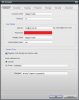
I just change my login in Bria to [email protected] (before was [email protected]).


I change to 22 because this is:


and this lines in 3CX log:

14:18:43.000 [CM503007]: Call(22): Device joined: sip:[email protected]:24978

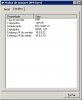
I thinking: if the IP is 19 (VPN Client) then what happens if i change the server to 22?

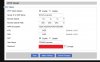
I still have NAT enabled in the router and don't have to do any network route.


I have two way audio when make and receive calls.

I really don't know why, but i try and work.
 

Attachments

  • bria.jpg
    bria.jpg
    67.2 KB · Views: 1,738
  • nat_enabled.jpg
    nat_enabled.jpg
    50.1 KB · Views: 1,738
  • vpn.jpg
    vpn.jpg
    33.1 KB · Views: 1,738
Hi :)

Like I say before the Softphone extension is working fine after change the Ip Address.

Now I'm having some problems with ATAs.

I buy the GrandStream HT 488.

The ATA is working fine behind the VPN.

The problem is that when occurs a VPN crash the can't register again after the connection be reestablished.

To do it register again I need to change some network properties on the ATA (I try to change SIP port and network IP address of the ATA and then the ATA register again). BUT, i need to do this every time when occurs a network crash. Only reboot ATA don't solve the problem, need to change any value like i say.

Syslog:

Code:
04-23-2011	09:05:52	User.Info	192.168.5.2	GS_LOG: [00:0B:82:04:DA:47][000][FFBF][01000360] 476 sip.c  2 0 REGISTERED 61959 280 34566
04-23-2011	09:05:52	User.Debug	192.168.5.2	GS_LOG: [00:0B:82:04:DA:47][000][FFBF][01000360] 2622 sip.c  SIP/2.0 200 OK  Via: SIP/2.0/UDP 192.168.5.2:5062;branch=z9hG4bK473435544f446cb4  Contact: <sip:[email protected]:5062;user=phone>;expires=300  To: <sip:[email protected];user=phone>;tag=6735517d  From: <sip:[email protected];user=phone>;tag=20d9420f056618b0  Call-ID: [email protected]  CSeq: 105 REGISTER  User-Agent: 3CXPhoneSystem 9.0.15776.0  Content-Length: 0    
04-23-2011	09:05:52	User.Debug	192.168.5.2	GS_LOG: [00:0B:82:04:DA:47][000][FFBF][01000360] 2622 sip.c  SIP/2.0 407 Proxy Authentication Required  Via: SIP/2.0/UDP 192.168.5.2:5062;branch=z9hG4bKaa7a9b7abf2a1d83  Proxy-Authenticate: Digest nonce="414d535c03c351a083:c099e9e067dc8a3bb03fa2ce68b6089a",algorithm=MD5,realm="3CXPhoneSystem"  To: <sip:[email protected];user=phone>;tag=293fec09  From: <sip:[email protected];user=phone>;tag=20d9420f056618b0  Call-ID: [email protected]  CSeq: 104 REGISTER  User-Agent: 3CXPhoneSystem 9.0.15776.0  Content-Length: 0    
04-23-2011	09:01:11	User.Info	192.168.5.2	GS_LOG: [00:0B:82:04:DA:47][000][FFBF][01000360] 476 sip.c  2 0 REGISTERED 61703 280 33798
04-23-2011	09:01:11	User.Debug	192.168.5.2	GS_LOG: [00:0B:82:04:DA:47][000][FFBF][01000360] 2622 sip.c  SIP/2.0 200 OK  Via: SIP/2.0/UDP 192.168.5.2:5062;branch=z9hG4bK23c49a10986ad27a  Contact: <sip:[email protected]:5062;user=phone>;expires=300  To: <sip:[email protected];user=phone>;tag=0531636c  From: <sip:[email protected];user=phone>;tag=20d9420f056618b0  Call-ID: [email protected]  CSeq: 103 REGISTER  User-Agent: 3CXPhoneSystem 9.0.15776.0  Content-Length: 0    
04-23-2011	09:01:11	User.Debug	192.168.5.2	GS_LOG: [00:0B:82:04:DA:47][000][FFBF][01000360] 2622 sip.c  SIP/2.0 407 Proxy Authentication Required  Via: SIP/2.0/UDP 192.168.5.2:5062;branch=z9hG4bK635434e37b89dc95  Proxy-Authenticate: Digest nonce="414d535c03c3508799:a1fbb4fdfece408a2b727967e5d2e1ad",algorithm=MD5,realm="3CXPhoneSystem"  To: <sip:[email protected];user=phone>;tag=6305a103  From: <sip:[email protected];user=phone>;tag=20d9420f056618b0  Call-ID: [email protected]  CSeq: 102 REGISTER  User-Agent: 3CXPhoneSystem 9.0.15776.0  Content-Length: 0    
04-23-2011	09:00:54	User.Info	192.168.5.2	GS_LOG: [00:0B:82:04:DA:47][000][FFBF][01000360] Grandstream HT488 1.0.3.96 1.1.0.1 1.0.3.96 1.0.0.13
04-23-2011	09:00:53	User.Debug	192.168.5.2	GS_LOG: [00:0B:82:04:DA:47][000][FFBF][01000360] 596 DAA  785 ST :6
04-23-2011	09:00:53	User.Debug	192.168.5.2	GS_LOG: [00:0B:82:04:DA:47][000][FFBF][01000360] 694 DAA  ST :1 EV :3 CS :0
Have someone any idea?
 
I have corrected/fixed FXS port by using this:


Then the ATA change automaticaly the SIP port when ATA try to make another register.

But, i can't use this for FXO port because I need to set the port on 3CX Server:


Any idea?
 

Attachments

  • random.jpg
    random.jpg
    24.5 KB · Views: 1,698
  • fxo.jpg
    fxo.jpg
    92.8 KB · Views: 1,697
I'd be concerned with what is causing the VPN to crash, it doesn't sound like something that shoulld be happening on a regular basis.

If you leave the ATA alone but reboot the routers at either end (one at a time), does the registration then succeed?
 
Leejor,

by VPN crash i need to say Stop and Start again (restart). (Not Stop Working).

If you leave the ATA alone but reboot the routers at either end (one at a time), does the registration then succeed?

If i reboot only VPN Service don´t register.

If i reboot DD-WRT completly it register.
 
Status
Not open for further replies.