Fail with Microsoft365 integration

Status
Not open for further replies.

TTelecom

Bronze Partner
Advanced Certified
Joined
May 3, 2022
Messages
23
Reaction score
7
Hello,

I need some help, our customer have a 64SC Enterprise edition in the last version and with all the updates installed and no other kind of third party app nor integration

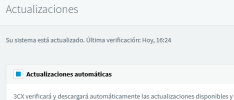
1669915232233.png

1669915242925.png

We triedt to make the Microsoft Integration to import customer's users and contacts from their Microsoft 365 Bussiness Standard.
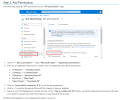
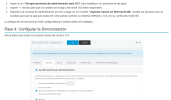
We followed all the steps from https://www.3cx.es/docs/manual/microsoft-365/ but we cant go beyond Point 5/Step 3 (Login with Microsoft Azure admin account from 3CX Admin Console and give the permissions needed to the app).
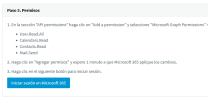
1669915126004.png
After that a new Login With Microsoft 365 button is shown in the 3cx login page, but after filling the credentials in the microfsoft login page it redirects again to the Admin Console login

1669914842629.png
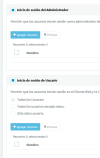
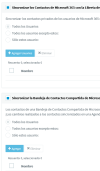
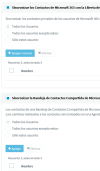
When we try to sync, the 'Add Users' button is greyed:
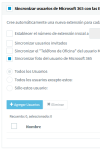
1669914943518.png1669914952943.png1669914981937.png
Here is the 3cx's log when trying to login with microsoft credentials:

Code:
2022/11/23 08:36:24.630|7410|0108|Trc|[Microsoft.AspNetCore.Hosting.Diagnostics] Request starting HTTP/1.1 GET http://exaplePBX.3cx.es:443/signin/microsoft?jwt=false - -
2022/11/23 08:36:24.630|7410|0108|Dbg|#18883 (traceid=0HMM7PV8LUJE5:00000023) START: GET https://exaplePBX.3cx.es:443/signin/microsoft
2022/11/23 08:36:24.630|7410|0108|Trc|[Microsoft.AspNetCore.Authentication.OpenIdConnect.OpenIdConnectHandler] oidc was not authenticated. Failure message: Not authenticated
2022/11/23 08:36:24.630|7410|0108|Trc|[Microsoft.AspNetCore.Authorization.DefaultAuthorizationService] Authorization failed. These requirements were not met:
2022/11/23 08:36:24.631|7410|0108|Trc|[Microsoft.AspNetCore.Authentication.OpenIdConnect.OpenIdConnectHandler] AuthenticationScheme: oidc was challenged.
2022/11/23 08:36:24.631|7410|0108|Dbg|#18883 (traceid=0HMM7PV8LUJE5:00000023) STOP: GET https://exaplePBX.3cx.es:443/signin/microsoft processed 00:00:00.0011602
2022/11/23 08:36:24.631|7410|0108|Trc|[Microsoft.AspNetCore.Hosting.Diagnostics] Request finished HTTP/1.1 GET http://exaplePBX.3cx.es:443/signin/microsoft?jwt=false - - - 302 0 - 1.3133ms

Tried to attach the detailed log after restarting services but it has moren than 1000 chars, so I uploaded to pastebin, the domain is anonymized to demo.3cx.es

https://pastebin.com/fXGqJLBS

Hope somebody can help me
 

Attachments

  • 1669914828727.png
    1669914828727.png
    143.7 KB · Views: 8
  • 1669914967913.png
    1669914967913.png
    30.4 KB · Views: 5
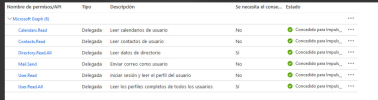
What have you set for the graph permissions?

Does you're match these?

1669918646978.png
 
  • Like
Reactions: Hasso97
yes, that is the set of permissions:

1669968164459.png
 
Last edited:
  • Like
Reactions: Hasso97 and jed
here are a blog of the log file, regarding 365 authentication
Code:
/var/lib/3cxpbx/Instance1/Data/Logs/3cxManagementConsole.log:2022/12/02 08:59:08.714|7522|0069|Trc|[Microsoft.AspNetCore.Hosting.Diagnostics] Request starting HTTP/1.1 GET http://customer.my3cx.es:443/api/office365 - -
/var/lib/3cxpbx/Instance1/Data/Logs/3cxManagementConsole.log:2022/12/02 08:59:08.714|7522|0069|Dbg|#47737 (traceid=0HMMDEJAF2O2G:0000000E) START: GET https://customer.my3cx.es:443/api/office365
/var/lib/3cxpbx/Instance1/Data/Logs/3cxManagementConsole.log:2022/12/02 08:59:08.714|7522|0026|Trc|[Microsoft.AspNetCore.Hosting.Diagnostics] Request starting HTTP/1.1 POST http://customer.my3cx.es:443/api/settings/TeamsIntegration application/json;charset=utf-8 2
/var/lib/3cxpbx/Instance1/Data/Logs/3cxManagementConsole.log:2022/12/02 08:59:08.714|7522|0026|Trc|[Microsoft.AspNetCore.Cors.Infrastructure.CorsMiddleware] No CORS policy found for the specified request.
/var/lib/3cxpbx/Instance1/Data/Logs/3cxManagementConsole.log:2022/12/02 08:59:08.721|7522|0069|Trc|[Microsoft.AspNetCore.Authorization.DefaultAuthorizationService] Authorization failed. These requirements were not met:
/var/lib/3cxpbx/Instance1/Data/Logs/3cxManagementConsole.log:2022/12/02 08:59:08.721|7522|0069|Trc|[Microsoft.AspNetCore.Authentication.Cookies.CookieAuthenticationHandler] AuthenticationScheme: Cookies was forbidden.
/var/lib/3cxpbx/Instance1/Data/Logs/3cxManagementConsole.log:2022/12/02 08:59:08.721|7522|0069|Dbg|#47737 (traceid=0HMMDEJAF2O2G:0000000E) STOP: GET https://customer.my3cx.es:443/api/office365 processed 00:00:00.0069024
/var/lib/3cxpbx/Instance1/Data/Logs/3cxManagementConsole.log:2022/12/02 08:59:08.721|7522|0069|Trc|[Microsoft.AspNetCore.Hosting.Diagnostics] Request finished HTTP/1.1 GET http://customer.my3cx.es:443/api/office365 - - - 403 0 - 7.1058ms
/var/lib/3cxpbx/Instance1/Data/Logs/3cxManagementConsole.log:2022/12/02 08:59:08.721|7522|0026|Trc|[Microsoft.AspNetCore.Authorization.DefaultAuthorizationService] Authorization was successful.
/var/lib/3cxpbx/Instance1/Data/Logs/3cxManagementConsole.log:2022/12/02 08:59:08.721|7522|0026|Trc|[Microsoft.AspNetCore.Routing.EndpointMiddleware] Executing endpoint 'ManagementConsoleJS.Controllers.SettingsController.TeamsIntegration (3CXManagementConsole)'
/var/lib/3cxpbx/Instance1/Data/Logs/3cxManagementConsole.log:2022/12/02 08:59:08.721|7522|0026|Trc|[Microsoft.AspNetCore.Mvc.Infrastructure.ControllerActionInvoker] Route matched with {action = "TeamsIntegration", controller = "Settings"}. Executing controller action with signature System.Object TeamsIntegration() on controller ManagementConsoleJS.Controllers.SettingsController (3CXManagementConsole).
/var/lib/3cxpbx/Instance1/Data/Logs/3cxManagementConsole.log:2022/12/02 08:59:08.721|7522|0026|Trc|[Microsoft.AspNetCore.Authorization.DefaultAuthorizationService] Authorization was successful.
 
here are a blog of the log file, regarding 365 authentication
Code:
/var/lib/3cxpbx/Instance1/Data/Logs/3cxManagementConsole.log:2022/12/02 08:59:08.714|7522|0069|Trc|[Microsoft.AspNetCore.Hosting.Diagnostics] Request starting HTTP/1.1 GET http://customer.my3cx.es:443/api/office365 - -
/var/lib/3cxpbx/Instance1/Data/Logs/3cxManagementConsole.log:2022/12/02 08:59:08.714|7522|0069|Dbg|#47737 (traceid=0HMMDEJAF2O2G:0000000E) START: GET https://customer.my3cx.es:443/api/office365
/var/lib/3cxpbx/Instance1/Data/Logs/3cxManagementConsole.log:2022/12/02 08:59:08.714|7522|0026|Trc|[Microsoft.AspNetCore.Hosting.Diagnostics] Request starting HTTP/1.1 POST http://customer.my3cx.es:443/api/settings/TeamsIntegration application/json;charset=utf-8 2
/var/lib/3cxpbx/Instance1/Data/Logs/3cxManagementConsole.log:2022/12/02 08:59:08.714|7522|0026|Trc|[Microsoft.AspNetCore.Cors.Infrastructure.CorsMiddleware] No CORS policy found for the specified request.
/var/lib/3cxpbx/Instance1/Data/Logs/3cxManagementConsole.log:2022/12/02 08:59:08.721|7522|0069|Trc|[Microsoft.AspNetCore.Authorization.DefaultAuthorizationService] Authorization failed. These requirements were not met:
/var/lib/3cxpbx/Instance1/Data/Logs/3cxManagementConsole.log:2022/12/02 08:59:08.721|7522|0069|Trc|[Microsoft.AspNetCore.Authentication.Cookies.CookieAuthenticationHandler] AuthenticationScheme: Cookies was forbidden.
/var/lib/3cxpbx/Instance1/Data/Logs/3cxManagementConsole.log:2022/12/02 08:59:08.721|7522|0069|Dbg|#47737 (traceid=0HMMDEJAF2O2G:0000000E) STOP: GET https://customer.my3cx.es:443/api/office365 processed 00:00:00.0069024
/var/lib/3cxpbx/Instance1/Data/Logs/3cxManagementConsole.log:2022/12/02 08:59:08.721|7522|0069|Trc|[Microsoft.AspNetCore.Hosting.Diagnostics] Request finished HTTP/1.1 GET http://customer.my3cx.es:443/api/office365 - - - 403 0 - 7.1058ms
/var/lib/3cxpbx/Instance1/Data/Logs/3cxManagementConsole.log:2022/12/02 08:59:08.721|7522|0026|Trc|[Microsoft.AspNetCore.Authorization.DefaultAuthorizationService] Authorization was successful.
/var/lib/3cxpbx/Instance1/Data/Logs/3cxManagementConsole.log:2022/12/02 08:59:08.721|7522|0026|Trc|[Microsoft.AspNetCore.Routing.EndpointMiddleware] Executing endpoint 'ManagementConsoleJS.Controllers.SettingsController.TeamsIntegration (3CXManagementConsole)'
/var/lib/3cxpbx/Instance1/Data/Logs/3cxManagementConsole.log:2022/12/02 08:59:08.721|7522|0026|Trc|[Microsoft.AspNetCore.Mvc.Infrastructure.ControllerActionInvoker] Route matched with {action = "TeamsIntegration", controller = "Settings"}. Executing controller action with signature System.Object TeamsIntegration() on controller ManagementConsoleJS.Controllers.SettingsController (3CXManagementConsole).
/var/lib/3cxpbx/Instance1/Data/Logs/3cxManagementConsole.log:2022/12/02 08:59:08.721|7522|0026|Trc|[Microsoft.AspNetCore.Authorization.DefaultAuthorizationService] Authorization was successful.
Did you check the app registration permissions as per my previous reply? as yours are set incorrectly, as per the screenshot you provided.

Check them carefully.
 
Last edited:
  • Like
Reactions: jed
I'm awaiting for the customer to re-create the permissions.

I followed the guide in a test instance and was able to sync without problems so for sure the problem is because the delegated permissions

Thank you!
 

Attachments

  • 1670228528055.png
    1670228528055.png
    193.6 KB · Views: 16
  • 1670229122249.png
    1670229122249.png
    15.5 KB · Views: 15
I'm awaiting for the customer to re-create the permissions.

I followed the guide in a test instance and was able to sync without problems so for sure the problem is because the delegated permissions

Thank you!
It's for sure the permissions!
 
  • Like
Reactions: jed
Status
Not open for further replies.