Failover cluster restore stopped working

Status
Not open for further replies.

Martin N.

Premier Customer
Joined
Jun 24, 2021
Messages
62
Reaction score
6
Hello, I realized that restore for passive instance of failover cluster suddenly stopped working. Dont know how is it possible once there is restore configured on daily basis (was working properly before) but both instances are different built right now, main is 314, passive is 307. Tried to manually update passive one, but its not working eighter. Coudl you please help? Any logs needed, I will upload.

Many thanks.
 
The fact that they are running different version may explain the issue.

When you say you tried to manually update what do you mean exactly, from the Management Console >> Updates section? If yes, did you not receive an email with a log attached to it regarding the failed update?
 
The fact that they are running different version may explain the issue.

When you say you tried to manually update what do you mean exactly, from the Management Console >> Updates section? If yes, did you not receive an email with a log attached to it regarding the failed update?
tried to update manually again literally now and seems its up to date....will give a try to restore manually again, actually no email has come throught thats weird..is it possible to check on logs somewhere if restore was successfull?
 
1642153548226.png
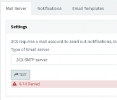
This could explain why....after test returns this
 
Ah, forgot to mention that this is actually expected to happen if you're using the 3CX SMTP. This is due to the fact that one of the SMTP authentication steps is matching the IP your PBX is contacting our servers from with the IP the FQDN is resolving to. Since this is the Passive server, it's expected to never have those two ips matching unless of course upon a failover event in which the IP for the FQDN gets updated to that of the passive server.

For the Restore process you can check the RestoreCmd.log. Access the Management Console and navigate to "Dashboard >> Activity Log >> Logs >> Instance" and you should be able to download it from there. Also check the creation date of the log file.
 
Status
Not open for further replies.

Forum statistics

Threads
111,974
Messages
590,083
Members
164,901
Latest member
Silent_Guru