FANVIL 3G Phones

Status
Not open for further replies.

texmansru47

SOHO User
Joined
Jan 9, 2021
Messages
122
Reaction score
20
I have two on my 3CX system at home. One is recognized the other cannot get an IP (but used too). The one the is recognized is telling me it needs a firmware upgrade to be supported but the phone system; There is only one problem. I downloaded all the firmware available for this phone and none will upload to the phone (fails are beginning up of the upgrade). I guess what I need is to know the proper firmware OR should I get two different phones that are less fragile. These phones worked great for months then... nothing. Any ideas would be greatly appreciated.
 
Hello,

There are some solutions for this, but I think you need to contact Fanvil to get the correct firmware for your model, then install all the versions one by one so you can upgrade one version at a time to reach the final version.
 
I finally got both phones upgraded. The firmware for the 3S worked but the phone is labeled 3G. I was on their support page and they told me in some batches the 3S and 3G are the same phones. The only problem I have now is one phone still will not get a DHCP IP (it does but registers an error) and the one working only works for 3CX extension calls. If I try to call it via the SIP trunk or from outside it answers but NO sound.
 
Ah yes, I have seen one of those models too - they appear as a X3S and take that firmware. Free upgrade ;)


Ok the fact that it will not take DHCP is another issue though. Factory reset it to make sure the problem is not the IP config of the phone, but if it still cannot get an IP you might possibly be having some network trouble.

I do not not know how your network is setup (routing / switching / VLANs / DHCP pool size etc) but it might not be the phone's fault. The phone might not be getting an IP because your network is not giving it an IP for some reason.

You could take the phone to another network and try it there to make sure. For example, connect it to your home internet router and see if it gets an IP (you will need a power adapter too). If it works ok there, then the phone is probably just fine.
 
I will try that. I have a pretty straightforward setup Meraki X64 Firewall, MS220 Layer 2 switch with an Xfinity service router. I have all the ports up. I am in the process of removing (stopping) DHCP from the XFINITY router and using my Windows 2012 Server to push the DHCP scopes but that has not been done yet. I will be swapping network cables and switch ports tonight when I get home to see if that could be the problem as well.
 
  • Like
Reactions: JohnS_3CX
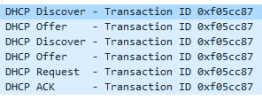
You know, you could always mirror the port the Fanvil uses, and capture the traffic on the port while the phone starts up.

You should see it broadcasting "DHCP Discover" and your DHCP server should reply back to it with an Offer, and the phone should ACK the offer

1633611367831.png

Analyzing this traffic might tell you what happened and why.
 
  • Like
Reactions: texmansru47
I will try that. I have a pretty straightforward setup Meraki X64 Firewall, MS220 Layer 2 switch with an Xfinity service router. I have all the ports up. I am in the process of removing (stopping) DHCP from the XFINITY router and using my Windows 2012 Server to push the DHCP scopes but that has not been done yet. I will be swapping network cables and switch ports tonight when I get home to see if that could be the problem as well.
I would use the Meraki DHCP, with the WS2012 DNS, not the Windows DHCP.
 
You know, you could always mirror the port the Fanvil uses, and capture the traffic on the port while the phone starts up.

You should see it broadcasting "DHCP Discover" and your DHCP server should reply back to it with an Offer, and the phone should ACK the offer

View attachment 24947

Analyzing this traffic might tell you what happened and why.
I will do that!
 
I set up the DHCP on my Meraki firewall. It seems to be set up correctly. The same phone that is not pulling an IP from the standard VLAN is still not receiving an IP from the new VLAN I created solely for the VOIP devices (I used /19 the maximum just as a test). The other phone grabs an IP from the new DHCP but the phone I have been having issues with still will not grab one. This phone used to work perfectly so I am not sure what happened. As for my other phone, I still get NO SOUND when I call the phone from the outside or from my cell. If I do an extension to extension from my cell to the phone it works. very confused.
 
I set up the DHCP on my Meraki firewall. It seems to be set up correctly. The same phone that is not pulling an IP from the standard VLAN is still not receiving an IP from the new VLAN I created solely for the VOIP devices (I used /19 the maximum just as a test). The other phone grabs an IP from the new DHCP but the phone I have been having issues with still will not grab one. This phone used to work perfectly so I am not sure what happened. As for my other phone, I still get NO SOUND when I call the phone from the outside or from my cell. If I do an extension to extension from my cell to the phone it works. very confused.
/19 is not a lot of IPs. Could you have ran out of DHCP on that voice VLAN?
 
Quite possible. Yet it was Meraki that stated that the maximum it would take is a /19 and I set up a /19 subnet on VLAN2. The one device gets one the other won't even if I take the one that did off the network,
 
Status
Not open for further replies.

Members Online Now

Forum statistics

Threads
111,834
Messages
589,287
Members
164,664
Latest member
dominik.pepel