Fanvil H5W phone are not connecting

Song

Bronze Partner
Basic Certified
Joined
Nov 12, 2018
Messages
379
Reaction score
24
Hi,

We have Fanvil H5 and H5w phone. I setup the Fanvil H5 phone the same way I setup the H5w phone. the only difference is the H5w phone is connected WIFI. WIFI phone connected are in the same subnet. So what I did is follow the instruction on how to setup the H5 phone. Add a user, go to the option and uncheck the block remote non-tunnels connection. then go to IP phone and select H5W and add it and enter mac address and it tell me to reboot the phone. I login to the phone remotely and rebooted it. For some reason the Fanvil H5 phone will connect and register to the 3cx and show up fine, but the H5W will not register to it? any troubleshooting I can do? I do notice that on the H5W there is two mac address. I would assume I enter the WIFI mac address instead of the ethernet mac address becuase I'm connecting WIFI?

If anyone connecteda fanvil h5w phone before please advice if i'm missing any step.

thank you
 
Assuming you're using the H5W template?

Also, what wifi are you using? Could be blocking multicast.

have you tried sticking in the provisioning URL?
 
Assuming you're using the H5W template?

Also, what wifi are you using? Could be blocking multicast.

have you tried sticking in the provisioning URL?
Yes I'm using the H5W template. I'm using unifi and have setup the WIFI network to go to the same VLAN as the phone network. Just simple WIFI setup. I'll check on unifi and see if there is any multicast setting and see if it is enable. thank you for this. I will also try to manually put in the provisioning URL in there and see.

Thank you so much for the advice..
 
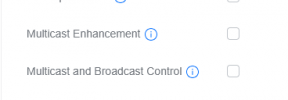
Check these in wifi networks

1747925067700.png
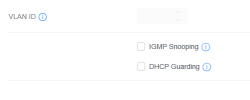
you may need to turn snooping off too

1747925189846.png
 
Check these in wifi networks

View attachment 47965
you may need to turn snooping off too

View attachment 47966
Ok. I have multicast enhancement checked. do I also need multicast and broadcast control checked? if so I will need to enter the mac address to allow it.
VLAN ID igmp snooping is off by default.. thank you for this. I'll see if this will do it.


Thanks alot!!
 

Attachments

  • Screenshot 2025-05-22 074940.png
    Screenshot 2025-05-22 074940.png
    56.5 KB · Views: 2
Hi,

It seems like you are connecting them to a remote PBX without an SBC and you will not be able to always get a reliable connection like you are facing now. Do it properly and use a SBC or router phone if you want it to be reliable.

Also, you must use the LAN MAC. Multicast is not related to your issue.
 
Hi,

It seems like you are connecting them to a remote PBX without an SBC and you will not be able to always get a reliable connection like you are facing now. Do it properly and use a SBC or router phone if you want it to be reliable.

Also, you must use the LAN MAC. Multicast is not related to your issue.
This is a lan pbx box in house . We are connecting it to the lan IP. Instead of the domain name.. lan Mac address or Wi-Fi Mac address?. This is connecting through wifi only

Thank you
 
So what I did is follow the instruction on how to setup the H5 phone. Add a user, go to the option and uncheck the block remote non-tunnels connection.

Where did you get such instructions? If the phone is not remote then why did you uncheck "Block remote non-tunnel connections"?

If the PBX is in house, it should be on the same LAN as the phones, and therefore not remote.

You should never uncheck that option, it reduces your security for no reason.
 
Where did you get such instructions? If the phone is not remote then why did you uncheck "Block remote non-tunnel connections"?

If the PBX is in house, it should be on the same LAN as the phones, and therefore not remote.

You should never uncheck that option, it reduces your security for no reason.
From here:


and it worked for the regular H5. it just do not work for the H5W
 
That's not the 3CX provisioning guide Song, let me introduce you to our guides: https://www.3cx.com/sip-phones/

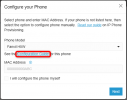
And to make it even easier and more convenient, just select your model and click here where the red circled link is to see its specific guide directly from your 3CX system.
1747982850714.png

Change the non-tunnel setting back how it was for any users where you unticked in without knowing what this setting does.

Use the LAN MAC like I told you earlier. Once you reboot the Fanvil it will try to download the config automatically.
 
That's not the 3CX provisioning guide Song, let me introduce you to our guides: https://www.3cx.com/sip-phones/

And to make it even easier and more convenient, just select your model and click here where the red circled link is to see its specific guide directly from your 3CX system.
View attachment 47975

Change the non-tunnel setting back how it was for any users where you unticked in without knowing what this setting does.

Use the LAN MAC like I told you earlier. Once you reboot the Fanvil it will try to download the config automatically.
Thank. that instruction is the same except the unchecking of the non-tunnel setting. I will check that back. So you say to use the LAN MAC address and not the WIFI MAC address? maybe that was it..

thank you.. I will try and see if it work.
 

Members Online Now

Forum statistics

Threads
111,834
Messages
589,287
Members
164,663
Latest member
svdDGS