- Joined
- Sep 3, 2020
- Messages
- 67
- Reaction score
- 6
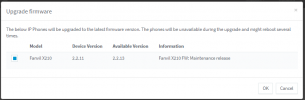
Finally decided to start upgrading the firmware on our Fanvil X210 phones from 2.2.11 to 2.2.13
First phone seems to have worked ok. Then I did another 2 and that is where the problem started.
The phone seems to be upgrading and rebooting. Once rebooted, you get the language select screen and all settings are lost. I can re-provision the phones and initially all seems well until you get an upgrading message on the screen followed by a reboot with the language screen coming up and all settings lost.
I tried manually downgrading the firmware and downloaded 2.0.5 from the fanvil website. After provisioning the phone it simply upgraded the firmware again and the problem continues as previously described.
We are on a 3cx hosted solution. Not sure what other details I need to post.
First phone seems to have worked ok. Then I did another 2 and that is where the problem started.
The phone seems to be upgrading and rebooting. Once rebooted, you get the language select screen and all settings are lost. I can re-provision the phones and initially all seems well until you get an upgrading message on the screen followed by a reboot with the language screen coming up and all settings lost.
I tried manually downgrading the firmware and downloaded 2.0.5 from the fanvil website. After provisioning the phone it simply upgraded the firmware again and the problem continues as previously described.
We are on a 3cx hosted solution. Not sure what other details I need to post.