Solved Fanvil X210 problem with caller ID on internal calls

Status
Not open for further replies.
Here is a screenshot of an incoming call missing the name information.

View attachment 40704
I've seen this before. This looks like an incoming video invite being sent to the phone.

Can you check whether it is indeed so, and whether you have enabled the Preview setting with 18x parameter next to it under Line > SIP > Advanced settings?

1712670662715.png


Polycom VVX 501 does include video in its invite by default as I remember so this is probably the root cause here.
 
I've seen this before. This looks like an incoming video invite being sent to the phone.

Can you check whether it is indeed so, and whether you have enabled the Preview setting with 18x parameter next to it under Line > SIP > Advanced settings?

View attachment 40753


Polycom VVX 501 does include video in its invite by default as I remember so this is probably the root cause here.
Would this be on the phone itself? If in 3CX can you be more specific about where this setting is located?

Note that this occurs only for 2 users, and with all clients from those 2 users (their desk phone, their smartphone app, and their softphone in the web client). Other users that are calling from VVX 501s do not have this problem and their caller ID name is displayed properly and all users were generated from the same information and have the same settings. While I do agree that in the screenshot of the phone display it shows the video icon so we may be narrowing the cause.
 
Last edited:
By default the Polycom offers video, and by default Fanvil tries to display it and it behaves the way you see in the picture above.
The quick solution is to either tell one phone to stop sending video, or tell the other one to stop accepting video.

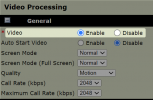
So if your VVX is not equipped with a camera, please disable its video from here and the Fanvil will no longer react to it.

VVX 501 Web UI > Preferences > Video Processing
Disable it and press save below.
It will restart with video disabled.
1712671597153.png
 
By default the Polycom offers video, and by default Fanvil tries to display it and it behaves the way you see in the picture above.
The quick solution is to either tell one phone to stop sending video, or tell the other one to stop accepting video.

So if your VVX is not equipped with a camera, please disable its video from here and the Fanvil will no longer react to it.

VVX 501 Web UI > Preferences > Video Processing
Disable it and press save below.
It will restart with video disabled.
View attachment 40755
John, I have seen this before as well but seems to absolutely affect calls from Polycom VVX 501s with video enabled (which is the default in your templates) to the 3CX clients (smartphone app and web/desktop clients) and we even have a custom template to deal with it for another customer. But please remember that in this case it is only 2 users that are affected out of some 40 Polycom VVX 501 phones and it happens no matter what they call from - it also happens when they call from their smartphone app and from their desktop app/web client.
 
By default the Polycom offers video, and by default Fanvil tries to display it and it behaves the way you see in the picture above.
The quick solution is to either tell one phone to stop sending video, or tell the other one to stop accepting video.

So if your VVX is not equipped with a camera, please disable its video from here and the Fanvil will no longer react to it.

VVX 501 Web UI > Preferences > Video Processing
Disable it and press save below.
It will restart with video disabled.
View attachment 40755
I would also like to address the video issue in particular - while I think you have hit on a possible issue its one that is not a problem currently - other Polycom VVX phones may cause the video issue but their caller ID name is still displayed. In this case the caller ID name is not being displayed for two users so these changes will probably not affect that problem.
 
I think the users affected all probably have Fanvil models* which can accept incoming video.

This is not necessarily a bad thing, more a matter of preference in conjunction with how Fanvil decided the phone should behave under video offer conditions by default.

But if you do not like the default behavior of the phone (or dont need video) it can be changed of course. You may need to customize your templates to achieve this by default.

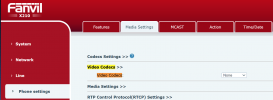
You can also disable it from the Fanvil (which is probably the best solution in this case I would imagine)
Give it a try and see if it's preferable to the current behavior

1712672517164.png
 
Last edited:
I think the users affected all probably have Fanvil models* which can accept incoming video.

This is not necessarily a bad thing, more a matter of preference in conjunction with how Fanvil decided the phone should behave under video offer conditions by default.

But if you do not like the default behavior of the phone (or dont need video) it can be changed of course. You may need to customize your templates to achieve this by default.

You can also disable it from the Fanvil (which is probably the best solution in this case I would imagine)
Give it a try and see if it's preferable to the current behavior

View attachment 40756
We are going to disable the video being sent from the Polycom phones via a custom template instead.

This still doesn't address the issue of not showing the caller ID name of the two users.
 
I suggest to check the follow settings
1 whether phone has the contacts in X210 phone book.
2 login to the phone web page with IP address . Set phone configuration like below .
If there is any query , please feel free to send email to [email protected] .
View attachment 40692
We tried your suggestion and it only created an additional problem. After the changes the extension number is also not shown, so for the two users that were not showing their caller ID name now there is nothing to indicate who is calling, and for users that were showing their caller ID name now only the name shows, not the extension number.

Again, this is particular to only two users calling (from any client including the Polycom desk phone, smartphone app, or web client softphone) this user who is answering on a Fanvil X210 phone. When those same users (again, from any client) call other users which have Polycom phones their name is displayed. Because of this I believe the problem is with 3CX sending the caller ID name information to this particular user and not with the Fanvil phone displaying it.

So again, the problem is:
- 2 particular users try to call 1 particular user. When they do their names are not displayed on the callee's Fanvil X210 phone display.
- they can be calling from any client (smartphone app, PC softphone, or desk phone)
- if those same 2 particular users call (again, from any client) any other user their name is displayed properly.
- I am waiting to find out if the Fanvil user see caller name information from within the apps/clients or not and will let you know when they respond.
 
We are going to disable the video being sent from the Polycom phones via a custom template instead.

This still doesn't address the issue of not showing the caller ID name of the two users.
I think the users affected all probably have Fanvil models* which can accept incoming video.

This is not necessarily a bad thing, more a matter of preference in conjunction with how Fanvil decided the phone should behave under video offer conditions by default.

But if you do not like the default behavior of the phone (or dont need video) it can be changed of course. You may need to customize your templates to achieve this by default.

You can also disable it from the Fanvil (which is probably the best solution in this case I would imagine)
Give it a try and see if it's preferable to the current behavior

View attachment 40756
Well, believe it or not, we figured out the problem. It was, in fact, due to the fact that the Polycom VVX 501 defaults to offering video on outbound calls even if there is no video camera installed, and the Fanvil X210 defaults to accepting video calls. This in and of itself is not a problem, but for some reason for some users when this happens the Fanvil does not show their name – oddly some users names still showed while others did not. Simply disabling video on the Polycoms or on the Fanvil fixed the problem.

It would be nice if you had a toggle switch in the phone configuration to enable or disable video because we were able to disable it on the Polycoms with a simple custom template which is changed from the default template as below.

Default Polycom VVX gen2 template video section (lines 935-943 of full template):
{IF ua=VVX_501,VVX_601}
<video
video.autoStartVideoTx="0">
<video.codecPref
video.codecPref.H263="2"
video.codecPref.H264="1"
/>
</video>
{ENDIF}

Custom template section that disables video:
{IF ua=VVX_501,VVX_601}
<video
video.enable="0"
video.autoStartVideoTx="0">
<video.codecPref
video.codecPref.H263="2"
video.codecPref.H264="1"
/>
</video>
{ENDIF}
 
Status
Not open for further replies.

Members Online Now

Forum statistics

Threads
111,834
Messages
589,287
Members
164,663
Latest member
svdDGS