Solved Fanvil X210 problem with caller ID on internal calls

Status
Not open for further replies.

Callinectes

Silver Partner
Joined
Nov 19, 2020
Messages
196
Reaction score
53
Does anyone know why, when a user (who uses a Polycom VVX 501) calls a user with a Fanvil X210, the Fanvil would only display the extension number of the caller and not the full caller ID name and extension number? This does not happen with all users that use the Polycom VVX 501 as their desk phone, just a couple of them, but it is pretty consistent. These phones are using the default templates and have the recommended firmware loaded. The 3CX system is v18 u9(b20) and all phones connect via the same linux SBC while the server is Internet hosted.
 
The issue is limited between Polycom and Fanvil specific models only?
 
The issue is limited between Polycom and Fanvil specific models only?
These are the only 2 models this customer has, and it's only been reported by the Fanvil X210 user when receiving calls from Poly VVX 501s. It could happen from others but these are the two they have and the two involved. Happy to do some testing per instruction if you have any suggestions.
 
If the Fanvil make a call to an extension, can the user see the extension information that he is calling?
 
I beli
If the Fanvil make a call to an extension, can the user see the extension information that he is calling?
To clarify, you mean can the Fanvil user see the name associated with the extension they are calling? I believe so - at least they have not reported a problem but I will ask and let you know. Do note that the phonebook/directory is enabled and one of the users they cannot see information of is in the same group/department.
 
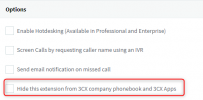
Does the user from Polycom has the below option enabled?
1712307852539.png
 
This will require to check what information is sent from the Polycom to Fanvil and vise versa.
Also with the Web Clients you have the same issue?
 
I beli

To clarify, you mean can the Fanvil user see the name associated with the extension they are calling? I believe so - at least they have not reported a problem but I will ask and let you know. Do note that the phonebook/directory is enabled and one of the users they cannot see information of is in the same group/department.
So they tested and when those users call from smartphone, computer softphone, or desk phone it does not matter - the name never shows. When other users call the name shows as expected.
 
Note that I have personally had those same users call a test Polycom VVX 501 I've set up (we don't have any Fanvil X210s to test) and I do see those user's caller IDs when they call to this test phone.
 
Another update - we had the customer factory reset the Fanvil X210 and it automatically reprovisioned but the problem with not being able to see the caller ID name for those select extensions still exists.
 
Based on the description is seems that Fanvil devices are not getting the phonebook upon provisioning.
Are you using a custom FQDN?
 
I suggest to check the follow settings
1 whether phone has the contacts in X210 phone book.
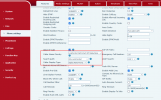
2 login to the phone web page with IP address . Set phone configuration like below .
If there is any query , please feel free to send email to [email protected] .
1712545406441.png
 
  • Like
Reactions: OlegR_3CX
Based on the description is seems that Fanvil devices are not getting the phonebook upon provisioning.
Are you using a custom FQDN?
No, this is not correct. The Fanvil user has checked the phonebook/directory on their phone and there are entries for the users that do not show the user details on inbound calls, and when they call those users the information shows on outbound calls. It is only on inbound calls from a couple of particular users that the users names do not show on the phone display - from other users on the same system and in the same group the user name information does show.
 
Do the names associated with the problematic extensions have any special characters?
 
I suggest to check the follow settings
1 whether phone has the contacts in X210 phone book.
2 login to the phone web page with IP address . Set phone configuration like below .
If there is any query , please feel free to send email to [email protected] .
View attachment 40692
Thank you for the response. We will check this but can you tell me if this would be the problem when it is only a couple of users that are having this problem? Most users, even those in the same group and set up identically to these users with the exception of the names and extension numbers, do have their names appear on the Fanvil phone user's display when they call that user.
 
Do the names associated with the problematic extensions have any special characters?
No - only letters - one user has 5 letters in their first name and 4 in their last and the other is 6 and 5, respectively. I have also made minor adjustments to the names to get the phonebook entries to rebuild and that did not help either.
 
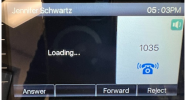
Here is a screenshot of an incoming call missing the name information.

Screenshot 2024-04-08 081255.png
 
Any BLF keys with special characters on the device?
 
Any BLF keys with special characters on the device?
No. The first 2 are shared parking spaces (SP0 and SP1) and the rest are either set as blank or are BLFs (selected from menus - nothing manually typed in and none of those use any special characters). The only thing I see of note is that there are blanks interspersed with the BLFs in order to obtain a certain layout on the phone's button displays. There has been no manually modification of the phone configuration - it has all been done via 3CX provisioning.
 
Status
Not open for further replies.

Latest Posts

Forum statistics

Threads
112,156
Messages
591,013
Members
165,188
Latest member
Teemal