Fanvil X5U Not Self Healing After Internet is Restored

Status
Not open for further replies.

AcrossThePond

Silver Partner
Basic Certified
Joined
Aug 11, 2021
Messages
7
Reaction score
0
Hi Everyone! Hope you all are doing well. Anyone have any ideas on why my phones might not be self healing (or at least maybe they are taking more than an hour and I don't know it because I reboot first)? This particular customer is using the Fanvil X5U.
 
Hi,

Not a very straightforward answer when it comes to this I'm afraid.

- What version of firmware are you running?

- Is there a VPN involved or a failover connection?

- Are the phones using STUN or SBC provisioning?

- Does the phone still have a reachable IP address when the internet comes back?

- Are you connected directly over wired ethernet to the modem?
 
Hi,

Not a very straightforward answer when it comes to this I'm afraid.

- What version of firmware are you running?

- Is there a VPN involved or a failover connection?

- Are the phones using STUN or SBC provisioning?

- Does the phone still have a reachable IP address when the internet comes back?

- Are you connected directly over wired ethernet to the modem?
Thanks for reaching out!
2.4.12
There is no VPN or failover connection
STUN
The phones can be pinged locally, but not sure that is what you mean. There is no NAT to the phones
Wired POE to a switch

After the Internet came back online, 1 phone did come back online but the rest didn't. We rebooted the rest after 45-60 minutes of the Internet being restored.
 
You'll be told these issues are common with STUN and use a SBC or RouterPhone.
 
  • Like
Reactions: JohnS_3CX
Are all the phones at the same site? Like @SweetAction said, these issues are unfortunately common with STUN.

Have you ever considered installing a 3CX SBC?
https://www.3cx.com/docs/3cx-tunnel-session-border-controller/

Instead of the phones reaching 3CX over the internet, they will talk directly to a local SBC. The SBC then encrypts and relays all the traffic to 3CX. Since the phones will be getting a response from the SBC even if the internet is down, they will stay alive.

The SBC will keep retrying to connect to 3CX until the internet is back. I think this will solve your problem permanently.
 
Are all the phones at the same site? Like @SweetAction said, these issues are unfortunately common with STUN.

Have you ever considered installing a 3CX SBC?
https://www.3cx.com/docs/3cx-tunnel-session-border-controller/

Instead of the phones reaching 3CX over the internet, they will talk directly to a local SBC. The SBC then encrypts and relays all the traffic to 3CX. Since the phones will be getting a response from the SBC even if the internet is down, they will stay alive.

The SBC will keep retrying to connect to 3CX until the internet is back. I think this will solve your problem permanently.
Thank you, I can certainly do this. The reason I didn't want to do this is because I wanted the phones to be able to be unplugged and taken home and just work without additional programming.
 
Thank you, I can certainly do this. The reason I didn't want to do this is because I wanted the phones to be able to be unplugged and taken home and just work without additional programming.
Router Phones are perfect for this. The Fanvil X5U can be a router phone with a simple, free, firmware upgrade.
 
Router Phones are perfect for this. The Fanvil X5U can be a router phone with a simple, free, firmware upgrade.
I'm afraid the X5U needs an external SBC.

It's specifically the X5U-V2 that can be a router phone (ie. a phone+SBC all in one)

So in the case @AcrossThePond will have to install an SBC. But if they wish to switch it to STUN for someone that will work from home, its easy to revert it again from the management console. After switching back to STUN, the user just has to factory reset and enter their credentials on the screen. And from Update 7 onwards, they will not even need to enter credentials, it will auto provision upon reset and be ready to use in a few moments.
 
Router Phones are perfect for this. The Fanvil X5U can be a router phone with a simple, free, firmware upgrade.
Does that mean that the Router Phone will act as the SBC, so to speak? It looks like I only need 1 per network. I found these instructions below, but there is no choice for Router Phone in the Phone Prov tab of 3CX. I can add a phone and choose the v2 firmware, but I don't get the 8-digit code needed for provisioning. Will it just ask for the VM PIN like the regular phones do? And then do I set up all the other phones to register to the router phone?

Configuring your Fanvil X and XU series as a Router Phone​

  1. Select "Router Phone".
  2. Choose your Fanvil X or XU model from the drop-down menu.
  3. Enter the phone’s MAC address without dashes or colons, and click “Add phone”.
  4. A pop-up with the extension number and the one-time code will appear. The PIN is valid for 14 days during which period you have to connect the phone to the network. If it is already connected, restart it.
  5. As soon as the phone boots up it will request:
    Your extension number
    The special 8-digit one-time PIN.
 
Does that mean that the Router Phone will act as the SBC, so to speak? It looks like I only need 1 per network. I found these instructions below, but there is no choice for Router Phone in the Phone Prov tab of 3CX. I can add a phone and choose the v2 firmware, but I don't get the 8-digit code needed for provisioning. Will it just ask for the VM PIN like the regular phones do? And then do I set up all the other phones to register to the router phone?

Configuring your Fanvil X and XU series as a Router Phone​

  1. Select "Router Phone".
  2. Choose your Fanvil X or XU model from the drop-down menu.
  3. Enter the phone’s MAC address without dashes or colons, and click “Add phone”.
  4. A pop-up with the extension number and the one-time code will appear. The PIN is valid for 14 days during which period you have to connect the phone to the network. If it is already connected, restart it.
  5. As soon as the phone boots up it will request:
    Your extension number
    The special 8-digit one-time PIN.

Firstly the above is done not from the management console, but from our new Webclient Admin panel.

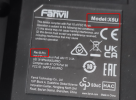
Secondly, if you are using the X5U with firmware v2.4.12, I'm 99% sure you have the Revision A model (which unfortunately cannot run this feature due to hardware limitations)
1677856183994.png

You need the model that shows Rev. B (as in Revision B, which also has a different model name X5U-V2)
Note: This is an engineering sample model, the final model might appear a bit differently but you will clearly see Rev.B as an indicator.


But yes, if you have the correct model, the firmware of that model contains the 3CX SBC built right into the phone and it can perform as an SBC both for itself, and for another 10 "normal" phones.
 
Does that mean that the Router Phone will act as the SBC, so to speak? It looks like I only need 1 per network. I found these instructions below, but there is no choice for Router Phone in the Phone Prov tab of 3CX. I can add a phone and choose the v2 firmware, but I don't get the 8-digit code needed for provisioning. Will it just ask for the VM PIN like the regular phones do? And then do I set up all the other phones to register to the router phone?

Configuring your Fanvil X and XU series as a Router Phone​

  1. Select "Router Phone".
  2. Choose your Fanvil X or XU model from the drop-down menu.
  3. Enter the phone’s MAC address without dashes or colons, and click “Add phone”.
  4. A pop-up with the extension number and the one-time code will appear. The PIN is valid for 14 days during which period you have to connect the phone to the network. If it is already connected, restart it.
  5. As soon as the phone boots up it will request:
    Your extension number
    The special 8-digit one-time PIN.
Yes, one per 10 devices, but if people like to take phones home I would make each phone it's own router phone.

That being said... is this the V2? See above post as only the V2 can be used as a RouterPhone.
 
Firstly the above is done not from the management console, but from our new Webclient Admin panel.

Secondly, if you are using the X5U with firmware v2.4.12, I'm 99% sure you have the Revision A model (which unfortunately cannot run this feature due to hardware limitations)
View attachment 34525

You need the model that shows Rev. B (as in Revision B, which also has a different model name X5U-V2)
Note: This is an engineering sample model, the final model might appear a bit differently but you will clearly see Rev.B as an indicator.


But yes, if you have the correct model, the firmware of that model contains the 3CX SBC built right into the phone and it can perform as an SBC both for itself, and for another 10 "normal" phones.
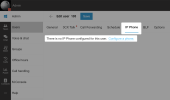
I am logged into the Webclient Admin panel as a System Owner and under the User's IP Phone tab there is not an option to “Configure a phone”
If I was ever in a position where I had 22 phones, could I make 2 of them Router Phones and register 10 to each? Could I make every phone a Router Phone so that they can be taken home?
 
I am logged into the Webclient Admin panel as a System Owner and under the User's IP Phone tab there is not an option to “Configure a phone”
This option appears if there are zero phones defined on the extension:
1677860143646.png

If I was ever in a position where I had 22 phones, could I make 2 of them Router Phones and register 10 to each?
Yes correct.

Could I make every phone a Router Phone so that they can be taken home?
Yes correct.
 
  • Like
Reactions: AcrossThePond
Hey there! Was able to set this up no problem, however when the Internet goes out the 2 router phones do not self heal. Once the router phones are rebooted, all the other phones quickly self heal. How can I get the router phones to self heal when Internet is restored?
 
thank you for letting me know. i am on U9 but it looks like the 2 router phones have firmware updates. i will run it this evening!
 
Someone mentioned this, but I'll add a bit more to it.

You might consider programming all of the phones on the system as router phones (if the phones support router mode, of course). I don't know if there's a limit, but I have two Yealink T53W phones, both on the same wifi network and both programmed as router phones, in my office/shop. Basically, it's creating a VPN tunnel between each phone and the server. They work great that way.

John Rayfield, Jr.
Rayfield Communications
 
I don't know if there's a limit
There's no upper limit, other then system resources, as far as we know. I've seen hundreds of RouterPhones on a PBX.
 
  • Like
Reactions: rayfield
I have this happening at a new client site...can't understand it either
 
Status
Not open for further replies.

Members Online Now

Forum statistics

Threads
111,835
Messages
589,288
Members
164,665
Latest member
dominik.pepel