- Joined
- Jun 27, 2021
- Messages
- 9
- Reaction score
- 8
Hiya!
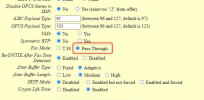
I have a few client sites set up with a Grandstream ATA for faxing. We have a VPN between the sites and the datacenter that the 3CX instances lives at, so the FXS is on a locally routable IP. One site recently became unable to send faxes. Inbound worked no problem.
When attaching a testing phone to the ATA, I found that I was unable to make outbound calls to any extension or any external number. Would essentially sit for a period of time and then die. Doing a TCP Dump showed that the invite was taking place and then it responded with a 478, then the FXS authenticated again, then nothing would happen. After about 60 seconds we hear a busy signal.
To get the site back online I removed the fax extension and created a regular extension, and updated the FXS config to use that extension. Since then, faxing in both directions has worked without issue. I can revert for testing purposes.
Can anyone suggest why this may have happened and what we can do to fix? Myself and some of my engineers have been working on this for a few days and are unable to figure out what would cause this.
In addition, routers on both sides have been restarted, VPN tunnel is confirmed working (able to send bi-directional traffic), 3CX box was restarted, FXS and fax machine were both replaced.
I have a few client sites set up with a Grandstream ATA for faxing. We have a VPN between the sites and the datacenter that the 3CX instances lives at, so the FXS is on a locally routable IP. One site recently became unable to send faxes. Inbound worked no problem.
When attaching a testing phone to the ATA, I found that I was unable to make outbound calls to any extension or any external number. Would essentially sit for a period of time and then die. Doing a TCP Dump showed that the invite was taking place and then it responded with a 478, then the FXS authenticated again, then nothing would happen. After about 60 seconds we hear a busy signal.
To get the site back online I removed the fax extension and created a regular extension, and updated the FXS config to use that extension. Since then, faxing in both directions has worked without issue. I can revert for testing purposes.
Can anyone suggest why this may have happened and what we can do to fix? Myself and some of my engineers have been working on this for a few days and are unable to figure out what would cause this.
In addition, routers on both sides have been restarted, VPN tunnel is confirmed working (able to send bi-directional traffic), 3CX box was restarted, FXS and fax machine were both replaced.