- Joined
- Feb 12, 2026
- Messages
- 1
- Reaction score
- 0
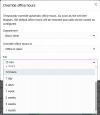
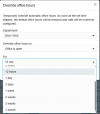
Hi, regarding the override office hours, it appears that only predefined time intervals can be selected. Currently, the available options in 3CX are 15 minutes, 30 minutes, 1 hour, 2 hours, and 12 hours and etc. However, we often receive requests for custom durations, such as 3, 4, or 5 hours which are not currently supported.
It would be greatly appreciated if a feature could be added to allow custom time ranges, similar to what’s available in FortiVoice PBX and other systems.
Thank you.
It would be greatly appreciated if a feature could be added to allow custom time ranges, similar to what’s available in FortiVoice PBX and other systems.
Thank you.