Solved Firewall Checker V16 PBX

Status
Not open for further replies.

jrodcpwk

Bronze Partner
Basic Certified
Joined
Dec 2, 2019
Messages
41
Reaction score
4
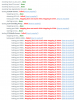
Im sure this has been asked already but I just want to verify if something isnt wrong or is wrong on my end. I set up this system similar to another location that is in full production along with using the same firewalls with the same configs but obviously different public static IPs. I run the check and it keeps telling me that the SIP ALG is failing the test along with the ports stating that they're mapped incorrectly? I tested through canyouseeme .org and it states that those ports are open along with when i check to access the web interface at 5001, i'll take it off the port forwarding group and the external url stops working and works immediately when i pop it back in. In short I just want to make sure I have my stuff in order along with knowing its all in good standing without any error on my end or if I am overlooking something. Thank you!
 

Attachments

  • yiffyz9.png
    yiffyz9.png
    100.1 KB · Views: 8
SIP ALG = failed, this means the test was not completed because the firewall likely blocked the traffic that the test relies on. Hence the test has failed. If it was completed and ALG was found it would say "detected". This was an inconclusive test due to your firewall settings most likely.

Also your ports are being remapped, meaning you don't have 1:1 NAT. It's almost as if the ports are not set up at all on this firewall for some reason. https://www.3cx.com/docs/ports/

Open ports does not necessarily mean that they reach the PBX correctly mapped as they should in full cone NAT
 
Last edited:
Is there something I am missing then? This is identical to the set up we have in our production location. Same model firewall and same OS on those as well. I'll double check to see if there is some extra setting in place possibly remapping it.
 
Probably, something is causing the remapping along the way of the test and something is also blocking some of the traffic from coming back.

If you are interested, there is more technical explanation on how the checker works to give you an idea of what it checks and how it does the test: https://www.3cx.com/docs/firewall-checker/
 
Got it resolved. Apparently all I had to do was disable and re enable the policy on my fortigate. Dont know why that was the resolve even after re building all the ports and setting them all back up twice. Fortigate issue none the less, all is fine now. Thanks!
 
Glad to hear it was resolved, and thanks for updating the thread with your solution
 
Status
Not open for further replies.

Latest Posts

Forum statistics

Threads
111,934
Messages
589,821
Members
164,813
Latest member
divdigital