firewall checker

Status
Not open for further replies.

Peter Carlson

Free User
Joined
Jul 2, 2017
Messages
23
Reaction score
1
can the firewall checker be run on the command line with more verbosity? I'm getting pretty much complete failure with it.
packet capture is run on 3cx and on the firewall internal and external interfaces
packet capture shows that stun and alg servers are being resolved, but I never see a connection attempt to either
Code:
resolving 'stun-us.3cx.com'... done
resolving 'stun2.3cx.com'... done
resolving 'stun3.3cx.com'... done
resolving 'sip-alg-detector.3cx.com'... done
testing 3CX PhoneSystem 01 SIP Server... failed (How to resolve?)
stopping service... done
detecting SIP ALG... failed (How to resolve?)
testing port 5060... not reachable (How to resolve?)
starting service... done
testing 3CX PhoneSystem Media Server... failed (How to resolve?)
stopping service... done
testing port 5090... not reachable (How to resolve?)
testing ports [9000..9398]... failed (How to resolve?)

I can connect to my sip provider and receive calls. Just no audio, which would indicate potentially a problem with the udp ports not being forwarded, but I want to make sure the firewall checker can run before testing any further.

firewall is iptables. I can telnet from outside to the static ip port 5060 and 5090 and get to the 3cx server, udp rules are identical to the tcp rules except of course the proto and port.

I'm really trying to figure out what the firewall checker is doing since packet capture seems to show it doing nothing, this way I can see what might be broken in my config
 
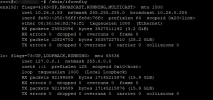
Please see a supported installtions ifconfig, they should all look something like this:
1660323797194.png

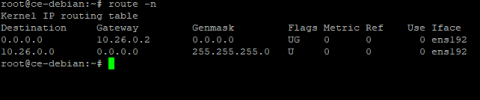
your route -n should look like the following:
1660323975152.png


Again we have though not that we have never tested nor provided support for the Proxmox Virtual Environment. Or can comment on what you have mentioned above.
 
I dont see anything wrong with the network config I posted, however I'll post again using ifconfig and route instead of the newer IP2 tools
Code:
root@3cx:~# ifconfig
ens18: flags=4163<UP,BROADCAST,RUNNING,MULTICAST>  mtu 1500
        inet 192.168.1.13  netmask 255.255.255.0  broadcast 192.168.1.255
        inet6 fe80::4872:d1ff:fe19:fd9d  prefixlen 64  scopeid 0x20<link>
        ether 4a:72:d1:19:fd:9d  txqueuelen 1000  (Ethernet)
        RX packets 8077  bytes 987690 (964.5 KiB)
        RX errors 0  dropped 0  overruns 0  frame 0
        TX packets 5836  bytes 2659598 (2.5 MiB)
        TX errors 0  dropped 0 overruns 0  carrier 0  collisions 0

lo: flags=73<UP,LOOPBACK,RUNNING>  mtu 65536
        inet 127.0.0.1  netmask 255.0.0.0
        inet6 ::1  prefixlen 128  scopeid 0x10<host>
        loop  txqueuelen 1000  (Local Loopback)
        RX packets 338677  bytes 55209301 (52.6 MiB)
        RX errors 0  dropped 0  overruns 0  frame 0
        TX packets 338677  bytes 55209301 (52.6 MiB)
        TX errors 0  dropped 0 overruns 0  carrier 0  collisions 0

root@3cx:~# route -n
Kernel IP routing table
Destination     Gateway         Genmask         Flags Metric Ref    Use Iface
0.0.0.0         192.168.1.1     0.0.0.0         UG    0      0        0 ens18
192.168.1.0     0.0.0.0         255.255.255.0   U     0      0        0 ens18
root@3cx:~#

And as I stated proxmox is just KVM which you do claim to support.

The problem is simple virtio is not supported by 3CX. this thread can be closed
 
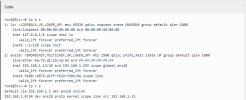
The config you posted was this one
1660325681883.png


And note to use only tested and supported infructurctures and do not use any unsupported equipemnt, software ect...
 
yup, and if you look it's the same
Code:
root@3cx:~# ifconfig
ens18: flags=4163<UP,BROADCAST,RUNNING,MULTICAST>  mtu 1500
        inet 192.168.1.13  netmask 255.255.255.0  broadcast 192.168.1.255
        inet6 fe80::4872:d1ff:fe19:fd9d  prefixlen 64  scopeid 0x20<link>
        ether 4a:72:d1:19:fd:9d  txqueuelen 1000  (Ethernet)
        RX packets 10291  bytes 1179467 (1.1 MiB)
        RX errors 0  dropped 0  overruns 0  frame 0
        TX packets 7317  bytes 4058708 (3.8 MiB)
        TX errors 0  dropped 0 overruns 0  carrier 0  collisions 0

lo: flags=73<UP,LOOPBACK,RUNNING>  mtu 65536
        inet 127.0.0.1  netmask 255.0.0.0
        inet6 ::1  prefixlen 128  scopeid 0x10<host>
        loop  txqueuelen 1000  (Local Loopback)
        RX packets 344747  bytes 57197156 (54.5 MiB)
        RX errors 0  dropped 0  overruns 0  frame 0
        TX packets 344747  bytes 57197156 (54.5 MiB)
        TX errors 0  dropped 0 overruns 0  carrier 0  collisions 0

root@3cx:~# ip a s
1: lo: <LOOPBACK,UP,LOWER_UP> mtu 65536 qdisc noqueue state UNKNOWN group default qlen 1000
    link/loopback 00:00:00:00:00:00 brd 00:00:00:00:00:00
    inet 127.0.0.1/8 scope host lo
       valid_lft forever preferred_lft forever
    inet6 ::1/128 scope host
       valid_lft forever preferred_lft forever
2: ens18: <BROADCAST,MULTICAST,UP,LOWER_UP> mtu 1500 qdisc pfifo_fast state UP group default qlen 1000
    link/ether 4a:72:d1:19:fd:9d brd ff:ff:ff:ff:ff:ff
    inet 192.168.1.13/24 brd 192.168.1.255 scope global ens18
       valid_lft forever preferred_lft forever
    inet6 fe80::4872:d1ff:fe19:fd9d/64 scope link
       valid_lft forever preferred_lft forever

Code:
root@3cx:~# route -n
Kernel IP routing table
Destination     Gateway         Genmask         Flags Metric Ref    Use Iface
0.0.0.0         192.168.1.1     0.0.0.0         UG    0      0        0 ens18
192.168.1.0     0.0.0.0         255.255.255.0   U     0      0        0 ens18
root@3cx:~# ip r s
default via 192.168.1.1 dev ens18 onlink
192.168.1.0/24 dev ens18 proto kernel scope link src 192.168.1.13

it's the same just 2 different tools to look at the same info
https://www.redhat.com/sysadmin/ifconfig-vs-ip
 
So basically, all this was was due to using something unsupported, which you were told not to, and this caused a networking issue. So nothing at all to do with 3cx.
 
Last edited:
So basically, all this was was due to using something unsupported, which you were told not to, and this caused a networking issue. So nothing at all to do with 3cx.
nope. please deposit .25 to play again

3CX documentation states that KVM 2.8 and above are supported. there are several products that build on top of kvm, proxmox, virtuozzo and others. These are NOT replacements for KVM but are WebUIs. The underlying technology is still KVM.

This morning I tested on vanilla KVM with virtio drivers and they fail as well. The lack of support for virtio is nowhere mentioned in the documentation.
 
This morning I tested on vanilla KVM with virtio drivers and they fail as well. The lack of support for virtio is nowhere mentioned in the documentation.
I hate to revive this after it sounds like you found a work-around but I just wanted to mention 10.2.7 of PVE Docs suggests:
"Like all VirtIO devices, the guest OS should have the proper driver installed."

Do you have the package qemu-guest-agent installed on the working 3CX guest KVM and not on this KVM?

apt install qemu-guest-agent

Are these the VirtIO drivers you tested with in vanilla KVM? If so, did you reboot after installing the package?

We have not seen any VirtIO issues of our own with KVM VM's in PVE 5.1 through 7.2.
 
qemu-guest-agent is not installed on either of the 2 VMs as it is not available in the default repos
Code:
root@3cxtest:~# apt search qemu
Sorting... Done
Full Text Search... Done
qemu-utils/buster,buster 1:3.1+dfsg-8+deb10u8 amd64
  QEMU utilities

root@3cxtest:~#

However I'm pretty sure guest-agent does not provide the driver for virtio. virtio is baked into the kernel
Code:
00:12.0 Ethernet controller: Red Hat, Inc Virtio network device
    Subsystem: Red Hat, Inc Virtio network device
    Physical Slot: 18
    Flags: bus master, fast devsel, latency 0, IRQ 11
    I/O ports at e0a0 [size=32]
    Memory at fea52000 (32-bit, non-prefetchable) [size=4K]
    Memory at fe408000 (64-bit, prefetchable) [size=16K]
    Expansion ROM at fea00000 [disabled] [size=256K]
    Capabilities: [98] MSI-X: Enable+ Count=4 Masked-
    Capabilities: [84] Vendor Specific Information: VirtIO: <unknown>
    Capabilities: [70] Vendor Specific Information: VirtIO: Notify
    Capabilities: [60] Vendor Specific Information: VirtIO: DeviceCfg
    Capabilities: [50] Vendor Specific Information: VirtIO: ISR
    Capabilities: [40] Vendor Specific Information: VirtIO: CommonCfg
    Kernel driver in use: virtio-pci
    Kernel modules: virtio_pci

And as you can see from below, the network card itself is correctly seen and installed by the OS.
Code:
root@3cxtest:~# ip a s
1: lo: <LOOPBACK,UP,LOWER_UP> mtu 65536 qdisc noqueue state UNKNOWN group default qlen 1000
    link/loopback 00:00:00:00:00:00 brd 00:00:00:00:00:00
    inet 127.0.0.1/8 scope host lo
       valid_lft forever preferred_lft forever
    inet6 ::1/128 scope host
       valid_lft forever preferred_lft forever
2: ens18: <BROADCAST,MULTICAST,UP,LOWER_UP> mtu 1500 qdisc pfifo_fast state UP group default qlen 1000
    link/ether c6:ea:fa:cd:2c:24 brd ff:ff:ff:ff:ff:ff
    inet 192.168.1.190/24 brd 192.168.1.255 scope global dynamic ens18
       valid_lft 520sec preferred_lft 520sec
    inet6 fe80::c4ea:faff:fecd:2c24/64 scope link
       valid_lft forever preferred_lft forever


root@3cxtest:~# ping www.google.com
PING www.google.com (142.250.188.228) 56(84) bytes of data.
64 bytes from lax31s15-in-f4.1e100.net (142.250.188.228): icmp_seq=1 ttl=118 time=80.6 ms
64 bytes from lax31s15-in-f4.1e100.net (142.250.188.228): icmp_seq=2 ttl=118 time=74.8 ms
^C
--- www.google.com ping statistics ---
2 packets transmitted, 2 received, 0% packet loss, time 1000ms
rtt min/avg/max/mdev = 74.785/77.679/80.573/2.894 ms


root@3cxtest:~# wget www.google.com
--2022-08-19 08:17:00--  http://www.google.com/
Resolving www.google.com (www.google.com)... 142.250.188.228, 2607:f8b0:4007:803::2004
Connecting to www.google.com (www.google.com)|142.250.188.228|:80... connected.
HTTP request sent, awaiting response... 200 OK
Length: unspecified [text/html]
Saving to: ‘index.html’

index.html                              [ <=>                                                               ]  13.72K  --.-KB/s    in 0.01s   

2022-08-19 08:17:00 (927 KB/s) - ‘index.html’ saved [14047]

root@3cxtest:~#

So here are my test results. YMMV. All tests were performed with 1 Socket/2Cores, 4G memory, vanilla 3cx install, after install no additions added, go straight to firewall check. Note, when firewall check fails, it's not a small failure, it's not nat cone failure, it's complete failure and appears to not use the correct interface but instead performs all tests on loopback
  • Install 1: Proxmox, virtio, OS sees the interface and can communicate inbound and outbound. Firewall check fails catastrophically. Switch to E1000 and firewall check succeeds. Switch back to virtio and firewall check succeeds
    • This is quite concerning. It's nice that it works after switching and switching back, but what unknown issues might crop up in the future.
  • Install 2: vanilla KVM, virtio firewall check fails.
  • Install 3: Proxmox, virtio. Firewall check succeeds
  • Install 4: Proxmox, virtio. Firewall check fails

Switching back to E1000
 
Status
Not open for further replies.

Forum statistics

Threads
111,974
Messages
590,081
Members
164,899
Latest member
mazet