Firmware and provisioning problem / SNOM 715

Status
Not open for further replies.

Michael37

Silver Partner
Joined
Apr 28, 2021
Messages
35
Reaction score
5
Hello,

We are using 3CX v18 on linux, we have old SNOM 715 and D715 phones on the network.

The 3CX server is in a data center and an IPSEC VPN link connects our telephone network with the 3CX server.

We have run firmware updates from 3CX on the D715 and 715 (3CX does not differentiate between the two).

The D715s, no problem, they are provisioned correctly.
The 715, the firmware update is good but we have the following message when provisioning "redirection provision ..."

Firmware : 10.1.84.15

Could you help us please?
 
Hi!

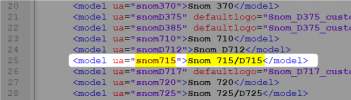
As far as we are aware, the 715 and the D715 are exactly the same and have exactly the same capabilities.
This has always been the case and as you can see in the template as well:
1638794175738.png

Also for both, snom provides the exact same firmware file, not only same version, but the actual file you upload to them is exactly the same.

Anyway, to your problem, how are the phones configured in 3CX, as "Local LAN" or as "Remote STUN"/"SBC" ?

I would also suggest trying to factory resetting one of these devices and checking again.
 
After a long test, we have more precise results which have changed a bit.

Effectively whether it is a D715 or 715, the behavior is indeed the problem, which matches what you said about the two models which are identical.

I therefore resume operation. The phones are on a 192.168.100.x network at the cleint and the 3CX server is in a datacenter on another network. Everything is interconnected with a vpnipsec.

If the phones (D715 and 715) are in 8.x.x.x fimrware no problem, everything works correctly.
In firmware 10.x.x.x this poses a problem and provisioning is not done. When starting up, the phone freezes and the interface is no longer accessible.

We have done some tests with an SBC in the LAN of the phones to see if this changes a few things, and not luckily the problem is still there.
 
OK, so the issue is with provisioning, not the firmware upgrade.

  • Have you tried Factory Resetting one and check again if it can reprovision?
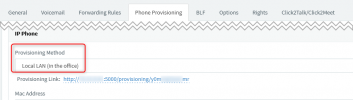
  • When you say that you are using LAN, you have it set like this right?
    1638795422469.png

  • If you run a packet capture on the 3CX Server while rebooting one of the devices, do you see any requests to TCP port 5000 (or whatever HTTP port you installed with) and any responses from the server?

These would be the first things I would recommend checking.
 
Yes it is configured like that.

Indeed during the packet capture, the server receives and sends a lot of information.

We have reset the phones and re-injected firmware by hand in tftp through Split.

On the same network we also have SNOM 720 (firmare 8.9.3.88) and SNOM 725 (10.1.84.15) and they work correctly
 
Yes it is configured like that.

Indeed during the packet capture, the server receives and sends a lot of information.

We have reset the phones and re-injected firmware by hand in tftp through Split.
Can you send it to me in a PM to have a look? Just upload it to a file sharing service of your choice and send e the download link.
I just want to check if the response of 3CX is whole and what is included in the template.

Also tell me the IP Address of the phone you tested with when you were running the packet capture.
 
After checking, even though you say you have an IPSEC tunnel, the devices are NOT using it to communicate with the 3CX Server, at least not for firmware and provisioning.

When snom phones are NOT "Local LAN" like it appears in your case, they get redirected to our download server to get their firmware file because snoms don't like HTTPS for firmware upgrades very much.

At this point, what I suggest you do is:
  1. Go to the 3CX Firmware page and:
  2. Get the link for the corresponding file for your model
  3. Important! Change the link from "https" to "http" (remember, snoms don't like HTTPS very much...)
  4. Log into the phones interface and in "Software Update", paste the modified link and press Load
    1638952263607.png
This should manually load the firmware onto the phone.

If for whatever reason this fails, try factory resetting and trying this again.

If this still fails, I'd suggest contacting the vendor for help upgrading the firmware.
 
Small additional precision.

New test, I provisioned the SNOM715 firmware v10.1.84.15 on a 3CX in the same network as the workstation and it worked immediately.

Please don't tell me right away "this is the network" .... Yes I suspect there is a network story, but I also know that in firmware v8.xxx that works well.

I would like to find out why and try to solve my problem :)

Do you think this can be a MTU story going into ipsec vpn?
 
Please don't tell me right away "this is the network" .... Yes I suspect there is a network story, but I also know that in firmware v8.xxx that works well.
:D Made my laugh! OK, not comment.

About troubleshooting this, personally what I would do is 2 things:
  • Add a small switch between the snom and the rest of the network that supports port mirroring (I use a D-Link DGS-1100-08, exceptional little thing!), hook up a PC to another port, enable port mirroring, and capture all the network traffic of what the phone is doing.
  • In the snom interface, in the "Log" section, set the logging level to the highest, trigger a firmware update let the phone reboot, and after it fails, check what the log says in case it gives some clue.
 
The problem is that I do not currently have a switch of this type.

Snom support informs me that the last visible choose is to download the phonebook, could this be a problem?

In addition, I redid provisioning tests in ipsec vpn, with several different 3CX installations, hosted in the same place and for some I have no provisioning problem and for others yes and I can not see the common point between those that cause concern.
 
The problem is that I do not currently have a switch of this type.

Snom support informs me that the last visible choose is to download the phonebook, could this be a problem?

In addition, I redid provisioning tests in ipsec vpn, with several different 3CX installations, hosted in the same place and for some I have no provisioning problem and for others yes and I can not see the common point between those that cause concern.
I couldn't really say for sure what the problem is, snom support though should be able to give you a definitive answer.

What I can say is that we have multiple snom phones in our lab that we test regularly and I don't recall having run into this problem.

What you said at the end though is the key: finding the common point and what is happening differently between a working and non-working...
Didn't the "Log" of the phone give you any clues?
 
Hello,

On my d715 in v8 I also have supplies and untimely restarts.

Do you have any idea where it might come from? I feel like all my problems are linked.

Nick, I private message you the logfile of the snom phones when it reboots on its own, if you can help me see it more clearly.
 
I also have a problem with a D715.

In my case, I had the devil's own job provisioning it, but when I did, I got the "not supported" message for 10.1.73.16 that is on the phone. When I click 'Firmware' to upgrade, I get the message saying the message has been sent, but then.... nothing happens (I can see data being sent to the SBC, but the SBC doesn't seem to send any data out to the handset. When I manually upgrade the phone to 10.1.84.15, the upgrade goes ahead, the phone provisions correctly and then it downgrades itself back to 10.1.73.16.

To be clear, this is 3CX saying "The phone needs upgrading", 3CX won't upgrade the phone and 3CX downgrades the phone if it is manually upgraded.

Interesting!
 
I also have a problem with a D715.

In my case, I had the devil's own job provisioning it, but when I did, I got the "not supported" message for 10.1.73.16 that is on the phone. When I click 'Firmware' to upgrade, I get the message saying the message has been sent, but then.... nothing happens (I can see data being sent to the SBC, but the SBC doesn't seem to send any data out to the handset. When I manually upgrade the phone to 10.1.84.15, the upgrade goes ahead, the phone provisions correctly and then it downgrades itself back to 10.1.73.16.

To be clear, this is 3CX saying "The phone needs upgrading", 3CX won't upgrade the phone and 3CX downgrades the phone if it is manually upgraded.

Interesting!
Hi Nicholas,

Best start your own thread for this, after reading this post:
https://www.3cx.com/community/threads/information-to-provide-when-requesting-help.67558/
 
Status
Not open for further replies.

Members Online Now

Forum statistics

Threads
111,832
Messages
589,283
Members
164,662
Latest member
DejanMDS