- Joined
- Mar 19, 2013
- Messages
- 5
- Reaction score
- 0
Hi,
Can anyone provide some guidance on how to configure outbound rules for a single Flowroute trunk that has multiple DIDs assigned to it? Our inbound routing and text messaging for all DIDs is working fine but all outbound calls continue to route over the trunk using the primary number, not the individual DIDs that are assigned to various extensions.
Extension Settings
Assigned DID number: Each extension is configured with its own dedicated DID that was setup under Voice & Chat / Trunk / DID Numbers
Outbound Caller ID: Each extension is configured with its own dedicated DID, the same as the assigned DID number.
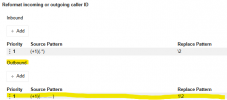
Voice & Chat / Trunk / Options / Caller ID Control
I do have the following set based on my findings: From: Display Name to: "OutboundCallerId"
Outbound Rules
I also tried creating a new outbound rule using "Calls from extension(s)" and filling in one extension that has an assigned DID, then selecting the same trunk for route 1 and then filling in the "Outbound caller ID" field for that user/extension with the assigned DID number. After saving I ensured we tested with the correct set length of digits for that rule from that extension but it still routed that call over the main trunk number.
I'm not sure what else to try at this point. I want to make sure whatever solution we come up with is scalable for many DIDs.
Thanks
Can anyone provide some guidance on how to configure outbound rules for a single Flowroute trunk that has multiple DIDs assigned to it? Our inbound routing and text messaging for all DIDs is working fine but all outbound calls continue to route over the trunk using the primary number, not the individual DIDs that are assigned to various extensions.
Extension Settings
Assigned DID number: Each extension is configured with its own dedicated DID that was setup under Voice & Chat / Trunk / DID Numbers
Outbound Caller ID: Each extension is configured with its own dedicated DID, the same as the assigned DID number.
Voice & Chat / Trunk / Options / Caller ID Control
I do have the following set based on my findings: From: Display Name to: "OutboundCallerId"
Outbound Rules
I also tried creating a new outbound rule using "Calls from extension(s)" and filling in one extension that has an assigned DID, then selecting the same trunk for route 1 and then filling in the "Outbound caller ID" field for that user/extension with the assigned DID number. After saving I ensured we tested with the correct set length of digits for that rule from that extension but it still routed that call over the main trunk number.
I'm not sure what else to try at this point. I want to make sure whatever solution we come up with is scalable for many DIDs.
Thanks