Solved Flowroute trunk configuration - can't select server

Status
Not open for further replies.

american10

Bronze Partner
Basic Certified
Joined
Jun 9, 2016
Messages
100
Reaction score
4
Hello. In previous versions before v20, I could select Flowroute from the SIP provider list and it would preconfigure everything. It would allow me to change the server to my closest server (in this case Virginia).

In v20 it doesn't give me an option to change the server address and I'm seeing on the flowroute side that it's using the Oregon server by default.

What am I missing here? I can add it as a generic SIP trunk, but then it gives me the annoying error message that it isn't a recommended provider and that there may be issues (will there actually be issues)?
 
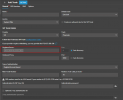
When adding in a trunk, you can choose the registrar/server to whichever register/host the provider supplied you with.

1712179742024.png
 
If you know the other server you want to us, just type in in and hit save
 
Why to use a Generic for a Supported Provider?
This has not been changed from V18 as the preconfigured server is the same in V20.
 
  • Like
Reactions: GregG_3CX
When adding in a trunk, you can choose the registrar/server to whichever register/host the provider supplied you with.

View attachment 40646
This is only on adding? We used to be able to change this AFTER it was created! Can that come ability come back?
 
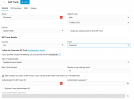
... and it seems that the current version of V20 doesn't allow you to change the server even on add?

1713443154172.png

The only way I've been able to change this is to update the Flowroute Template by modifying the file on the filesystem.

We really need this ability back.
 
It is missing only on the Pro, Enterprise has the option to change servers
 
I just checked more of my systems, some have it and others don't, pro and ent. not sure what to think.
 
Hi Charles, any thoughts on why this isn't available on some deployments?
Was this system updated from version 18 to version 20 and using the template from version 18?
 
Was this system updated from version 18 to version 20 and using the template from version 18?
No sir, fresh install on V20. Happens also when I delete and re-add the SIP trunk.
 
What is the exact V20 build?
 
Upgraded to the latest beta - Version 20.0 Update 1 (Build 673 Beta) - even though the warnings say not to, and it's now available to change!
 
Glad to know the issue is resolved.
Note that although this is a Beta update it is a very stable version.
 
Status
Not open for further replies.

Latest Posts

Forum statistics

Threads
111,831
Messages
589,276
Members
164,660
Latest member
RJenkinsROCK