Forward To Mobile with (Announce Caller) - Then Call Foward?

Status
Not open for further replies.

JayNZ

Bronze Partner
Advanced Certified
Joined
Aug 9, 2017
Messages
24
Reaction score
3
Hey Team,

I hope everyone is keeping safe and well. I wanted to ask please if it's possible to configure an extension with "Forward to Mobile" using "Announce Caller (Rebound)" to bounce the call to an external number if the call isn't answered instead of just sending the call to voicemail?

Essentially if the call can't be answered by the first person (our on call engineer), I want to send the call off the system to an external call answering service so handle the call. I've asked if we could use the Soft Phone on the on-call engineer mobile, but I'm told no, it needs to be a PSTN call, thus the reason for using the rebound feature in the first place.

Any feedback is welcome.
 
Hi Jay,

Yes absolutely possible, You can use external numbers like PSTN and ISDN DID numbers instead of the user's personal mobile number to forward the call.

You just enter the External number into the Extension mobile number box then in forwarding rules, Choose "Forward to Mobile" and enable "Announce Caller (Rebound)".

Thanks,
RA.
 
Thanks RA.

The issue is with the forwarding of the bounce back. If the person doesn’t answer their mobile, 3CX takes the call back and sends it to voicemail. I’m wanting to send the call to a different destination, not voicemail if that’s possible.

Thanks again for the reply!
-Jay
 
Hi Jay,

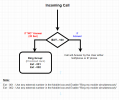
In this case, you can do this call route using the "Ring Group" function. Please see the following may help you on this.

1st --- Create RingGroup for call forward. Eg. Ext - 001, Ext - 002,

So when Ext-100 Not answering the call then it will forwarded to Ring group, As per the Ring Group Ring Strategy "Prioritized Hunt", First the call will route to EXT-001 and after 20 sec Ring Time the call will jump to Ext-002. It dosen't mater those extensions are register when you enable "Ring my mobile simultaneously".
1626936194435.png

Thanks,
RA.
 
  • Like
Reactions: Naveen | Cal4care
Hey RA,

Wow thanks for the awesome quality reply and even the diagram! What I need is for the call to go to a dummy extension with the rebound feature on it (since it doesn’t have the Softphone client and we can’t use it). But if they can’t answer the call, it will rebound and then I want to send it off to an external
phone number.

Any thoughts around that by chance?

I also need to use the rebound feature for the mobiles as I can’t have a call terminate on the voicemail of the mobile.

Thanks again,
Jay
 
Once a call has reached a forwarding rule with rebound there is no way to route it somewhere else.

Provided I have understood your requirements correctly, you need the following call flow:

1. Call to external number (engineer's number)
2. If no answer, call should be routed to a different external number.

If this is the case, then you will have to indeed use a dummy extension and utilize the "Ring my mobile simultaneously" feature for the first call and then utilize the Available status forwarding rules for the second call.

1. Create a dummy extension
2. Set it's mobile number to be the engineer's mobile number
3. Go to Forwarding Rules, select the Available Profile status and set the time-out forwarding rule for external calls to "Forward to Number"
4. Enable "Announce Caller(Rebound)" and enter the second external number in the field.
5. Scroll down and Select the "Ring my mobile simultaneously" feature.

Notes:
• The default timeout is 20 seconds but you can increase it or decrease it as per your preference.
• With the above configuration, the "Announce Caller(Rebound)" will only work for the second call.
 
The problem you may encounter, not using the rebound feature on the first call, is that if the original mobile destination is busy, or the phone is off (or no service), the call will probably route to the mobiles voicemail, if enabled, causing the call to end there. Even if the call does ring the mobile, if it is not "taken back" by 3CX (timeout), the call could still go to the mobiles VM.
 
  • Like
Reactions: ChrisC_3CX
The problem you may encounter, not using the rebound feature on the first call, is that if the original mobile destination is busy, or the phone is off (or no service), the call will probably route to the mobiles voicemail, if enabled, causing the call to end there. Even if the call does ring the mobile, if it is not "taken back" by 3CX (timeout), the call could still go to the mobiles VM.
Hey Leejor,

Yes that's exactly the issue (which is why I need to use Rebound) so sadly none of the scenarios above will work for my situation. I had hoped I could use Rebound within the Call Flow Designer to get what I needed, but it sounds like that's not possible.

I guess adding additional Rebound logic might be something to add to the 3CX wishlist ;)

Thanks again everyone.
-Jay
 
Once a call has reached a forwarding rule with rebound there is no way to route it somewhere else.

Provided I have understood your requirements correctly, you need the following call flow:

1. Call to external number (engineer's number)
2. If no answer, call should be routed to a different external number.

If this is the case, then you will have to indeed use a dummy extension and utilize the "Ring my mobile simultaneously" feature for the first call and then utilize the Available status forwarding rules for the second call.

1. Create a dummy extension
2. Set it's mobile number to be the engineer's mobile number
3. Go to Forwarding Rules, select the Available Profile status and set the time-out forwarding rule for external calls to "Forward to Number"
4. Enable "Announce Caller(Rebound)" and enter the second external number in the field.
5. Scroll down and Select the "Ring my mobile simultaneously" feature.

Notes:
• The default timeout is 20 seconds but you can increase it or decrease it as per your preference.
• With the above configuration, the "Announce Caller(Rebound)" will only work for the second call.
Thanks for your detailed message Chris, much appreciated.

Sadly that won't give the outcome I need as I need to use the Rebound feature to ensure calls don't go to voicemail on the mobile phone if it's no another call or out of service. I had hoped to use the CFD to add in some logic for a different destination, other than Voicemail for the rebounded call, but it looks like the product doesn't offer this at this time.

I appreciate everyone's help, thank you.
- Jay
 
  • Like
Reactions: ChrisC_3CX
Sadly that won't give the outcome I need as I need to use the Rebound feature to ensure calls don't go to voicemail on the mobile phone if it's no another call or out of service
I understand, though, do bear in mind that this is because a call that gets answered by an external voicemail is actually an answered call as far as the 3CX PBX is concerned. That means that there is no way for the 3CX PBX to know the difference from a call that got answered by the first callee(the actual person) from a call that went to the first callee's voicemail instead.
 
Status
Not open for further replies.

Latest Posts

Forum statistics

Threads
111,982
Messages
590,120
Members
164,909
Latest member
Jacob.Ive