Solved Free 3CX Rules and Extensions. Where to add?

Status
Not open for further replies.

Leaders

SMB User
Joined
May 21, 2020
Messages
15
Reaction score
2
Hello,

I have downloaded the 3CX software and signed up for a new SIP number through Kinetix.
Where in the software do I create an extension for myself and then, where do I create a rule that the number 021xxxxxxx should ring to my extension please?

Thank you
 
If you are on 3CX SMB and you have access to the interface then you already have an extension. You can then go to users and assign a DID to your extension number. After you create your trunk of course.
 
Thank you all.

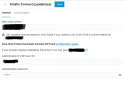
I am following the instructions on this page. I get to point 2.3 bu my DID button is greyed out. I assume this is where I am meant to add my DID number but dont know why it is greyed out.

If someone can help please?

Thanks, see attached.
 

Attachments

  • PNG.png
    PNG.png
    28.2 KB · Views: 6
Thank you all.

I am following the instructions on this page. I get to point 2.3 bu my DID button is greyed out. I assume this is where I am meant to add my DID number but dont know why it is greyed out.

If someone can help please?

Thanks, see attached.
You are using the free version. There are only one did, the main trunk number. Thats why you cant click on DID.
 
  • Like
Reactions: Leaders
I assume this is where I am meant to add my DID number but dont know why it is greyed out.
If you are using the 3CX Free edition then can you only have one trunk with a single number. That's why the tab for adding additional numbers is grayed out.
 
  • Like
Reactions: Leaders
Kinetix guys managed to sort it out for me. Thank you all.
 
  • Like
Reactions: YiannisH_3CX
Status
Not open for further replies.

Members Online Now

Forum statistics

Threads
111,831
Messages
589,277
Members
164,660
Latest member
RJenkinsROCK