Full cone test fail after upgrade to V18

Status
Not open for further replies.

apitsos

SOHO User
Basic Certified
Joined
Mar 27, 2020
Messages
184
Reaction score
52
Hi there,

I upgraded the 3CX of a customer into V18 yesterday evening. After the upgrade there is a failure on the 3CX firewall check. Some of the Audio UDP ports are failing on the full cone test. It is strange why that appeared after the upgrade and why only some of them are failing.

The system is running on Windows, which means I had to backup configuration, uninstall V16, install V18 and restore the configuration. As an additional information the Internet is accessible via a FRITZ!Box 7530, where I have made all the necessary port forwarding. As for the big range of Media Server Audio UDP Ports, I have made them all (UDP 9000-10999) in parts, since the FRITZ!Box doesn't allow you to put such a big range in one rule.

Any advises, in order to get full green ticks on the 3CX Firewall check?


With regards,
Angelos Pitsos
 
Reboot both, 3CX/Windows and Fritzbox.
 
Check the Windows firewall. Maybe there are some problems.
 
Check the Windows firewall. Maybe there are some problems.
I checked and reconfigure the ports on the Windows firewall. There was nothing wrong. Actually there was, because Windows firewall has the default ports after the installation, even if we declare other, custom ports during the initial configuration. But this is known and I configure the firewall exactly after the installation and configuration of the 3CX.

In addition, I tried to completely disable the Windows firewall, but the 3CX Firewall Check was still returning full cone test failures on some Media Server Audio UDP Ports.

That means that the problem is not on the Windows firewall.
 
Every time you run the Firewall Checker, do the same ports fail, or are they different ports each time you run it?
 
Hi @NickD_3CX!

I think they were the same ports, but in order to be sure I need to recheck. I contacted the customer, but it's not possible to run these tests right now. We agreed to run them this afternoon.

As soon as I have the results of my check, I will let you know.

Thanks a lot for your efforts!


With kind regards,
Angelos Pitsos
 
  • Like
Reactions: NickD_3CX
Hi @NickD_3CX!

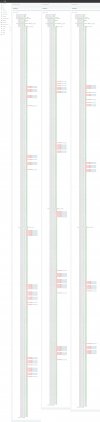
I ran the 3CX Firewall check 3 times and I noticed that the ports are slightly different. I am placing here a screenshot with a comparison of the 3 checks. Some entries are missing, because of the scrolling capture, but I believe this will help you understand the problem.

3CX-Exarchos-Firewall-Check-comparison_2022-01-03 (Copy).jpg

Thanks a lot in advance for your time. I will be waiting for your help...


With kind regards,
Angelos Pitsos
 
I really couldn't say, sometimes firewalls have problems due to the speed at which the Firewall Checker is being ran, but in normal circumstances they will work OK for calls, etc.

I can't say for sure this is the case here, but maybe there is some other security feature that is making this happen? Also maybe check for a firmware upgrade. Other than that, I don't have any other recommendation.
 
  • Like
Reactions: apitsos
Thanks a lot @NickD_3CX. I will inform my customer about that. Since there are no issues at all with voice, I would also say it's not something to worry about.

But please explain to me something. If some of the Audio ports are not working isn't true that the system is bypassing them and try the next port? So in theory the voice cannot fail if some of the ports are truly blocked. Isn't it?
 
Thanks a lot @NickD_3CX. I will inform my customer about that. Since there are no issues at all with voice, I would also say it's not something to worry about.

But please explain to me something. If some of the Audio ports are not working isn't true that the system is bypassing them and try the next port? So in theory the voice cannot fail if some of the ports are truly blocked. Isn't it?
No that isn't quite how it works. Assuming that from the range 9000-10999, for whatever reason port 9050 is closed/not forwarded.

For each call that is placed, the system uses the next even port, so after a service restart, on the first call port 9000 will be used, second call 9002, third call 9004, etc...
This means that the 25th call will have one-way audio. When hang up and call again, port 9052 will be used which will be OK.

So, given that you see these results on the Firewall Checker, proceed with caution. If you hear your customer telling you that "every 4-5 days, we have a call with one-way audio, but the next one is OK afterwards", then you know something is up and you need to pay more attention to it.
 
  • Like
Reactions: apitsos
Hi @NickD_3CX,

Your explanation is more than accurate and you gave me a full understanding of who that works and what should I expect.

On the other hand, I know that I have opened all the ports as ranges on the central router and they are forwarded to the IP of the 3CX system. I suppose that the FRITZ!Box has it's mechanism to block ports when are scanned so quickly. I just didn't find this option to shut it down. What is your opinion on that?

And one more question. We are planning with the customer to use a MikroTik Firewall and use the FRITZ!Box in bridge mode. That means it will operate as a modem and the whole routing and firewalling will be controlled by the MikroTik firewall. I have a lot of experience from MikroTik firewalls and I control these full cone problems on it, since it operates on a PPPoE mode. Do you think that this option could give us the wanted solution and bypass the problems of the FRITZ!Box blocking the ports?

Thanks a lot in advance for your answers!


With kind regards,
Angelos Pitsos
 
Do you think that this option could give us the wanted solution and bypass the problems of the FRITZ!Box blocking the ports?
Very likely that it will solve your problem, in Bridge Mode the Fritzbox will not have any involvement so all routing will be controlled by the Mikrotik.
 
  • Like
Reactions: apitsos
Status
Not open for further replies.

Forum statistics

Threads
111,974
Messages
590,083
Members
164,901
Latest member
Silent_Guru