Unsupported FXS DECT, TLS is required by the customer, but no way in 3CX to toogle to it.

Status
Not open for further replies.

WifxMain

Silver Partner
Joined
Mar 27, 2021
Messages
45
Reaction score
14
A client requires TLS to be active for signaling, but I don't see any way to make the change through the GUI, nor do I see any way to make a custom template for provisioning...

How to do it? There are more than 15 bases with a lot of extensions, I don't really want to do the setup by hand and prefer provisioning.

Help !
 
I am not sure i understand you correctly. You want the connection between the DECT base and the 3cx over tls? That doesnt make really sense. How to use SIP TLS you will finde in the manual.
 
I am not sure i understand you correctly. You want the connection between the DECT base and the 3cx over tls? That doesnt make really sense. How to use SIP TLS you will finde in the manual.
TLS work fine !

But the DECT base are provisioned with UDP on port 5060 and not TLS on port 5061.
And I don't really want to configure everything manually :)
 
This is just internal and no problem at all. TLS internal wont work because no certificate.
 
This is just internal and no problem at all. TLS internal wont work because no certificate.
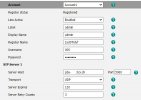
Clipboard 1.jpg

The provisionning is made using UDP port 5060.
I need it to be TLS port 5061 !

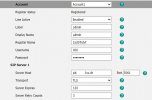
As you can see, If I switch manually, to TLS port 5061, it work too :

Clipboard 2.jpg

I need 3CX to provision the transport and port right !
 
You could try to change the parameter on the 3cx... But I am not sure it will work for you. Why it is important to use TLS internally for the dect stations?
 
Hello,

There is no supported way to provision FXS / DECT devices with SIP TLS. You cannot build custom templates for these devices, and even if you do the system will overwrite them.

Try to just provision it normally, then when done, remove the provisioning link, and manually make the changes you need. The changes will now stay and you can have the device working as you wanted.
 
Easy-peasy...
The below works well with remote telephone.
Create a custom template (not supported by 3CX) in which you can specify the TLS port that you can enter in 3CX (e.g. port 5061 or similar)
In 3CX at Phone Provisioning > Network > SIP Transport you can select TLS.
That's all.
 
Easy-peasy...
The below works well with remote telephone.
Create a custom template (not supported by 3CX) in which you can specify the TLS port that you can enter in 3CX (e.g. port 5061 or similar)
In 3CX at Phone Provisioning > Network > SIP Transport you can select TLS.
That's all.
Unable to create a custom transport for DECT devices.
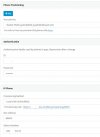
And I dont see the option to change SIP transport :

Prov.jpg

Can you please explain a little bit more the path you use ? :)
 
You are showing the deskphone (T54W) not the DECT base (W60B, W70B)
TLS and SRTP is used between deskphone/DECT base and the PBX.
DECT handsets use the DECT protocol between DD10K Dongle or Base station.
 
You are showing the deskphone (T54W) not the DECT base (W60B, W70B)
TLS and SRTP is used between deskphone/DECT base and the PBX.
DECT handsets use the DECT protocol between DD10K Dongle or Base station.
Yes, but DECT base are not listed ...
I have to go to in advanced, FXS/DECT to see DECT base and I dont see any ways to change either a template or SIP transport.
 
Yes, but DECT base are not listed ...
I have to go to in advanced, FXS/DECT to see DECT base and I dont see any ways to change either a template or SIP transport.
Like it was said above, simply provision it from 3CX once, then remove the URL in the base and change the config you need for TLS.

That's it.

3CX has no built-in way (as of now) to enable TLS on any phones. Only trunks at this point.
 
  • Like
Reactions: WifxMain
Like it was said above, simply provision it from 3CX once, then remove the URL in the base and change the config you need for TLS.

That's it.

3CX has no built-in way (as of now) to enable TLS on any phones. Only trunks at this point.
I'll do that, thanks!
Well, with 15 bases and 50 accounts, it's a bit of work.
So, to propose for future development :cool:
 
If you remove the URL then is it not possible anymore to provisioning the base station.
Copy the template from 3CX and make the changes.
Rename the template and copy it back into the 3CX.
This template will never been changed with PBX updates and thus will work always.
 
If you remove the URL then is it not possible anymore to provisioning the base station.
Copy the template from 3CX and make the changes.
Rename the template and copy it back into the 3CX.
This template will never been changed with PBX updates and thus will work always.
False. FXS/DECT templates get erased on updates.

Custom regular templates don't. So he'd have to create a ph.xml from a FXS template, which are not the same.
 
That's why I say "Rename the template".
e.g. The original template is called "yealink.W60B.fxs.xml"... then rename it in "yealink.W60B_new.fxs.xml"
 
That's why I say "Rename the template".
e.g. The original template is called "yealink.W60B.fxs.xml"... then rename it in "yealink.W60B_new.fxs.xml"
It will still get deleted and replaced on updates.
 
  • Like
Reactions: WifxMain and bitn2
Status
Not open for further replies.

Members Online Now

Forum statistics

Threads
111,832
Messages
589,278
Members
164,662
Latest member
DejanMDS