


- Joined
- Aug 23, 2018
- Messages
- 1
- Reaction score
- 0
Hello everyone,
I'm quite new in this community, so excuse me for beeing sometimes unprecise or too general.
I've installed 3CX server on premise on my own dedicated server with public IP (esxi hosted).
The server has internet connectivity and resolves the DNS with nslookup correctly.
I've created a new Generic SIP Trunk, since my provider wasn't found, and configured it with my best knowledge. Unfortunately I receive two errors when the sertries to register the Sip Trunk:
Registration at Generic SIP Trunk has failed. Destination (sip:485663xxxxx%[email protected]:5060) is not reachable, DNS error resolving FQDN, or service is not available.
and shortly after:
Call or Registration to Generic SIP Trunk has failed. sip:485663xxxxx%[email protected]:5060 replied: 403 Forbidden; from IP:83.0.8.193:5060
I've checked and the server can't ping the neofon.tp.pl but it resolves the name correctly.
Can you check what can be the issue?
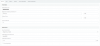
Why as a user name I have twice the domain name printed: %[email protected]?

I'm quite new in this community, so excuse me for beeing sometimes unprecise or too general.
I've installed 3CX server on premise on my own dedicated server with public IP (esxi hosted).
The server has internet connectivity and resolves the DNS with nslookup correctly.
I've created a new Generic SIP Trunk, since my provider wasn't found, and configured it with my best knowledge. Unfortunately I receive two errors when the sertries to register the Sip Trunk:
Registration at Generic SIP Trunk has failed. Destination (sip:485663xxxxx%[email protected]:5060) is not reachable, DNS error resolving FQDN, or service is not available.
and shortly after:
Call or Registration to Generic SIP Trunk has failed. sip:485663xxxxx%[email protected]:5060 replied: 403 Forbidden; from IP:83.0.8.193:5060
I've checked and the server can't ping the neofon.tp.pl but it resolves the name correctly.
Can you check what can be the issue?
Why as a user name I have twice the domain name printed: %[email protected]?


