Ghost call or Weird call back?

Status
Not open for further replies.

glfgrp

Customer
Joined
Jan 18, 2022
Messages
14
Reaction score
0
recently my client notice one of the extensions keep ringing in after hour time.

today I got more details information. Here is the scenario:

the client phone system setup to 6pm after hour, after 6pm it will forward to some external number.
the ringed extension is the last agent in the call queue. (it seems always this extension ringing after hours)

1. at 5.54pm a number xxxxxxx ring in and no one pick it up.
2. at about 6.50pm one of the extension in the main queue start to ringing. there are two line display on the phone screen. top line display service: xxxxxxxx (the number ringed in at 5.54), bottom line display 17xxxxxxxx (17 is callback outbound prefix)

I check call log there is no income call at 6.50 at all, as the desk phone showed 17xxxxxxx. I suspect it is a call back not actual income call. Then another question raised up, why call back happened about 1 hour after the unanswered income call happened.

what would be the best way I could track this "ghost" call?

Please advise.
 
Run a call report and a QCB report.

Review the QueueManager.log to see when the call came in and when QCB was selected.
 
To hopefully clear this up a bit first:

• Are your agents configured to automatically log out once after hours is reached? If yes, then all Queue Back calls should fail and all normal Queue Calls should be routed to the Queue's Destination if no answer.

• If they do not log out and hence were still logged in at the time, were they perhaps all still busy on a call until 6:50pm? If yes, then what you experienced is expected as the original caller had already managed to reach the call during working hours (5:54pm) and had left a Queue call back request which simply stayed in the Queue until an available agent was found.

• If none of the above apply, checking the reports as @kieferschild mentioned to hopefully gather a bit more information would probably be the way to go.
 
I was turning off the call back function which try to identify whether it is the reason cause the "ghost" call or not. It seems work fine in last 10 days. But same thing happened again. At 6:44 PM the same handset ringed again. I have run the call report and checked call log, there is no such income call at 6:44PM at all. the last call with same incoming number was happened at 5.52pm ringed queue but no one answer.

Please advise what I can do for further investigation?
 
Have you port forwarded 5060 to the IP of this phone?

Is this phone provisioned using STUN?

What is the make and model of the handset and FW version?
 
The handset is one of the 30+ handsets in the company. I didn't do any port forward 5060 to this phone.
The handset is just simply setup SIP account in the handset directly, it doesn't do any provision.
It is Yealink T42G FW version is 29.80.0.60
 
  • Like
Reactions: ChrisC_3CX
Thanks for the advise.

I understand upgrade FW and provision the handset is the best way to set it up.
But I don't really think I will solve the problem for following reasons:

- without auto provisioning (just setup SIP account manually) the handset should still function .
- This is not only the handset in the company using manual setup, there are 5 handsets with manual setup is in the same queue, but the "ghost" call only happened to this particular handset.
- This handset has been in the queue for more than 12 months already with current setup, but the "ghost" call just started from Jan 2022.
 
Ok.

So you're running an unsupported setup and you're not willing to troubleshoot to a supported setup. Therefore, there is no more assistance I can offer.

The argument of "well this worked fine before" is not valid.

The supported firmware is a result of 3CX working with Yealink which will more than likely stop your ghost calls.

The fact that ghost calls are coming into a phone on your network should ring alarm bells for you as they've clearly gotten through your firewall.
 
I am not refusing to try to with your solution. On the contrary, I would like to try anything to get the problem solved

Just as a tech guy, I would like to understand the logic behind and find the exact weak point.

I will upgrade and re-provision the handset as what you recommend when I am back to work and keep update the post for the outcome.
 
I am not refusing to try to with your solution. On the contrary, I would like to try anything to get the problem solved

Just as a tech guy, I would like to understand the logic behind and find the exact weak point.

I will upgrade and re-provision the handset as what you recommend when I am back to work and keep update the post for the outcome.
https://support.yealink.com/en/portal/knowledge/show?id=14404b55bd9e4ca05aba334b

3CX templates and FW sort this problem.

But the fact remains that calls are getting through your firewall to this phone. So, you need to restrict 5060 to your 3CX server only.
 
The 3CX server is in Windows Azure, not on premise.
But the calls arent going through 3CX, they're going direct to the phone hence weak firewall.
 
Do check the remote firewall, update the firmware of the device, factory reset and reprovision it as @kieferschild suggested but, also, I'm curious, did you see the QCB outbound prefix on this call too as you did for the last one you reported?

If it happens again, while the call is ringing quickly check the "Management Console >> Dashboard >> Number of Calls in use" section. Do you happen to see anything like this:
1645184185479.png


If not, then the call is indeed almost definitely going straight to the device and not through 3CX.
 
Do check the remote firewall, update the firmware of the device, factory reset and reprovision it as @kieferschild suggested but, also, I'm curious, did you see the QCB outbound prefix on this call too as you did for the last one you reported?

If it happens again, while the call is ringing quickly check the "Management Console >> Dashboard >> Number of Calls in use" section. Do you happen to see anything like this:
View attachment 28026


If not, then the call is indeed almost definitely going straight to the device and not through 3CX.
Hi Chris,

This time there is no QCB outbound prefix, which is bit different from my original post.

As it is after hour time already, normally when client reported to me about such issue always after the handset ringed.

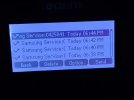
Enclosed the display on the handset (the client took the photo on Friday but just sent the PIC to me). It seems happened not only one time.
- One of the queue's name is Samsung Service.
- inbound rule for after hours is forwarding all income calls to an external number directly, it shouldn't hit the queue at all. ( I could see the income call had been diverted to external number from call log)
- there are 12 agents in the queue, none of them logout. But only this particular handset was ringing.

I pretty much listed all the facts I could think, as I mentioned in previous post. I will re-provision that handset on Monday and will post the update.
 

Attachments

  • 20220220102948.jpg
    20220220102948.jpg
    163.8 KB · Views: 3
I am not refusing to try to with your solution. On the contrary, I would like to try anything to get the problem solved

Just as a tech guy, I would like to understand the logic behind and find the exact weak point.

I will upgrade and re-provision the handset as what you recommend when I am back to work and keep update the post for the outcome.
As a fellow tech guy I too like to know why things are happening.

You need to enable port mirroring on your switch (whatever port the phone is plugged into you need to mirror to another port) and start a packet capture from a device connected to that port (wireshark will work fine).
Replicate the issue, then review the capture to find out *what* sent the invite to the phone.
 
As a fellow tech guy I too like to know why things are happening.

You need to enable port mirroring on your switch (whatever port the phone is plugged into you need to mirror to another port) and start a packet capture from a device connected to that port (wireshark will work fine).
Replicate the issue, then review the capture to find out *what* sent the invite to the phone.
Thanks for the advise. I think the tricky part for the package capture is the timing. As it happened randomly, not really in a certain time pattern. I don't think I could reproduce the issue by myself so far and I never try to let the wireshark keep running for 24x7.
 
Thanks for the advise. I think the tricky part for the package capture is the timing. As it happened randomly, not really in a certain time pattern. I don't think I could reproduce the issue by myself so far and I never try to let the wireshark keep running for 24x7.
Why do you not want wireshark to run 24/7? If you set it up with a capture filter and filter just SIP invites, I don't see an issue.
 
Why do you not want wireshark to run 24/7? If you set it up with a capture filter and filter just SIP invites, I don't see an issue.
I didn't say I don't want to run it 24/7 just never try to run like that. Also I am not quite confidence about seeking for particular information in one day or maybe even one week package capture data as well. But I will give a go.
 
EDIT:

Please follow the below steps:

1. Make sure you're running the latest stable version of 3CX v18.0.2.314 (v18.0.2.315 if Windows)

2. Upgrade the IP Phone to the latest supported firmware.

3. Check the "Management Console >> Updates" section for any template updates for the Yealink T42G and download them.

4. Factory reset the IP Phone and provision as per our provisioning guide.

Important: Do NOT manual provision the IP Phone.

5. Set the 3CX PBX's logging to Verbose and wait to see if the issue resurfaces, if it does, note down the exact time the call came in and the caller name/ID then generate the Support Info from "3CX Management Console >> Support(upper-right corner) >> Generate Support Info". Let me know once you have this info and data.

Noe: To enable verbose logging go into "Dashboard >> Activity Log >> Settings".
 
Last edited by a moderator:
Status
Not open for further replies.

Forum statistics

Threads
111,974
Messages
590,083
Members
164,901
Latest member
Silent_Guru