- Joined
- Aug 24, 2020
- Messages
- 28
- Reaction score
- 5
I'm trying to reestablish the connection between 3CX and Google Workspace for user provisioning and sync.
In previous versions, this used to be a manual process whereby you'd create a Google Cloud project, set up the necessary APIs and authorisation, and then copy & paste the information into 3CX.
Now, it's a streamlined 1-click process, however when it fails I've got very little to go by as to exactly what isn't working.
Now when I run the 3CX Connect Wizard, it thinks for a bit and then returns an error:
Precondition check failed.: Cloud billing quota exceeded: https://support.google.com/code/contact/billing_quota_increase
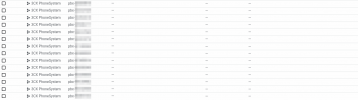
I've deleted some projects in Google Cloud (this is a Google Workspace Enterprise tenancy, I have over 100 projects and have deleted 10+ projects)
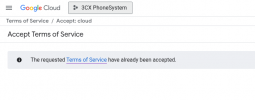
I've made sure I'm a Billing Administrator. I've made myself an Owner as well just to be sure. I've contacted Google via the link provided and had an increase approved.
Yet still it fails every single time I go to set it up.
In previous versions, this used to be a manual process whereby you'd create a Google Cloud project, set up the necessary APIs and authorisation, and then copy & paste the information into 3CX.
Now, it's a streamlined 1-click process, however when it fails I've got very little to go by as to exactly what isn't working.
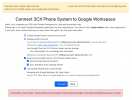
Now when I run the 3CX Connect Wizard, it thinks for a bit and then returns an error:
Precondition check failed.: Cloud billing quota exceeded: https://support.google.com/code/contact/billing_quota_increase
I've deleted some projects in Google Cloud (this is a Google Workspace Enterprise tenancy, I have over 100 projects and have deleted 10+ projects)
I've made sure I'm a Billing Administrator. I've made myself an Owner as well just to be sure. I've contacted Google via the link provided and had an increase approved.
Yet still it fails every single time I go to set it up.