• We do not provide troubleshooting help for unsupported phones. Please try with a supported phone.
  • V20 Update 10 Alpha 2 Learn more

GrandStream GSC3506 detected but not able to assign extension

Status
Not open for further replies.

john.liu

Premier Customer
Joined
Aug 12, 2021
Messages
18
Reaction score
4
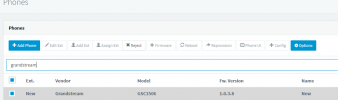
I connected a new bought SIP speaker GSC3506 to the same subnet as SBC, and it showed up on 3CX hosted PBX phone list as a new phone, but "assign ext" button was greyout, actually all function buttons for this phone are greyout except "reject" button.
Please advise how can I assign an extension number to the SIP speaker in this way?

Thanks!

p.s.
I upgraded the speaker's firmware to the latest, but it didn't help.
 

Attachments

  • 3506.png
    3506.png
    12.5 KB · Views: 5
The GSC3506 is not technically supported, as it's different a little from the 3505.

However, if you have a self-hosted/on-premise system, you can simply copy the official template as a custom one, add the line for the GSC3506 model name, and use that template to set it up.

Otherwise, if you're hosted, you can either set it up manually, or just do it fully manual with the MAC address entered as GSC3505 and simply enter the provisioning link in the device directly.
 
Status
Not open for further replies.

Forum statistics

Threads
112,147
Messages
590,959
Members
165,167
Latest member
Finatra.us