• We do not provide troubleshooting help for unsupported phones. Please try with a supported phone.
  • V20 Update 10 Alpha Learn more

Grandstream GXP2135 (firmware1.0.11.74) blind transfer doesn't work on On Premise 3CX Version 20.0

supportfx

Silver Partner
Joined
Jan 21, 2025
Messages
2
Reaction score
0
Hi Guys hope your are ok,
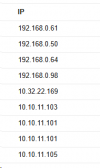
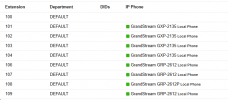
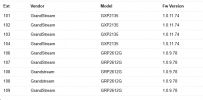
I am using an On Premise 3CX Version 20.0 Update 4 we have currently two offices located in different locations, the first office have 4 grandstream phones model GXP2135 with extensions 100,101,102,103 y 104, and the second office have 5 phones grandstreams GRP2612G with extensions 106,107,108,109 ,all the extensions are active (green) in users section in 3cx, but when we trying to transfer a call from extension 102 to 103 (blind transfer) the transfer is not working ,I check the extensions a DND is not enable , additionally according to this url https://www.3cx.com/docs/phone-firmwares for 3CX V20 the last firmware supported for this model GXP2135 is 1.0.11.74 .

I would appreciate if you could give me some recommendations to solve this problem, thank you.

1737423655174.png1737423671507.png1737424082872.png
 
Hello , when you say blind transfer is not working, what exactly happens?
If you try to blind transfer to 106-109 range is it working fine? how are the extensions linked to the pbx? behind a SBC ?

Nothing in the logs you can get to help understand what's going on?
In the IP phone settings, is the blind transfer enabled? not on supervised choice?

Is 3CX Firewall check passed green?
 
Hi Aws2p thanks for your answer,
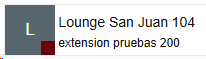
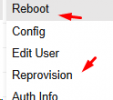
I checked this issue againt today , the transfer from 102 ext to 103 ext now is working , however the transfer from 102 ext to 104 ext is not working,I made some test using a ext 200 and I identified the ext 104 is not receiving calls, although in 3cx users section it appears active in green, and although when calling from a different extension you can see the extension ringing in 3cx web 1737509383564.png , the phone does not physically ring or show any notification on the screen, I applied a cold reboot to the phone with ext 104 and sent a reprovision command and reboot command from 3cx admin plataform but the extension is not receiving calls , when you dial the extension you can hear it ring and after several seconds the call pass to voice mail but it does not physically ring.

1737508916599.png

  • I checked the call log report you can see the call passing to the voice mail .

01/21/2025 7:38:08 PM extension pruebas (200) VMail (104) Answered 00:00:00 00:00:02 0.00 Terminated by extension pruebas (200) - -
01/21/2025 7:37:47 PM extension pruebas (200) Lounge San Juan (104) Unanswered 00:00:21 00:00:00 0.00 No answer, forwarded to VMail (104)

  • I checked the Event Log but It doesn't appear any event for the calls.
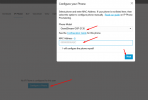
  • To add the phones to 3CX we basically enabled dhcp on the phones through a router installed in each office and we add the phones using this button available for each ext in the ip phone section, we provided the mac address to the 3cx plataform, we currently don't have a SBC. 1737510013598.png
  • Yes firewall is checked green 1737510365115.png.
 

Members Online Now

No members online now.

Forum statistics

Threads
111,831
Messages
589,277
Members
164,660
Latest member
RJenkinsROCK