- Joined
- Mar 7, 2023
- Messages
- 78
- Reaction score
- 19
We are having an issue trying to program HT812 with the 3CX.
Below is the HT812 info.
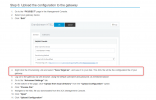
It has used the updated firmware following the guide here.
https://www.3cx.com/voip-gateways/grandstream-ht-fxs/#h.5g2pjfl5mwcl
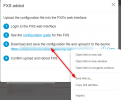
The problem I'm having is on the 3CX dashboard -> FXS/DECT
I'm not able to download the XML under the Provisioning Link so then I can upload it to the Grandstream device.
Every time I clicked on the link, it kept opening a page saying "This site can't provide a secure connection" instead of downloading the XML file per the 3CX KB above.
The Provisioning Method is Local LAN.
I have tried incognito mode and other browsers (Firefox and Edge).
I also tried rebooting the 3CX server.
Just FYI, we also have a Grandstream HT802 that we used as a fax line and the setup on that one was a breeze.
But this was set up about a year ago so I'm not sure if something must have changed since the 3CX has a few updates within a year.
Help please?
Below is the HT812 info.
Hardware Version: | V4.0A Part Number -- 9610005040A | ||||||||||
Software Version: |
|
It has used the updated firmware following the guide here.
https://www.3cx.com/voip-gateways/grandstream-ht-fxs/#h.5g2pjfl5mwcl
The problem I'm having is on the 3CX dashboard -> FXS/DECT
I'm not able to download the XML under the Provisioning Link so then I can upload it to the Grandstream device.
Every time I clicked on the link, it kept opening a page saying "This site can't provide a secure connection" instead of downloading the XML file per the 3CX KB above.
The Provisioning Method is Local LAN.
I have tried incognito mode and other browsers (Firefox and Edge).
I also tried rebooting the 3CX server.
Just FYI, we also have a Grandstream HT802 that we used as a fax line and the setup on that one was a breeze.
But this was set up about a year ago so I'm not sure if something must have changed since the 3CX has a few updates within a year.
Help please?
Last edited: