GXW4104 Not answering second line

Status
Not open for further replies.

lewis2010

Joined
Jun 11, 2010
Messages
9
Reaction score
0
Hi guys & girls,

I've been setting up a system using a grandstream 4104. We have two PSTN lines which are recognised by the GXW in the 'status' tab. Under 'registered' it shows all trunks are registered with 3cx and under 'PSTN Lines' is shows the two lines as 'connected, idle'. I've had no problems in adding the trunks in the 3cx management console and can make and recieve calls through line 1. However if i try to make a call through line 2 i get a 'not available' message on the 3cx softphone. I've tried calling the second line and the GXW doesnt seem to pick it up.

Is this a fault GXW or just mis configured.

Thanks

Lewis
 
This is the log from 3cx when i try to make a call using line 2 (i've disconnected line 1 for this purpose)


10:38:11.062 [CM503008]: Call(38): Call is terminated

10:38:11.031 [CM503015]: Call(38): Attempt to reach <sip:[email protected]:5060> failed. Reason: Server Failure

10:38:11.031 [CM503003]: Call(38): Call to sip:[email protected]:5060 has failed; Cause: 503 Service Unavailable; from IP:192.168.1.160:5060

10:38:10.937 [CM503024]: Call(38): Calling PSTNline:1471@(Ln.10001@Grandstream )@[Dev:sip:[email protected]:5066;transport=udp]

10:38:10.937 [CM503003]: Call(38): Call to sip:[email protected]:5060 has failed; Cause: 503 Service Unavailable; from IP:192.168.1.160:5060

10:38:10.843 [CM503024]: Call(38): Calling PSTNline:1471@(Ln.10001@Grandstream )@[Dev:sip:[email protected]:5064;transport=udp]

10:38:10.828 [CM503003]: Call(38): Call to sip:[email protected]:5060 has failed; Cause: 503 Service Unavailable; from IP:192.168.1.160:5060

10:38:10.734 [CM503024]: Call(38): Calling PSTNline:1471@(Ln.10001@Grandstream )@[Dev:sip:[email protected]:5062;transport=udp]

10:38:10.718 [CM503003]: Call(38): Call to sip:[email protected]:5060 has failed; Cause: 503 Service Unavailable; from IP:192.168.1.160:5060

10:38:10.625 [CM503024]: Call(38): Calling PSTNline:1471@(Ln.10001@Grandstream )@[Dev:sip:[email protected]:5066;transport=udp]

10:38:10.609 [CM503003]: Call(38): Call to sip:[email protected]:5060 has failed; Cause: 503 Service Unavailable; from IP:192.168.1.160:5060

10:38:10.531 [CM503024]: Call(38): Calling PSTNline:1471@(Ln.10001@Grandstream )@[Dev:sip:[email protected]:5064;transport=udp]

10:38:10.515 [CM503003]: Call(38): Call to sip:[email protected]:5060 has failed; Cause: 503 Service Unavailable; from IP:192.168.1.160:5060

10:38:10.437 [CM503024]: Call(38): Calling PSTNline:1471@(Ln.10001@Grandstream )@[Dev:sip:[email protected]:5062;transport=udp]

10:38:10.406 [CM503003]: Call(38): Call to sip:[email protected]:5060 has failed; Cause: 503 Service Unavailable; from IP:192.168.1.160:5060

10:38:10.312 [CM503024]: Call(38): Calling PSTNline:1471@(Ln.10000@Grandstream )@[Dev:sip:[email protected]:5066;transport=udp]

10:38:10.296 [CM503003]: Call(38): Call to sip:[email protected]:5060 has failed; Cause: 503 Service Unavailable; from IP:192.168.1.160:5060

10:38:10.218 [CM503024]: Call(38): Calling PSTNline:1471@(Ln.10000@Grandstream )@[Dev:sip:[email protected]:5064;transport=udp]

10:38:10.203 [CM503003]: Call(38): Call to sip:[email protected]:5060 has failed; Cause: 503 Service Unavailable; from IP:192.168.1.160:5060

10:38:10.109 [CM503024]: Call(38): Calling PSTNline:1471@(Ln.10000@Grandstream )@[Dev:sip:[email protected]:5062;transport=udp]

10:38:10.093 [CM503003]: Call(38): Call to sip:[email protected]:5060 has failed; Cause: 503 Service Unavailable; from IP:192.168.1.160:5060

10:38:10.046 [CM503004]: Call(38): Route 3: PSTNline:1471@(Ln.10001@Grandstream )@[Dev:sip:[email protected]:5062;transport=udp, Dev:sip:[email protected]:5064;transport=udp, Dev:sip:[email protected]:5066;transport=udp]

10:38:10.031 [CM503004]: Call(38): Route 2: PSTNline:1471@(Ln.10001@Grandstream )@[Dev:sip:[email protected]:5062;transport=udp, Dev:sip:[email protected]:5064;transport=udp, Dev:sip:[email protected]:5066;transport=udp]

10:38:10.031 [CM503024]: Call(38): Calling PSTNline:1471@(Ln.10000@Grandstream )@[Dev:sip:[email protected]:5060]

10:38:10.031 [CM503004]: Call(38): Route 1: PSTNline:1471@(Ln.10000@Grandstream )@[Dev:sip:[email protected]:5060, Dev:sip:[email protected]:5062;transport=udp, Dev:sip:[email protected]:5064;transport=udp, Dev:sip:[email protected]:5066;transport=udp]

10:38:10.015 [CM503010]: Making route(s) to <sip:[email protected]:5060>
 
Do you mind posting how you configured your GXW4104?
 
You have to change Round-robin parameter in 4104. Search 4104 settings for something like rr:1-4 and change it on rr:1-2.

Hope, this will help.
 
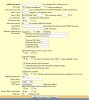
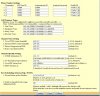
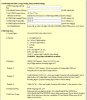
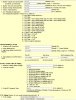
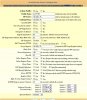
Hi wzaatar i've attached the screen shots from the GXW to show how its configured, i configured it following the guide on the 3cx site. Any help would be greatly appreciated. Since the second line problem users are now reporting occasionally that when they make an outbound call they can hear the caller but the caller cannot hear them, any idea?

Thanks
Lewis
 

Attachments

  • Advanced Settings.jpg
    Advanced Settings.jpg
    99 KB · Views: 1,767
  • Channels.jpg
    Channels.jpg
    141.3 KB · Views: 1,766
  • Dial Plan.jpg
    Dial Plan.jpg
    96.3 KB · Views: 1,765
  • FXO Lines.jpg
    FXO Lines.jpg
    112.2 KB · Views: 1,764
  • Profile 1.jpg
    Profile 1.jpg
    99.3 KB · Views: 1,760
Thanks igor.snezhko!

I've changed the round robin settings and the second line is now working, users are still reporting the silence problem with calls but this is a big step closer.

Thanks
 
Hi,

I know this is an old post, but I am having the exact same issue and changing the round robin setting has not resolved the issue.

Setup:

GXW4104
10001 - PSTN line
10002 - PSTN line
10003 - PSTN line
10004 - not connected

When calling the 10001 line will get passed on to 3CX server, but if that is in use the 10002 in the Gateway Status page just shows " busy Connected, idle" and to the caller just rings and rings with no answer.

Is there anything else I need to be doing? Any fixes or pointers to help track the cause is much appreciated.

thanks
Mark
 
Well, first I am not sure that I would follow the above user's screen shots as a guide. There are a couple of configuration settings that have me concerned.

The other user's example also has the inbound calls only going to one port.

We wil likely need to see more of the configurations setting to get to the bottom of this, but first, did you manually provision or did you use the 3CX template to provision?

Do the three lines all show successfully registered?

How many simultaneous calls do you have the system to accommodate using this device?

You indicate having 3 lines. Presumably each line has its own phone number and the caller must use the unique number by which to call a specific line. Or, do you have a busy-call-forward arrangement with hunt such that a caller uses one number (the primary) and if in use, then the carrier rolls the call onto the next available line.

Change the round robin back ro rr:1-4; The round robin determines the polling strategy by which the GXW will make calls, not for receiving/answering calls.

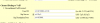
I have also attached a snippet of the most important setting to receiving calls. This is from a working install using the GXW4108, but with some custom settings.

You settings should read:

User ID: Ch1-4:10000+;
Sip Server: Ch1-4:p1;
Sip Destination Port: Ch1-4:5060;


What this is basically telling the GXW is that when an incomming call is detected, answer the call and send to port 10000 which will be located on the SIP server (your 3CX System) as defined in the Profile 1 page and use port 5060 for SIP. The "+" after the 10000 is an indication that if the 10000 port is busy, then go ahead and increment by "1" position to 10001 and so on. It will not try 10004 as it understands that there is no line connected.
 

Attachments

  • CaptureVoIP.PNG
    CaptureVoIP.PNG
    12 KB · Views: 1,037
Status
Not open for further replies.

Latest Posts

Members Online Now

Forum statistics

Threads
111,843
Messages
589,328
Members
164,680
Latest member
JV J