Hello 3CX world

owenp

SMB User
Joined
Apr 9, 2025
Messages
13
Reaction score
0
I wonder if someone can please help me?

We are trying to embed the live chat from three 3CX into our website, and we utilize Zoho Commerce, and we usually have no issues in embedding any other external types of chats, etc., with the code.

However, with the code below, we are trying to add it via the header code area, and nothing shows up, and the same with an embedded code element anywhere on any page. Nothing shows up.

<call-us-selector phonesystem-url="https://1....3cx.cloud" party="dynamic..."></call-us-selector>

Just changed some of the code details above by replacing the cloud 3xc address with some .. and our party name. But we are entering the full code on the site, and nothing works.

I really hope someone can help us, and that would be much appreciated.
 
Hi,
do you have the the following JS on the page too?
1744281659322.png
Regards
Keith
 
Hi,
do you have the the following JS on the page too?
View attachment 47415
Regards
Keith
No I don’t .

With my limited tech skills, may I please ask that you put in the full script with the example that I used in the original thread as part of the script. It will be a great help and much appreciated.
 
Hi,

You should be able to copy it directly from the 3cx admin console
Admin > Voice and Chat
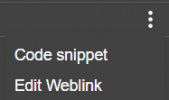
right click the vertical dot's to the right of the chat you want to add to your website, you should see:
1744292323032.png
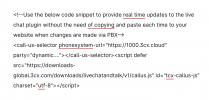
Click on Code snippet, then click on
1744292383929.png
which will give you all the code you need

Regards
Keith
 
Hi,

You should be able to copy it directly from the 3cx admin console
Admin > Voice and Chat
right click the vertical dot's to the right of the chat you want to add to your website, you should see:
View attachment 47423
Click on Code snippet, then click on
View attachment 47424
which will give you all the code you need

Regards
Keith
Hi Keith

I have done that and it gives the long code for real-time updates and non realtime

None of them work in Zoho commerce. We want to use the real-time updates one, but I see this has no JS like your previous message


<!--Use the below code snippet to provide real time updates to the live chat plugin without the need of copying and paste each time to your website when changes are made via PBX-->


<call-us-selector phonesystem-url="https://1000.3cx.cloud" party="dyn...."></call-us-selector>


Can you advise what needs to be added to the above with the JS as you mentioned?
 
Hi,

It is in there, it's the last line of the copied code

<!--Use the below code snippet to provide real time updates to the live chat plugin without the need of copying and paste each time to your website when changes are made via PBX-->
<call-us-selector phonesystem-url="https://my.3cx.uk" party="LiveChat54321"></call-us-selector>
[script defer src="https://downloads-global.3cx.com/downloads/livechatandtalk/v1/callus.js" id="tcx-callus-js" charset="utf-8"][/script]

Note: replace the [ with < and ] with >
the forum appears to block the script tags

Regards
Keith
 
Hi,

It is in there, it's the last line of the copied code

<!--Use the below code snippet to provide real time updates to the live chat plugin without the need of copying and paste each time to your website when changes are made via PBX-->
<call-us-selector phonesystem-url="https://my.3cx.uk" party="LiveChat54321"></call-us-selector>
[script defer src="https://downloads-global.3cx.com/downloads/livechatandtalk/v1/callus.js" id="tcx-callus-js" charset="utf-8"][/script]

Note: replace the [ with < and ] with >
the forum appears to block the script tags

Regards
Keith
Hi Keith,

Thanks so much for your effort, I have tried the code exactly as you have instructed and we cannot get it to work. I also shared your edited code with the changes with the symbols as mentioned in your message with Zoho Support and they themselves can't get it to work in anyway..

We have had to use the paid Elfsight buttons maker to just link our calling and messaging address directly to an icon that the software creates and then gives a code which works perfectly on the website, for now.

Not sure if you have any other ideas, as the Elfsight temporary solution makes the 3CX chat open in a new window, which is not ideal.

Regards,
Owen
 
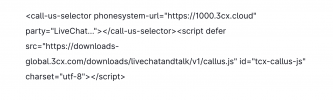
Make sure your website URL is defined correctly, and paste the following 2 highlighted lines in the website code

1744356464331.png

You will need BOTH of these lines for the chat to work.
 
  • Like
Reactions: Evolute IT
Make sure your website URL is defined correctly, and paste the following 2 highlighted lines in the website code

View attachment 47440

You will need BOTH of these lines for the chat to work.
Hi Nicholas,

Here is the exact code being used without correct IP address and shortned department address for the forum. Also, we have added the correct website address where this is being copied via 3cx with https:
 

Attachments

  • Screenshot 2025-04-11 at 11.39.06.png
    Screenshot 2025-04-11 at 11.39.06.png
    150.6 KB · Views: 5
Just to clarify, you are using LiveChatXXXXXX instead of Dynamic, right?
 
We just tried exactly as attached with livechat with the correct livechat address and server, of course,e as below, and still no luck
 

Attachments

  • Screenshot 2025-04-11 at 11.52.12.png
    Screenshot 2025-04-11 at 11.52.12.png
    92.8 KB · Views: 5
Hi Owen,

What do you see when you open the page where the chat is installed and view the page source, does the code still look the same as you have posted?
Is Zoho Commerce filtering out the script tags?

Regards
Keith
 
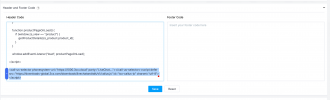
We have it as attached in the header section. We have many others here where there are script codes and they don't filter out tags from what we can see. We have never had an issue like this with a code not working

I have changed some of the correct details as before
 

Attachments

  • Screenshot 2025-04-11 at 12.20.37.png
    Screenshot 2025-04-11 at 12.20.37.png
    202.2 KB · Views: 2
Ok, so that's the admin side, what do you see in the page when you view it as a visitor?
What's in the page source?
I'd also put it in the footer as two lines
 
We have it as attached in the header section. We have many others here where there are script codes and they don't filter out tags from what we can see. We have never had an issue like this with a code not working

I have changed some of the correct details as before
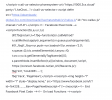
The page source is shown as attached and I have edited AC and server again and facebook ID

Zoho are also trying to debug theprevious code above to see why its not working as expected
 

Attachments

  • Screenshot 2025-04-11 at 13.05.11.png
    Screenshot 2025-04-11 at 13.05.11.png
    354.9 KB · Views: 2
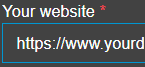
Ok, the only thing left that I can think of is the setting of Your Website on the General tab of the Live Chat edit pages, it does have the correct domain names in there?
1744362967645.png
if you are viewing through a staging url or temporary link the you would need to add those domains in too
 
Hi Keith

Yes, correct domsin.

We do have a few live chats setup, individual ones with the person linked and link added to their email signature for direct chat and then one for the website with a ring group. All with the same domain name
 

Members Online Now

No members online now.

Forum statistics

Threads
111,831
Messages
589,277
Members
164,660
Latest member
RJenkinsROCK