Holiday Prompts

brenrich101

Premier Customer
Basic Certified
Joined
Feb 15, 2022
Messages
33
Reaction score
7
I've been through the documentation, but I don't think scripts will necessarily work here as the routing is more granular than a whole trunk (but correct me if I'm wrong).

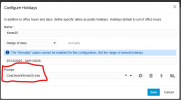
I've set up a test department with a DID, and given it some holiday hours with prompt, however the system ignores the prompt set on the holiday hours section. It will however play the prompt I want if I specify it in the Call Handling > Department > When on holiday route to.

If this is the case, what is the purpose of allowing a prompt selection per holiday, and what would I do if I wanted different prompts per holiday? For instance between 25/12-26/12 we're closed for Christmas, and on 01/01 say we're closed for New Year.

I want to try and avoid scripts if possible, and looking at the UI the prompt associated per holiday would do what I want, it just doesn't seem to work. Thanks in advance :)
 
That's what the script is for. There is no way to do it with just the gui...
 
  • Like
Reactions: fxbastler
I've set up a test department with a DID, and given it some holiday hours with prompt, however the system ignores the prompt set on the holiday hours section. It will however play the prompt I want if I specify it in the Call Handling > Department > When on holiday route to.
That is correct: you can store a holiday announcement there for each department or IVR, queue or ring group. The disadvantages are that as long as you do not change this setting, the announcement always remains the same. This does not work for DIDs or CIDs that are routed directly to users.

The 3CX call script holiday.cs from the 3CX Script Store enables the use of individual announcements per call on an assigned SIP trunk - regardless of what the destination is (CID, DID, or default route). As usual you define holidays and can assign an individual announcement to that holiday. The script then plays exactly this announcement during that period for every incoming call on the SIP trunk to which it is bound..
 
Thanks guys - pity really as we don't want to do it per trunk. We have a lot of DID's on a single trunk - some are on holiday, some aren't, they work different hours etc.

Shame the fields are literally already there, ah well! Cheers :)
 
Just use different departments. You can define the holidays per department.
 
Just use different departments. You can define the holidays per department.
Yeah I am doing, it's just that we want to play different messages for different days, so I'll just have to change it manually. Just seems silly when the field is there to set a prompt per holiday, it just doesn't do anything :D

Might have to dust off my Call Flow Designer skillz... :D
 
So if this field doesn't do what I thought it would and set the prompt per holiday, what does it do?

1765983037161.png
 
It does exactly what it says, you just need the script for it.
 
  • Like
Reactions: fxbastler
that audio is played if you have the holiday.cs script from the store. If you use that don't forget to change the destination component behavior when on holiday, otherwise it will play the prompt and then continue the call.

if you want to take a look here's a template for the call flow design I use when I have multiple trunks and dids and also more advanced requests like transfer calls instead of just playing the holiday prompt. I just put it as the trunk destination and then in the csv insert the did - destination ext - holidayname - some description to know what's that number for

edit: wrong attachment
 

Attachments

Last edited:
  • Love
Reactions: fxbastler
that audio is played if you have the holiday.cs script from the store. If you use that don't forget to change the destination component behavior when on holiday, otherwise it will play the prompt and then continue the call.
right

A nice idea with the CFD program. Thanks for that and for sharing it.

As I understand it - please correct me if I’ve misunderstood - the CFD app does not run on the SIP trunk itself but as a call forwarding a step afterward. That is the fundamental problem in the 3CX call flow and with CFD apps in general: all calls entering there are always answered first and only then processed further. As a result some 3CX options and features can no longer be used.

The only real solution is to use a pure C# call script that triggers on every call on a SIP trunk - just like the original 3CX holiday.cs does. Thank you 3CX for this great capability. We’ve been very happy with it since 3CX v20u4 / autumn 2024. *love-it*

If we want to change anything we do so in the C# call script which triggers on the trunk, because only there does it work fundamentally and without breaking other 3CX features.
 
  • Like
Reactions: KyriacosS_3CX
We are planning to bring back the holiday prompt in the interface again in early 2026.....
 
We are planning to bring back the holiday prompt in the interface again in early 2026.....
Great! I think about the basic edition where no scripts are possible.
 
  • Like
Reactions: N_G and Evolute IT
We are planning to bring back the holiday prompt in the interface again in early 2026.....
Music to my ears, thanks! Have a great Christmas and Happy New Year!
 
  • Like
Reactions: N_G
We are planning to bring back the holiday prompt in the interface again in early 2026.....
Good because I'm currently pulling my hair out as to why I have to assign a DID to a script just to play a holiday message or FOLLOW the drop down when I select forward to outside number when on holiday. Also, why is the call script under integrations settings, is this not a core function of the system?
 
You do not have to assign a DID to a script to play a holiday message, leave the DID assigned to where it was, and have the holiday script run Upon recieving a call on a trunk.
 
You do not have to assign a DID to a script to play a holiday message, leave the DID assigned to where it was, and have the holiday script run Upon recieving a call on a trunk.
Tried that even set it to system wide and when calling the DID it still ignored the holiday schedule for this department. Added it back to a specific DID and it worked as intended. Of course nowhere in the GUI does it mention you need to apply a script for the holiday schedule to work. Office hours work without me applying a script, so why would we make holiday settings any different.
 
@Area69
The original 3CX call script holiday.cs from the 3CX Script Store enables the use of individual holiday announcements per call on an assigned SIP trunk - regardless of what the destination is (CID, DID, or default route): one script per SIP trunk.

As usual you define holidays and can assign an individual announcement to that holiday. The script then plays exactly this announcement during that period for every incoming call on the SIP trunk to which it is bound.

It doesn't matter to which department the script is bound. It runs on every call on a SIP trunk, find the defined destination, find destinations departments and their holiday settings and - if holiday settings and audio is defined - plays this individual announcement.
 
There is also our free Holiday Importer.
 
  • Like
Reactions: fxbastler

Latest Posts

Forum statistics

Threads
111,953
Messages
589,915
Members
164,850
Latest member
masvty