Holiday recording not played

ZenMasta

Customer
Joined
Mar 10, 2010
Messages
254
Reaction score
10
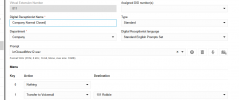
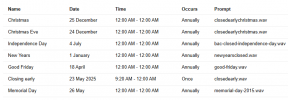
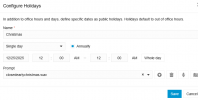
I have this temporary holiday just an early closing message. When I call to verify, this prompt is not played. Instead it seems like it just plays the normal ivr/closed prompt
the temp closure is in the right department... and if it wasn't then I assume it wouldn't say that we're closed right now anyway.

1748020005162.png

1748019634394.png


1748019755342.png
 
Hello @ZenMasta ,
There’s actually a simpler way to achieve what you're aiming for. I recommend using the Holiday Prompt feature by activating the Holiday Script on your PBX. This allows you to play a specific message (such as early closing) on designated dates without affecting your regular open/closed hours setup.

You can find step-by-step instructions in our Configuring Holiday Prompts Guide .
 
  • Like
Reactions: Evolute IT
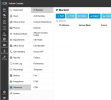
Hey brother. That's what I'm complaining about because I did just that and it did not work. And you can see in the call log that I provided, it shows Holiday but it's forwarding to our normal "after office hours ivr"
1748369549073.png


[edit] I guess I'm confused by this particular script method you suggested vs creating a temporary holiday. Which is what I've always done without issue since v11.

I can consider this script option in the future, but I'm unsure why it's not working as expected. Based on how it used to work in the past. This makes me question if any of my currently configured repeating holidays will actually work properly.
 
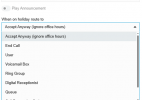
In your IVR 811, how is "When on holiday route to" set?

The holiday script plays the prompt. The routing is handled by the IVR, ring group, etc.
 
  • Like
Reactions: TheodorosG_3CX
The holiday script has to be assigned to a SIP Trunk.

The call will come in during the holiday period, it will play the prompt assigned to the holiday and then send the call to its original destination.

In the Call handling items (Queue, Ring Group, Digital Receptionist) it will follow the Holiday routing path. This also give you the option to play an ADDITIONAL prompt for the holiday uniquely for this destination.

The most important thing here is to assign the holiday script to a TRUNK, not to a DID or to a dial code.
 
In your IVR 811, how is "When on holiday route to" set?

The holiday script plays the prompt. The routing is handled by the IVR, ring group, etc.
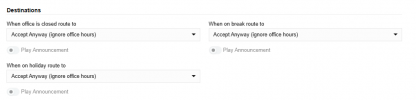
Under Call Handling>IVR 811, the destinations are all defaulted. I've never tweaked this.
"Accept Anyway (ignore office hours) and the toggle switch beneath that is grayed out.
1748454349876.png

Bottom line. How do I configure global holiday hours? This is default stuff that's worked for over 10 years. But since v20 apparently not. I can't wrap my head around the idea of a specific feature in 3cx dubbed "Office Holidays" with dates all configured ,but it's being suggested that is NOT the right way to do it, and I should use a custom script instead. I don't understand why my "closing early" holiday played the generic IVR prompt rather than the holiday prompt.

1748454304244.png
 
Under Call Handling>IVR 811, the destinations are all defaulted. I've never tweaked this.
"Accept Anyway (ignore office hours) and the toggle switch beneath that is grayed out.
You cannot set a destination for holidays? The dropdown doesn’t look disabled…

Overall:
Put IVR in department.
Set holiday on department.
Set routing on IVR.
If you want a custom prompt per holiday, set up the holiday script.
 
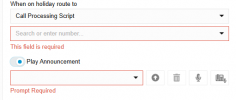
Steve I can select various options in the drop down.
1748890790165.png


But, just to be clear. It doesn't matter that I have holidays configured, and each one has a prompt that is "supposed" to play. 3cx will only play the prompt if I set the IVR to call processing script? This is SOOO unintuitive compared to v18.

I don't see how this is being touted as easier than what we used to do since v11-v18
Maybe I'm obtuse.


1748890540249.png
 

Attachments

  • 1748890229793.png
    1748890229793.png
    14.4 KB · Views: 1
3cx will only play the prompt if I set the IVR to call processing script?
Correct.

Though to be clear "when on holiday route to" is NOT the holiday script, it's normally a voicemail box or IVR or whatever. See the doc page but the script is attached to a trunk: https://www.3cx.com/docs/holiday-script/

And Play Announcement there is an additional announcement. The holiday prompt is set on the holiday.
 
Per the guide, Advanced>Call Processing Script. I don't have this available to me
1749057579963.png
 
It's under Admin > Integrations > Call Scripts now.
 
  • Like
Reactions: KyriacosS_3CX
I can't understand why these changes, it was logical in V18. Many users was trained to set holidays and record announcements accordingly themselves. Now it got way to technical for regular users.
@ 3CX, would it be possible to bring this back as it was in V18 ? All it would take would be to add the holiday prompt as a destination in the drop-down list of "When on holiday route to"
 
Its really easy to use... Just download the holiday script und do what you did before. The only thing that change is what happens after the holidy file is played. The routing is now at the end where your number is attached.
 
Thank you bitn2, it works indeed, but only for calls that are routed towards digital receptionist, call group or call q. But if a call arrives on DDI set towards an extension (user), the holiday prompt is played and the call carries on to the user because user settings do not include "When on holiday route to" where "End the call" need to be selected
 
But if a call arrives on DDI set towards an extension (user), the holiday prompt is played and the call carries on to the user because user settings do not include "When on holiday route to" where "End the call" need to be selected
That depends on the configuration in the 3CX. If the user’s status changes automatically according to business hours, then on department holidays it switches to DND (or whatever is set under Admin / System / Options / Scheduler) - and that works correctly.

If the automatic status change is not desired, then you need to adjust the holiday.cs. That’s possible as well.
 

Forum statistics

Threads
111,954
Messages
589,921
Members
164,851
Latest member
DrunkeMeister