- Joined
- Jul 24, 2019
- Messages
- 108
- Reaction score
- 22
Hi there-
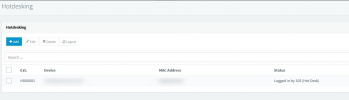
We have a prospect that is a medical practice that will need to use the hot desking feature. However, one of their requirements is something that I'm not sure how we can accommodate. They want the receptionist to be able to look at the Web Client panel to see which extension is signed into what room (or physical location).
Ex: Extension 101 is signed into the xray room
Ex: Extension 102 is signed into the lab
Etc.
Does anyone have any ideas on how this can be accomplished with 3CX and hot desking? For what it's worth, each room or location has a computer in it along with 1 phone.
Any ideas would be greatly appreciated.
We have a prospect that is a medical practice that will need to use the hot desking feature. However, one of their requirements is something that I'm not sure how we can accommodate. They want the receptionist to be able to look at the Web Client panel to see which extension is signed into what room (or physical location).
Ex: Extension 101 is signed into the xray room
Ex: Extension 102 is signed into the lab
Etc.
Does anyone have any ideas on how this can be accomplished with 3CX and hot desking? For what it's worth, each room or location has a computer in it along with 1 phone.
Any ideas would be greatly appreciated.