


- Joined
- Nov 3, 2021
- Messages
- 65
- Reaction score
- 9
Can someone explain what the red/green/grey indicators mean in the admin interface for hotdesk phones.
There's an Indicator under the Extension column and another under the IP Phone column.
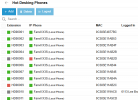
My HD00005 phone is offline so i guess Grey+Red = not connected.
The Green+Green phones are online and ready to be assigned to an extension
HD00010 is signed in so im gessing Grey+Green is that
But what does HD00009 indicate with its Red+Green indicators... As far as I can tell theres no difference between this phone and any of the others ???
There's an Indicator under the Extension column and another under the IP Phone column.
My HD00005 phone is offline so i guess Grey+Red = not connected.
The Green+Green phones are online and ready to be assigned to an extension
HD00010 is signed in so im gessing Grey+Green is that
But what does HD00009 indicate with its Red+Green indicators... As far as I can tell theres no difference between this phone and any of the others ???


