


- Joined
- Jul 4, 2019
- Messages
- 54
- Reaction score
- 6
Hello,
Since the last update, i cannot provision a new YLT46 & YLT54 as a hotdesking extension.
I have tried to assign to a user => OK
When creating a hotdesk extension, nothing happens on the phone.
Error in syslog:
Mar 9 19:33:48 btsv[722.722]: ANY <0+emerg > 628.599.622:Built-at :Feb 25 2021,13:51:21,Git:cef120c22eeddfc8d4460175fa29466df8b91bc3
Mar 9 19:33:48 btsv[722.722]: ANY <0+emerg > 628.599.924:ANY =6
Mar 9 19:33:48 GUI [556:556]: WIRE<3+error > 628.604.742:[bt alive][true]
Mar 9 19:33:48 GUI [556:556]: WIRE<3+error > 628.652.896:[bt init][successful]
Mar 9 19:33:49 auto[744.744]: ANY <0+emerg > autoServer log :type=1,time=0,E=3,W=4,N=5,I=6,D=7
Mar 9 19:33:49 auto[744.744]: ANY <0+emerg > ANY =3
Mar 9 19:33:49 auto[744.744]: ANY <0+emerg > autoServer service process starts!
Mar 9 19:33:49 auto[744.744]: ANY <0+emerg > Version :7.3.0.134 for release
Mar 9 19:33:49 auto[744.744]: ANY <0+emerg > Built-at:Mar 3 2021,20:10:33
Mar 9 19:33:49 sys [744.760]: ANY <0+emerg > sys log :type=1,time=0,E=3,W=4,N=5,I=6,D=7
Mar 9 19:33:49 sys [744.760]: ANY <0+emerg > LSYS=6
Mar 9 19:33:49 ATP [744.760]: ANY <0+emerg > ATP log :type=1,time=0,E=3,W=4,N=5,I=6,D=7
Mar 9 19:33:49 ATP [744.760]: ANY <0+emerg > ANY =6
Mar 9 19:33:52 sys [867.867]: ANY <0+emerg > sys log :type=1,time=0,E=3,W=4,N=5,I=6,D=7
Mar 9 19:33:52 sys [867.867]: ANY <0+emerg > LSYS=6
Mar 9 19:33:52 WEB [867:867]: ANY <0+emerg > 632.880.702:WEB log :type=1,time=1,E=3,W=4,N=5,I=6,D=7
Mar 9 19:33:52 WEB [867:867]: ANY <0+emerg > 632.881.584:_log_set ANY =6
Mar 9 19:33:53 ATP [744.761]: ATP <3+error > url with auth parameter fail
Mar 9 19:33:53 ATP [744.761]: ATP <3+error > Get static config url fail
Mar 9 19:33:53 GUI [556:556]: APP <3+error > 633.914.524:from[app_vpPhone] sync[0] msg[395306][0][0] size[4] target[0xc401d620] not found
Mar 9 19:33:56 ATP [744.761]: DURL<3+error > [DCMN]Recode is 403, Request err.
Mar 9 19:33:56 ATP [744.761]: DURL<3+error > [DCMN]download common error, errcode:403, no out.
Mar 9 19:33:57 ATP [744.761]: DURL<3+error > [DCMN]Recode is 403, Request err.
Mar 9 19:33:57 ATP [744.761]: DURL<3+error > [DCMN]download common error, errcode:403, no out.
Mar 9 19:33:59 ATP [744.761]: DURL<3+error > [DCMN]Recode is 403, Request err.
Mar 9 19:33:59 ATP [744.761]: DURL<3+error > [DCMN]download common error, errcode:403, no out.
Mar 9 19:34:00 ATP [744.761]: DURL<3+error > [DCMN]Recode is 403, Request err.
Mar 9 19:34:00 ATP [744.761]: DURL<3+error > [DCMN]download common error, errcode:403, no out.
Mar 9 19:34:02 ATP [744.761]: DURL<3+error > [DCMN]Recode is 403, Request err.
Mar 9 19:34:02 ATP [744.761]: DURL<3+error > [DCMN]download common error, errcode:403, no out.
Mar 9 19:34:04 ATP [744.761]: DURL<3+error > [DCMN]Recode is 403, Request err.
Mar 9 19:34:04 ATP [744.761]: DURL<3+error > [DCMN]download common error, errcode:403, no out.
Mar 9 19:34:05 ATP [744.761]: ATP <3+error > Get redirect error.
Mar 9 19:34:05 ATP [744.761]: ATP <3+error > get RPS url error.
Since the last update, i cannot provision a new YLT46 & YLT54 as a hotdesking extension.
I have tried to assign to a user => OK
When creating a hotdesk extension, nothing happens on the phone.
Error in syslog:
Mar 9 19:33:48 btsv[722.722]: ANY <0+emerg > 628.599.622:Built-at :Feb 25 2021,13:51:21,Git:cef120c22eeddfc8d4460175fa29466df8b91bc3
Mar 9 19:33:48 btsv[722.722]: ANY <0+emerg > 628.599.924:ANY =6
Mar 9 19:33:48 GUI [556:556]: WIRE<3+error > 628.604.742:[bt alive][true]
Mar 9 19:33:48 GUI [556:556]: WIRE<3+error > 628.652.896:[bt init][successful]
Mar 9 19:33:49 auto[744.744]: ANY <0+emerg > autoServer log :type=1,time=0,E=3,W=4,N=5,I=6,D=7
Mar 9 19:33:49 auto[744.744]: ANY <0+emerg > ANY =3
Mar 9 19:33:49 auto[744.744]: ANY <0+emerg > autoServer service process starts!
Mar 9 19:33:49 auto[744.744]: ANY <0+emerg > Version :7.3.0.134 for release
Mar 9 19:33:49 auto[744.744]: ANY <0+emerg > Built-at:Mar 3 2021,20:10:33
Mar 9 19:33:49 sys [744.760]: ANY <0+emerg > sys log :type=1,time=0,E=3,W=4,N=5,I=6,D=7
Mar 9 19:33:49 sys [744.760]: ANY <0+emerg > LSYS=6
Mar 9 19:33:49 ATP [744.760]: ANY <0+emerg > ATP log :type=1,time=0,E=3,W=4,N=5,I=6,D=7
Mar 9 19:33:49 ATP [744.760]: ANY <0+emerg > ANY =6
Mar 9 19:33:52 sys [867.867]: ANY <0+emerg > sys log :type=1,time=0,E=3,W=4,N=5,I=6,D=7
Mar 9 19:33:52 sys [867.867]: ANY <0+emerg > LSYS=6
Mar 9 19:33:52 WEB [867:867]: ANY <0+emerg > 632.880.702:WEB log :type=1,time=1,E=3,W=4,N=5,I=6,D=7
Mar 9 19:33:52 WEB [867:867]: ANY <0+emerg > 632.881.584:_log_set ANY =6
Mar 9 19:33:53 ATP [744.761]: ATP <3+error > url with auth parameter fail
Mar 9 19:33:53 ATP [744.761]: ATP <3+error > Get static config url fail
Mar 9 19:33:53 GUI [556:556]: APP <3+error > 633.914.524:from[app_vpPhone] sync[0] msg[395306][0][0] size[4] target[0xc401d620] not found
Mar 9 19:33:56 ATP [744.761]: DURL<3+error > [DCMN]Recode is 403, Request err.
Mar 9 19:33:56 ATP [744.761]: DURL<3+error > [DCMN]download common error, errcode:403, no out.
Mar 9 19:33:57 ATP [744.761]: DURL<3+error > [DCMN]Recode is 403, Request err.
Mar 9 19:33:57 ATP [744.761]: DURL<3+error > [DCMN]download common error, errcode:403, no out.
Mar 9 19:33:59 ATP [744.761]: DURL<3+error > [DCMN]Recode is 403, Request err.
Mar 9 19:33:59 ATP [744.761]: DURL<3+error > [DCMN]download common error, errcode:403, no out.
Mar 9 19:34:00 ATP [744.761]: DURL<3+error > [DCMN]Recode is 403, Request err.
Mar 9 19:34:00 ATP [744.761]: DURL<3+error > [DCMN]download common error, errcode:403, no out.
Mar 9 19:34:02 ATP [744.761]: DURL<3+error > [DCMN]Recode is 403, Request err.
Mar 9 19:34:02 ATP [744.761]: DURL<3+error > [DCMN]download common error, errcode:403, no out.
Mar 9 19:34:04 ATP [744.761]: DURL<3+error > [DCMN]Recode is 403, Request err.
Mar 9 19:34:04 ATP [744.761]: DURL<3+error > [DCMN]download common error, errcode:403, no out.
Mar 9 19:34:05 ATP [744.761]: ATP <3+error > Get redirect error.
Mar 9 19:34:05 ATP [744.761]: ATP <3+error > get RPS url error.

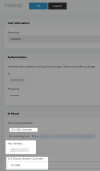
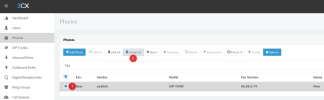
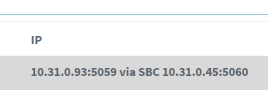

 HD0004 is now provisioned. i will try with HD001


