


- Joined
- Aug 28, 2020
- Messages
- 22
- Reaction score
- 3
Hi,
I was unable to succesfully upgrade our self-hosted Debian 3CX v16 install to v18. So, I provisioned a new VM and restored a backup taken from the old install.
Our Snom D717 phones are registered to the local IP of the old v16 install, using the multicast PnP method:
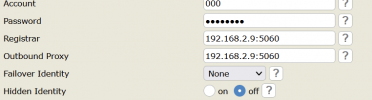
The new server has a new IP address of .2.100.
What is the best way to reprovision the phones to the new server? There are not many phones (30), so I was considering logging into each one and changing the registrar and outbound proxy field to a FQDN defined in our on-prem DNS server. E.g. 3cx.company.local, which currently resolves to 192.168.2.9. Once done, I could simply update the DNS record to point to 192.168.2.100.
Is there a better way of doing this? How can I quickly move our phones from the old system to the new one?
Thanks
I was unable to succesfully upgrade our self-hosted Debian 3CX v16 install to v18. So, I provisioned a new VM and restored a backup taken from the old install.
Our Snom D717 phones are registered to the local IP of the old v16 install, using the multicast PnP method:
The new server has a new IP address of .2.100.
What is the best way to reprovision the phones to the new server? There are not many phones (30), so I was considering logging into each one and changing the registrar and outbound proxy field to a FQDN defined in our on-prem DNS server. E.g. 3cx.company.local, which currently resolves to 192.168.2.9. Once done, I could simply update the DNS record to point to 192.168.2.100.
Is there a better way of doing this? How can I quickly move our phones from the old system to the new one?
- Factory reset the phones after taking the old system offline? (Won't that require me to factory reset them one by one manually?)
- Update the new server to have the IP address of the old system? (192.168.2.9)
Thanks
Last edited:


