How to Add a Name for DID in 3CX v20?

Sajjad.Khurshid

Customer
Joined
Dec 23, 2024
Messages
128
Reaction score
11
In 3CX v20, there doesn’t seem to be an option to assign a name to a DID number. Previously, we could label or name DID numbers for better identification, but in the current version, I am unable to find this feature.

Could you please confirm if this functionality has been removed, or is there an alternative way to add a name/label to a DID in 3CX v20?

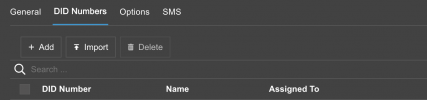
Attached is a screenshot of the DID Numbers section where the "Name" column is visible but without an option to modify it.
1741184854317.png
 
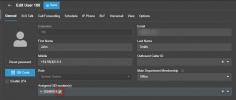
Once you assign a DId to a user, Ring Group, Queue etc, there will be a little pencil that allows you to add a friendly name

1741184958483.png

In Update 5 you will also be able to import your DID with a name and destination, not just the number, and this will be added automatically.
 
@NicholasP_3CX
Thank you for your quick response! It’s working now.


How can we assign a DID to a Call Processing Script?
 
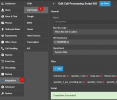
Just open your script and select to run the script when this DID is called.

1741185518228.png

It will give you he option to select your DID(s) and give a name as well to them.
 
how to point a did number to voicemail of extension, like in version 18 ?
 
how to point a did number to voicemail of extension, like in version 18 ?
one possible solution:
create a new department, assign it the desired DID and forward all their calls to the mailbox of the desired extension

note: with departments (and their business hours if desired) the former incoming rules can be mapped

but honestly - titanium partner, really?
 
Last edited:
  • Haha
Reactions: GregG_3CX
one possible solution:
create a new department, assign it the desired DID and forward all their calls to the mailbox of the desired extension

note: with departments (and their business hours if desired) the former incoming rules can be mapped

but honestly - titanium partner, really?
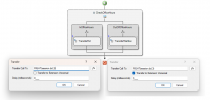
You could also use a call flow that includes a "Transfer" block. In this setup, you can identify the extension based on the DID number and route the call to voicemail outside of business hours, and to the extension during business hours. This approach is more flexible and you don’t need to set up so many departments.

Alternatively, you can also use call scripts – a combination of some of the examples might be able to handle that as well.
 

Attachments

  • Screenshot 2025-04-02 015842.png
    Screenshot 2025-04-02 015842.png
    37.1 KB · Views: 10
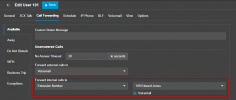
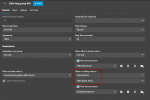
A DID generally isnt bound to a voicemail box during the day, but is used mostly for out of office hours routing. So you can assign this directly from in the queue routing, or in the forwarding rules of the users. You would just need to select the check box for the voicemail in this case.

1743587279871.png

1743587326792.png
 

Latest Posts

Forum statistics

Threads
111,964
Messages
590,000
Members
164,869
Latest member
hpgitsupport