How to auto reprovision

Status
Not open for further replies.

R4addZ

Bronze Partner
Advanced Certified
Joined
Jan 28, 2020
Messages
5
Reaction score
0
I have a hotel that has analogue phones off Grandstream multi port ATAs. The hotel management system updates the 3CX name field for guests as they check in but the Reception Yealink handsets don't update due to the grandstreams not having updated.

It has been suggested that if I take the provisioning link out of the Grandstreams, the Yealinks will reprovision from the data in the 3CX. What I am trying to find out is can I somehow get the reception handsets to reprovision automatically, say, hourly?
 
First off, what exact Yealink models are you using? There might be an option on the Phone's UI but I do have to mention that this is not a setting that can be set via the 3CX Management Console.

Also, what names on the IP Phones are you looking to update, the ones shown on the BLF keys or the IP Phone's Phonebook/Directory?
 
The phones are Yealink T48s and it is the names on the BLF keys that we need to refresh. I was under the impression that the phones auto reprovisioned once every 24 hours but that does not seem to be the case. I am currently testing on a T23G as the customer is a 5 hour drive away.
 
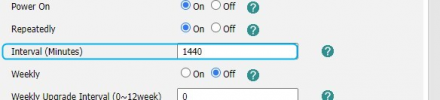
For the Yealink T48S we actually do set auto-provisioning to be performed every 24 hours. As far as I know that goes for the T23G too, You can give it a try by accessing the phone UI and changing the following value under "Settings >> Autoprovision":
1645177497482.png

The problem is that, even if you do change it, since we set it with the default template it will get overwritten with the next provisioning and be set back to 1440 minutes. You would need to use custom templates to keep a custom value which will also render your IP Phone configuration an unsupported configuration by 3CX.

Alternatively, users can probably force a config update on the yealinks as a lot of yealinks allow this to be done from the on-screen menu. Just press "Menu >> Basic >> Update Configuration(last option) >> Press OK".
 
Status
Not open for further replies.

Members Online Now

Forum statistics

Threads
111,832
Messages
589,283
Members
164,662
Latest member
DejanMDS