Solved How to barge in a call?

Status
Not open for further replies.

JCubio

Free User
Joined
Oct 7, 2019
Messages
134
Reaction score
13
Hi all,

How can I barge in a call?

I already enable the barge call option from the group and extension options.
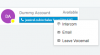
I've read in the forum that I just need to right-click a live call and select Listen, Whisper or Barge.

But I can't see these options. Did I miss the configuration somewhere?
12933
 
Hi all,

How can I barge in a call?

I already enable the barge call option from the group and extension options.
I've read in the forum that I just need to right-click a live call and select Listen, Whisper or Barge.

But I can't see these options. Did I miss the configuration somewhere?

View attachment 12933
Users need to be in the same group.

Also, a Pro or Enterprise license is required.
 
Yes, these conditions are already met.
Oh, just noticed. Don't right click the user itself, left click on the blue box containing the caller ID. Then you'll have a menu to barge-in, spy, drop or transfer the call.
 
  • Like
Reactions: accentlogic
Hi Sir,
I just found out that the options don't appear with right-click. Instead, it appears in left click
 
  • Like
Reactions: Evolute IT
Hi Sir,
I just found out that the options don't appear with right-click. Instead, it appears in left click
Right click is for the contact box.
 
Glad to see the issue has been resolved
 
Status
Not open for further replies.

Forum statistics

Threads
111,934
Messages
589,818
Members
164,811
Latest member
aurorasigntrtechitnet