- Joined
- Apr 3, 2019
- Messages
- 198
- Reaction score
- 27
Hello
When I go in the Audio/Video settings of the new Win10 app, I see the message "The current device does not support media settings"
And everything is grayed, can't change.
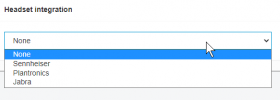
I Also the "headset integration" is set to None.
I don't know what that option does, but I have a Yealink WH66 headset bluetooth connected to the PC.
I would like the Win10 app to use it's own settings, and not use the global PC settings, especially for audio settings.
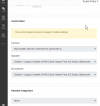
When I go in the Audio/Video settings of the new Win10 app, I see the message "The current device does not support media settings"
And everything is grayed, can't change.
I Also the "headset integration" is set to None.
I don't know what that option does, but I have a Yealink WH66 headset bluetooth connected to the PC.
I would like the Win10 app to use it's own settings, and not use the global PC settings, especially for audio settings.