how to configure and use BLFs in StartUp PRO

Status
Not open for further replies.

kjuzs

SMB User
Joined
Aug 24, 2022
Messages
26
Reaction score
3
In StartUp PRO desktop app for user, there is this option (screenshot below). I know a little bit about it but am looking for a fuller explanation of how to configure and use these settings but cannot find anything useful on the 3cx website.
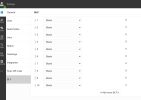

1666903654830.png
 
Regarding your question please find a guide regarding blf keys : https://www.3cx.com/pbx/blf-function-keys/

There is also a link to a video in the guide that you will find helpful that is based on the legacy app but the principles are the same.

Once you assign keys they will be visible in the dial pad of the desktop app.

You can also assign custom speed dials, status change keys and more.
 
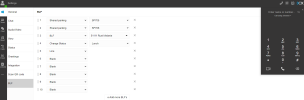
I assigned BLF keys 1 thru 4 (see screenshot below) . There's not a way to really save it so I went away to another part of the app and came back and they were still all there so I assumed it is saved. Howver, the dial pad (to the right) still looks the same and does not show the assigned BLF keys?

1666967629435.png
 
I assigned BLF keys 1 thru 4 (see screenshot below) . There's not a way to really save it so I went away to another part of the app and came back and they were still all there so I assumed it is saved. Howver, the dial pad (to the right) still looks the same and does not show the assigned BLF keys?

View attachment 32582
You need to download the DesktopApp (via the windows logo in the sidebar.) That dialer will have a button to open the BLF panel.

The Webclient doesn't support that.
 
I installed desktop app and see what you mean now. The webclient looks so similiar to the desktop app that I thought I was on the desktop app - they both have identical icons in my bottom task bar. There is no need for the webclient because we can do everything with the desktop app (and more) that the webclient can do right? If so, I will get delete that webclient icon.
 
I installed desktop app and see what you mean now. The webclient looks so similiar to the desktop app that I thought I was on the desktop app - they both have identical icons in my bottom task bar. There is no need for the webclient because we can do everything with the desktop app (and more) that the webclient can do right? If so, I will get delete that webclient icon.
What you installed is probably the PWA, which is just the Webclient in a separate browser window, like a small app. But the DesktopApp has indeed a few more features including the separate window for the dialer, and auto-start.
 
  • Like
Reactions: kjuzs
Status
Not open for further replies.

Members Online Now

Forum statistics

Threads
111,831
Messages
589,277
Members
164,660
Latest member
RJenkinsROCK