How to find conference ID when starting an adhoc conference?

Status
Not open for further replies.

Fred2k

Free User
Joined
Oct 30, 2018
Messages
39
Reaction score
4
We're running 3CX version 16 Enterprise.

Just started using the Web Client since we're all working from home. I've noticed from the web client (and the Android app) that when you're on an internal audio call you can hit the conference button and add other extensions in. This is very handy, but if someone wants to join this conference it asks for a conference ID. Where can this be found for these ad hoc style conference calls please?
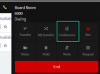
 
Does anyone know if 3CX generates a conference ID, and where it can be found, if you start a conference via the conference button in the Web Client please?

conf.png
 
Hello!

if you're intention is to create an ad-hoc conference and want people to dial in, I would ignore this button.

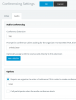
Firstly, in the PBX MGMT console go to Settings > Conference > Audio

Check what the EXT number is (700 by default)

Check whether or not you require a PIN to set up conferences.

In my example, I have it turned on with a PIN of 1234.

1586947296037.png

Now from my phone I dial 700

"Please enter conference ID and press hash"

You make up a conference ID and include the PIN specified above.

1001*1234#

Now your conference is created.

Other users (internal) join by dialling 700 then my conference id of 1001

Alternatively, you can disable the requirement for PIN on conference creation.

Source: https://www.3cx.com/blog/voip-howto/create-conference-using-desk-phone/
 
Last edited:
  • Like
Reactions: Fred2k
Many thanks, this resolves all my issues :)
 
  • Like
Reactions: Alphabetic
Status
Not open for further replies.

Forum statistics

Threads
111,944
Messages
589,864
Members
164,835
Latest member
Firefox Technologies